
Pickori's Take
- We recommend this Acer Chromebook Plus 514 as an everyday laptop if your email, documents, school portals and video calls already run on websites or in web apps. Look elsewhere if a school, employer or hobby requires installing a specific Windows or Mac program, because no amount of hardware changes that.
- Storage is the reason to choose this configuration, but only if you'll use it. Before paying for capacity, total up what you actually want offline, such as a full Drive sync, a media library or project folders.
- Built-in USB-C on both sides, USB-A and HDMI cover the mouse, flash drive and classroom or desk display most people already use, so the common day-one connections don't need a hub.
- Memory is the real trade-off. The installed amount suits focused work. If your normal day keeps calls, shared slides and several live web apps active together, a 16GB Chromebook that fits your budget is the safer purchase.
- Google's automatic update date for this family is June 2035, a longer software runway than the older CB514-3H, 4H and 5H models, which end in June 2033.
What is a Chromebook, and how is it different from Windows or Mac?
A Chromebook is a laptop that runs ChromeOS, Google's operating system, instead of Windows or macOS. The operating system is the software that runs the whole computer. It starts the machine, manages your files and decides what kinds of apps you can install. Chrome, the browser, is a separate thing. A browser is simply the program you use to open websites, and you can install Chrome on a Windows laptop or a Mac without turning either one into a Chromebook.
Think about a typical week on a laptop: email, shopping, bank and school websites, writing documents and joining video calls. On any computer, most of that already happens in a browser. Gmail, Google Docs, Canva, and Word and Excel on the web are web apps, which means you use the software through a website instead of downloading a desktop program. A Chromebook is built around that way of working, and it handles it well.
Windows laptops and Macs do those same web tasks. The difference is what else they can install. Windows runs compatible desktop programs from software publishers and the Microsoft Store, and a Mac installs apps made for macOS. Those two aren't interchangeable either, since a Windows program doesn't automatically run on a Mac. A Chromebook can't install either kind. It adds compatible Android apps from Google Play instead, though not every Android app works on every Chromebook, and school or work accounts can restrict what you install.
Here's where that matters in practice. Word in a website handles an ordinary essay or report without fuss. A familiar app name doesn't guarantee the same features, though. Excel for the web can open a workbook containing macros, which are saved automations that repeat a task for you, but it can't run or edit them. If your job depends on a spreadsheet like that, you need the installed desktop version, and it won't install here.
A common misconception is that a Chromebook is useless without internet. It isn't cloud-only. Files can live on the laptop itself, and a saved document or media file opens without a connection when it's in a supported format and you have an app that can open it offline. Saving a file doesn't, by itself, make it or a web app work offline. Google Docs needs a quick setup to work offline, covered below. Email delivery, live calls and websites need a connection, exactly as they do on Windows or a Mac. The 512GB drive in this model is storage on the laptop. That is separate from cloud storage, which means files kept in an online account or storage service such as Google Drive.
So the test is simple. If the tasks you care about happen on websites or in apps that work here, this can be your main laptop, not a stand-in for a real one. If you must install a specific Windows or Mac program, confirm that before you buy.

The exact model, and who it's for
The Acer Chromebook Plus 514 we're reviewing is the US CB514-6HT-368E configuration (part NX.JFCAA.001), with full specifications in the table below. Its case is simple: an everyday Chromebook with enough local storage and built-in connections that ChromeOS feels like the main event rather than the cut-rate option.
It's part of the CB514-6H/6HT family Acer launched in 2025, and Acer still lists it as a current US model. Treat the family name carefully when shopping. The older AMD CB514-3H and Intel CB514-4H, the CB514-5H and the Spin 514 convertible all share some of the branding but not this hardware. In particular, there is no 360-degree hinge here, so touch is for tapping and scrolling, not tablet use.
Pickori's view is that this model makes sense for one clear buyer. That buyer's school or work already runs through Google Workspace, Microsoft 365 on the web, online portals and video calls, and they want a machine that stays out of the way. For that person, a Chromebook is a choice in its own right. This one earns its price when the storage and connections match how they actually work.

Storage and ports do more than the AI badge
Most of the marketing points at AI, but the parts that change daily life are storage and connectivity. The Quick Insert key is a keyboard shortcut to a menu that includes ordinary tools such as insertion and quick calculations. The cloud AI features and promotional trials attached to Chromebook Plus branding are the parts that depend on eligibility and Google's services. Treat them as a bonus, not a reason to pay more. Cloud AI doesn't turn an N355 into a workstation.
Storage is the headline here, but only for buyers who use it. Chromebook Plus models can turn on a full My Drive sync when there's room, and this drive makes that realistic for libraries that wouldn't fit on a small one. Large offline photo and music collections, project folders you carry between home and class, and downloads from services that allow them all benefit. The extra capacity doesn't make the laptop faster. If your offline needs are small, it's space you pay for and never use. The storage check below shows which buyer you are.
The ports matter for the same practical reason. Acer's manual places a USB-C port on each side, and either one takes the 65W charger or drives a display over DisplayPort, so you plug in on whichever side faces the outlet. USB-A keeps an existing mouse or flash drive working, and HDMI on the left handles a classroom projector or desk monitor. Some workflows will still call for an accessory, but the everyday connections are already on the chassis.
How this hardware should handle real work
These are expectations based on the hardware class, not benchmark results. The N355's eight efficient cores are aimed at everyday work, and for most browser tasks the useful question is how much you keep running at once.
| Workload | Outlook | What to expect |
|---|---|---|
| Research with many mostly static tabs | Comfortable | Reading pages, articles and PDFs puts little steady load on the system. Tab count alone is a poor guide. A pile of idle reference pages typically asks less than a few apps that keep updating, though individual sites vary. |
| Writing in Docs or Word on the web | Comfortable | Document editing is light work for this chip. The 16:10 screen and backlit keyboard help here more than extra processing power would. |
| Video call with screen sharing | Good, with care | The camera, encoding and screen sharing all compete for resources. Close unneeded apps first. Lag on calls often comes from the network, and a faster CPU won't fix that. |
| Call, shared slides, a chat app and an Android app all at once | Possible, with less headroom | Several live apps running together is the workload most likely to press on memory. The memory guide below is written for exactly this case. |
| Light photo touch-ups and cloud gaming | Workable, not a specialty | Basic edits in web or Android tools are fine. Cloud gaming depends on the service and connection, and native Windows games won't run. |
The N355 isn't the fastest chip you can buy in a laptop, but more power doesn't improve a browser-based day if the processor is already keeping up. For writing, research, video calls and coursework, it should feel capable rather than strained.
If things slow down, check the obvious causes first: the network, a heavy extension or a background app you forgot about. Closing apps you've finished with frees resources. Separate desks keep projects organized, but they don't free memory by themselves. Reloading tabs can also come from the Memory Saver setting, so a reload alone isn't a diagnosis. If interruptions keep recurring in your ordinary workflow after those checks, memory pressure is a reasonable suspect, and more of it belongs on your list for the next machine.
Living with it: screen, offline work and the charger
Setup centers on your Google account. Once sync is on, your bookmarks, extensions and Drive follow you, though a school or work account may come with managed settings that limit what you can install or change. Three visible Walmart comments from August 2026, all labeled as incentivized reviews syndicated from Influenster, mostly praise ease of use and everyday responsiveness. One describes the account setup in detail and mentions getting used to the keyboard. That small, biased sample fits the convenience pitch. It says nothing about durability, thermals or battery life.
The taller panel shows more rows of a spreadsheet and more lines of an essay than a widescreen display of the same width, and text stays sharp at comfortable scaling. Touch helps with scrolling a PDF or tapping a dialog box. The anti-glare finish helps under overhead lights, though that alone doesn't guarantee the screen will be bright enough outdoors. For color-critical photo editing, we'd pick a display with verified color accuracy instead. The bigger limit is size. Fourteen inches is a portable work area, not a roomy one, so if you spend long sessions with a source beside a draft, plan on an external monitor at your desk.
If you've seen a Swedish review knock this laptop for slow storage, it covered a different configuration. PC for Alla tested the CB514-6H-30TC, which shares the N355 but uses 128GB of eMMC storage and a non-touch 1920x1080 panel. You can't assume its storage complaint applies to the SSD in this configuration, though that alone doesn't establish how fast this drive is. Its screen findings describe a different panel.
Offline work needs a minute of preparation. Google Docs, Sheets, Slides and some other Drive files can work offline once you mark them as available offline and wait for the checkmark before disconnecting. Edits sync when you reconnect. Not everything follows, however: Google lists Forms and Maps among the services that don't work offline. Before a flight or a commute through dead zones, open the exact files you'll need and confirm the checkmarks. Also remember that sync isn't a backup. Files saved only to the local Downloads folder aren't automatically in the cloud, so keep a separate copy of anything you can't afford to lose.
The 53Wh battery is a reasonable capacity, but watt-hours don't convert into a dependable hour count. A two-hour call with the camera on drains far more than writing in a document. For a long day away from a desk, pack the 65W adapter rather than counting on a small phone charger, and run a real call on battery during your return window to learn your own number. At about 3.09 pounds, it carries easily around a campus without being ultralight.

While you're comparing
The right product, at a better price
Our free morning email rounds up discounts worth knowing about, from kitchen upgrades to everyday tech. Reviews and buying guides arrive separately in our occasional newsletter.
Free to joinUnsubscribe anytime
Where it stops: required desktop software and heavy multitasking
The explainer above sets the main rule: desktop Office apps, like other Windows or Mac programs, can't be installed. Microsoft doesn't support its Android Office apps as a workaround here either. If a course or job depends on a desktop-only Office feature, that's a firm limit.
The same check applies elsewhere. A required Windows-only engineering tool, campus exam proctoring software, a particular employer VPN or a managed-device policy can rule out ChromeOS no matter how good the processor is. Not every school or VPN is a problem, but you need to check rather than assume. Linux support is an option for some tools, but it doesn't solve a Windows dependency.
Finally, this isn't a gaming laptop. Browser and cloud gaming depend on the service and your internet connection, and native Windows games won't run.
What roughly $500 buys
Acer's US store listed this exact configuration at $499.99 when we checked on October 22, 2026, and showed it as out of stock there. We use that figure as a value reference, not as a current offer from Acer or any other retailer.
At that reference price, we think it's worth buying without waiting for a deep sale, as long as your offline library justifies the storage. You get a complete everyday laptop for web-based work with the everyday connections built in and a support date well into the next decade.
At around $500, the decision comes down to two questions. First, does a ChromeOS workflow fit you, or do you need Windows compatibility? Second, does your work lean on stored files or on many apps running at once?
Prices on 16GB Chromebooks and better-screened models move around, so compare actual totals against the features you'd use. Prioritize a 16GB model if it fits your budget with a screen and storage you can live with, and your day keeps several live apps running. If the higher price forces you to give up offline space you need, or you'd never use the extra headroom, don't pay for the spec. More memory also won't fix an unsupported app, a slow network or a task that's limited by the processor.
Google's update date adds to the value but has limits. Updates through June 2035 are welcome. They don't cover warranty repairs or battery service, and they don't guarantee the hardware will feel quick that long. A long update window is only useful as long as your software still fits the laptop.
Will you actually use this much storage?
Start with what you intend to keep on the laptop, not with the file types you own. On your current computer, check how much space your own files take up, separate from the operating system and apps. Then list only the cloud folders and media you genuinely want available offline. Add the project files you expect to accumulate over the next couple of years. Don't count a folder twice if it already sits both locally and in Drive. Finally, leave room for the system, apps, updates and temporary working files, because the advertised capacity is never all usable space.
Then read the total honestly. Documents, course PDFs and scanned records are usually a modest share of a drive, so owning them is not by itself a reason to pay for this much capacity. The extra room starts to matter with a full My Drive kept offline, a large photo or music library, or audio and video projects you carry between places. A small, nearly full old Chromebook tells you that you ran out. It doesn't tell you that you need this much, and that gap between running out and a specific requirement is what you should measure. If what you really want is a backup, buy external storage or keep cloud copies. Space inside the laptop is not a separate copy of anything.
If your total is small and you work mostly online, this is capacity you'll rarely touch. Put your money toward memory or a better screen instead, if a suitable model fits your budget. If your total is large or growing, this configuration is the right shape.
Is 8GB enough, or should you hold out for 16GB?
Think about what's live, not how many tabs are open. A video call, a shared presentation, an interactive dashboard, a running Android app or a busy chat client keeps working in the background, while a stack of reference articles mostly sits idle. This configuration suits a focused day built around a document or a call, with reference tabs beside it. If several live apps stay active for hours, 16GB earns its cost, and that's where we'd steer you.
Storage and memory do different jobs. Storage holds what you keep, and memory holds what you're working on right now, so a bigger drive won't make up for less RAM. A 16GB option exists elsewhere in this family, but that doesn't make this model upgradeable later. Buy the memory you need from the start.
Will it work for your school, job or home office?
The explainer at the top tells you what to look for. This is how to test it. Before buying, do one real day of your work in a browser on your current computer, without relying on any installed programs other than the browser itself. Submit an assignment with an actual file upload. Format a real document with your usual headings, tables and citations. Join a meeting and share your screen. Then confirm with your school or employer whether any required exam software, VPN or device-management policy works on ChromeOS. The fact that Google Docs works isn't proof that everything else will.
After the laptop arrives, repeat the same checks during the return window. Home buyers should add a print job and a scan with their specific printer, since compatibility varies by model.
CB514-6HT-368E configuration, decoded
Several laptops share the Chromebook Plus 514 name. The older AMD CB514-3H, the Intel CB514-4H and CB514-5H, and the convertible Spin 514 are different machines, so match the part number before buying.
This is a low-power chip launched in early 2025 and designed for efficient everyday work. It is not a Core i3, and it isn't trying to be a workstation part.
This decides how many live apps stay responsive at once, and the large drive doesn't change that. Buy the amount you need up front.
There's plenty of room for an offline library. That room only has value if you have a library worth keeping locally.
You get more vertical room per screen and less glare. For color-critical work, we'd choose a screen with verified gamut and accuracy figures, which this one doesn't publish.
Touch works for tapping and scrolling, but there is no tablet mode. Shop for a convertible if you want one.
Charging works from either side, which matters more on a cramped desk or lecture-hall seat than it sounds.
Some family models list Wi-Fi 7, but this configuration has Wi-Fi 6E. That's still solid for a cloud-heavy laptop on a modern router.
53Wh is a reasonable capacity for this class. Actual runtime depends on screen brightness and workload, so treat the charger as part of the travel kit.
It's light enough to carry daily but not ultralight. Updates run into the next decade if the software you rely on still fits.
Who this product fits
College student on Google Workspace
If you keep a full Drive or a large course library offline, there's room for it, and HDMI connects to a classroom display. Confirm your school's exam proctoring requirements first. If they check out, this is an easy recommendation.
Family laptop for paperwork and homework
Scanned documents, homework and streaming fit with room to spare. USB-A works with existing accessories, and separate Google accounts keep each person's files apart. Check that your printer works with ChromeOS before relying on it.
Remote worker who lives on video calls
If your meetings, chat and shared documents all run in a browser, the software side is covered. Whether this is the right model depends on how many of those stay live at once, so read the memory guide before choosing.
Chromebook Plus 514 or something else?
Find your top priority, then start with the option listed.
| Your priority | Start here | Why |
|---|---|---|
| Browser-based work with lots of local files | Acer Chromebook Plus 514 (CB514-6HT-368E) | Room for offline files, built-in everyday connections and updates through 2035 at a mainstream price. |
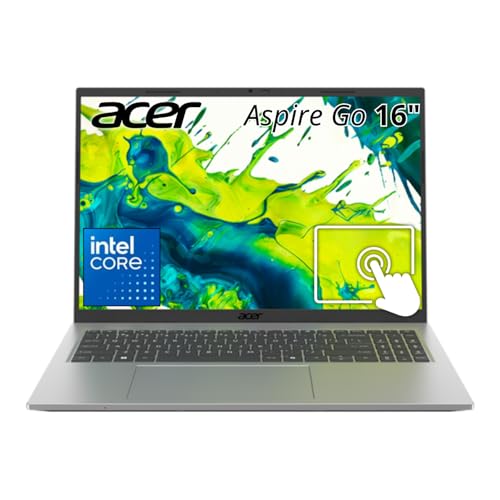
| You need Windows desktop software or a number pad | Acer Aspire Go 16 | A larger Windows laptop with 16GB and 512GB. Choose it for software compatibility, not battery life. |
| Many live apps open all day | A 16GB Chromebook | More memory gives headroom when calls, shared slides and dashboards stay active together. |
| You want a tablet mode or pen use | A convertible such as a Spin-style 2-in-1 | Touch here helps with tapping and scrolling, but this model doesn't fold into a tablet. |
What else to compare
These options make sense when your needs differ from what the 514 covers best.
Acer Chromebook Plus 514 FAQ
Is the Acer Chromebook Plus 514 a touchscreen 2-in-1?
This CB514-6HT-368E has a touchscreen for tapping and scrolling. It's a clamshell, not a 360-degree convertible. Buy by the exact part number, not the 514 name alone. If you want tablet mode, look at a convertible and confirm that specific model's pen support.
Can it run Microsoft Office?
It runs Word, Excel, PowerPoint, OneNote, Outlook and OneDrive on the web. The Windows and Mac desktop versions can't be installed. Open a typical file you already work with to confirm the web versions cover your needs.
Is this a recent Chromebook Plus 514?
It belongs to the CB514-6H/6HT family Acer launched in 2025 and still listed in October 2026. Older models with the same name, the AMD CB514-3H and the Intel CB514-4H and CB514-5H, use different hardware and reach their update end date in June 2033. Match the part number when shopping.
When does it stop getting updates?
Google lists June 2035 for the CB514-6H/6HT family. That is a software date. It doesn't cover warranty repairs or battery service, and it isn't a promise about how quick the hardware will feel by then.
Our call
Buy it if ChromeOS fits your work and you'll actually fill the space with a full Drive kept offline, a large media library or project folders you carry everywhere. At its roughly $500 reference price, that storage and a long update window make a fair deal, and we'd buy it without waiting for a sale.
If your offline needs are small and your day runs many live apps at once, look for a 16GB model instead, as long as it fits your budget without costing you features you use. Pay for extra memory only when it helps your normal work.
Sources and research notes
We match the exact configuration to manufacturer documentation, examine independent evaluations and owner feedback, and assess how the hardware and software fit everyday work. Performance outlooks are our analysis, rather than hands-on measurements. How Pickori evaluates products.
Independent evaluations
Official product information
- CB514-6HT-368E / NX.JFCAA.001 exact specificationsAcer
- US CB514-6HT-368E specifications and direct-store reference priceAcer Store
- Chromebook Plus 514 CB514-6H/6HT platformAcer
- CB514-6H/6HT user manual: ports, charging and controlsAcer
- Core 3 N355 processor specificationsIntel
- Automatic update expiration dates for Acer ChromebooksGoogle
- Use Google Drive files offline on a ChromebookGoogle
- How to access Microsoft 365 on a ChromebookMicrosoft
- Learn about Chromebooks: ChromeOS, local files and offline useGoogle
- Install and use Android apps on a ChromebookGoogle
- Recommended Chromebook apps for everyday tasksGoogle
- Work with VBA macros in Excel for the webMicrosoft
- Install apps from the internet on MacApple
- How to install programs from online sources on WindowsMicrosoft