
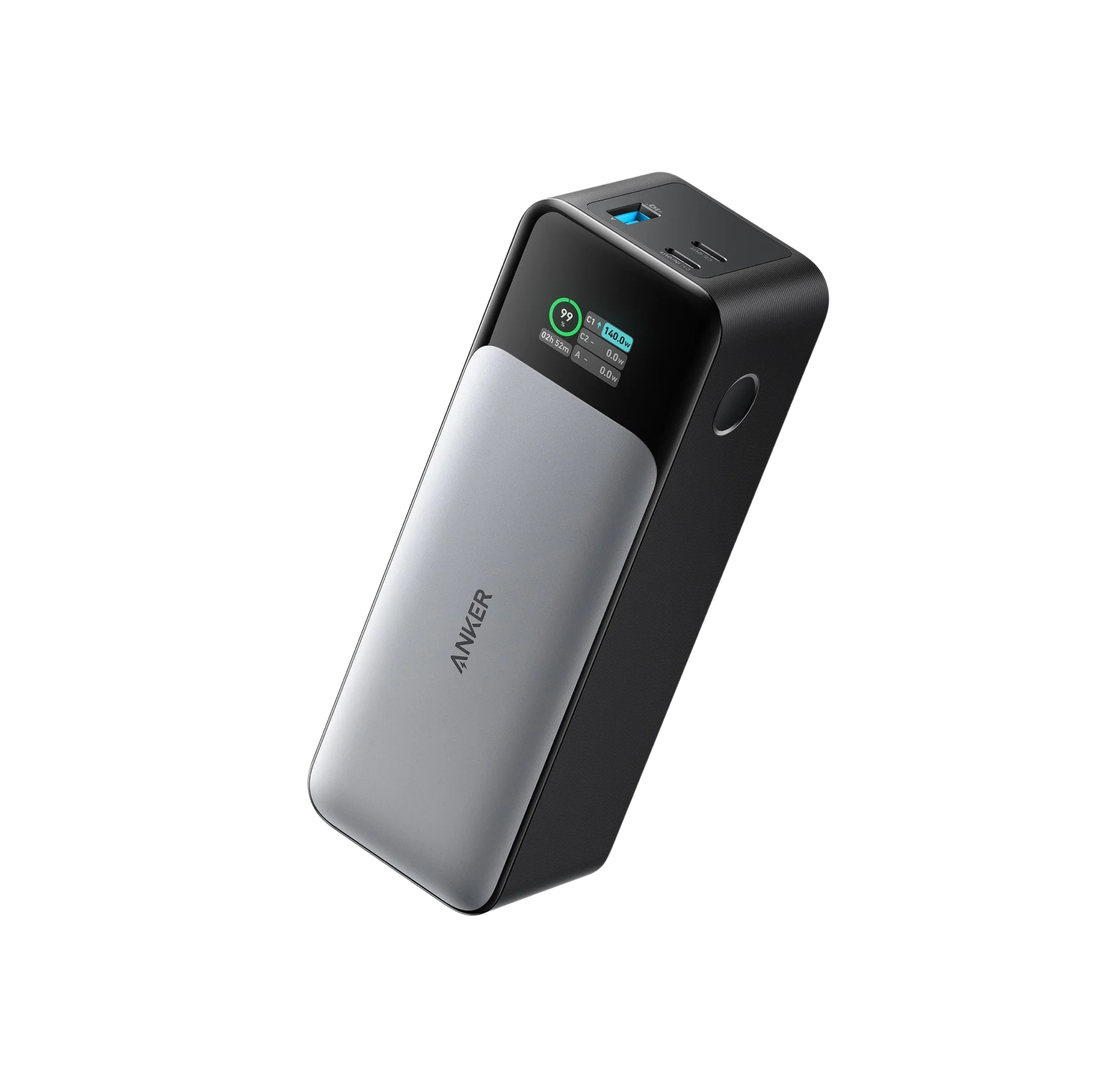
What to know first
- Made for laptops: up to 140W max output and two USB-C ports.
- 24,000mAh capacity is sized for all-day carry, not quick errands.
- Smart display shows wattage per port plus battery health and usage stats.
- Can recharge itself very fast when paired with a high-watt USB-C charger (up to 140W input).
- No 12V USB-C PD output, which can matter for some niche gear.
What the Anker 737 Power Bank (PowerCore 24K) is
The Anker 737 Power Bank (PowerCore 24K) is a large, high-output portable battery meant to charge more than just phones. It’s built around a 24,000mAh capacity and a USB-C power system that can deliver up to 140W max output, which is the territory you need for many USB-C laptops.
You get three ports total: two USB-C ports and one USB-A port. That setup is practical for real life because it lets you prioritize a laptop on USB-C while still topping off a phone, headphones, or a tablet on another port.
The other defining feature is the built-in digital display. Instead of a basic “four dots” battery indicator, it can show charging wattage and deeper stats like battery health and usage information. If you’ve ever wondered why a device is charging slowly, that screen gives you a clear answer.
Why it stands out
The big reason to buy the Anker 737 Power Bank (PowerCore 24K) is power. With up to 140W max output and USB-C PD 3.1 support, it’s designed to handle laptop charging, not just phone charging. For a commuter student, that can mean finishing the day without hunting for an outlet.
The display is not just decoration. It shows the wattage coming from each port, which is a straightforward way to confirm your laptop is actually pulling the power you expect. It also tracks battery health and usage stats, which is useful if you’re relying on this every day and want visibility into how the battery is aging over time.
It also supports very fast recharging of the power bank itself, up to 140W input through USB-C. In plain terms, if you already own a high-watt USB-C wall charger and the right cable, you can refill the battery much faster than older power banks that take hours and hours.
One more practical detail: there’s a low-current mode (activated by double pressing the power button) for small devices that don’t like aggressive fast charging behavior. That’s handy for things like earbuds or wearables.
What it is like to own
Day to day, the Anker 737 Power Bank (PowerCore 24K) is a bag power bank, not a pocket power bank. It’s 6.13 x 2.15 x 1.95 inches and weighs 22.22 oz (630 g). In a backpack, it’s easy. In a jacket pocket, it’s a commitment.
The workflow is simple: plug your laptop into USB-C, plug your phone into the other USB-C or USB-A, and use the display to see what’s happening. If you’re moving between classes, that screen makes it easier to decide whether you should prioritize the laptop now or save capacity for your phone later.
One ownership quirk is that leaving the settings screen on can drain the battery faster than you’d expect for a power bank that’s just sitting there. Anker notes the display and internal controller draw power when the screen stays on, and recommends turning the display off when you’re not using it.
If you plan to use it at the full 140W level, cable choice matters. Anker is clear that you need a PD 3.1 capable cable and a device that supports PD 3.1 input to reach 140W. Without that, you can still charge, you just should not buy this expecting the max number to appear automatically.
What to know before you buy
First, not every device will be a perfect match. This model’s USB-C ports do not include 12V Power Delivery output. Most mainstream phones and laptops will still charge fine on the common PD voltages, but some gear expects 12V specifically, and this can be a compatibility issue in those cases.
Second, pass-through charging has limits. The 737 can pass through up to 90W, but it will not charge itself at the same time, and it does not have a UPS mode. If your goal is keeping a desk setup running during brief outages, this is not designed to behave like a battery backup.
Finally, the size and weight are part of the deal. You’re buying a serious battery with serious output. If your real need is just an emergency phone top-off, you’ll be happier with something smaller.
The specs that matter
This capacity is meant for longer stretches away from outlets, including charging larger devices like a USB-C laptop, not just a quick phone top-off.
That’s laptop-charging power. It’s what makes this a real option for USB-C laptops instead of a phone-focused battery that can’t keep up.
You can charge a laptop on USB-C while charging a phone or other device at the same time, which is how most people actually use a big power bank.
With a high-watt USB-C wall charger and the right cable, you can refill the power bank much faster than models that recharge slowly.
It lets you see whether your laptop is charging at a high rate or a slow one, and it gives you more information than a basic LED indicator.
This is easy to carry in a backpack, but it’s heavy for pocket carry. It makes the most sense if you already carry a laptop bag.
Some devices expect 12V over USB-C PD. If you use niche gear, check compatibility before relying on this as your main power source.
Who this product fits
Commuter student with a USB-C laptop and long gaps between outlets
You can charge your laptop over USB-C during the day and still have ports left for your phone. The display helps you see how much power your laptop is drawing and how much battery you have left.
Library day with group work and everyone fighting for wall plugs
You can keep your laptop charging from the power bank and still have an extra USB-C or USB-A port available for a phone top-off.
Heavy daily power bank user who wants visibility into battery condition
The battery health and usage stats give you a clearer picture of how the power bank is holding up over time, which matters if you’re cycling it constantly.
Anker 737 Power Bank (PowerCore 24K) FAQ
Can the Anker 737 Power Bank (PowerCore 24K) charge a laptop?
Yes, it’s built for laptop charging with up to 140W max output and two USB-C ports. Your actual charging speed depends on what your laptop supports and the cable you use.
Do I need a special cable to get 140W charging?
Yes. To reach 140W, Anker says you need a cable that supports USB Power Delivery 3.1 and a device that supports PD 3.1 input (for example, a 2021 MacBook Pro 16). Without that, it can still charge, just not at the full 140W level.
How many devices can I charge at once?
Up to three at once: two over USB-C and one over USB-A. That’s enough for a laptop, a phone, and a small device like earbuds.
Does the Anker 737 have pass-through charging or a UPS mode?
It can pass through up to 90W of power, but it will not charge itself at the same time. It also does not have a UPS mode, so it’s not meant to act like a battery backup for always-on gear.
Why is the battery draining when I’m not charging anything?
If the settings screen stays on, the display and internal controller keep drawing power. Anker recommends turning off the display when you’re not using it.
Is the Anker 737 Power Bank (PowerCore 24K) easy to carry around campus?
It’s easy to carry in a backpack, but it’s heavy for pocket carry at 22.22 oz (630 g). If you already carry a laptop bag, it fits that routine well.
Should you buy the Anker 737 Power Bank (PowerCore 24K)?
Buy the Anker 737 Power Bank (PowerCore 24K) if you want a power bank that can realistically support a USB-C laptop during a full day away from outlets. The combination of 24,000mAh capacity, up to 140W output, and a display that shows real charging wattage makes it a practical tool for commuters and students, not just a phone accessory.
Skip it if you’re trying to travel light or you only need a small phone boost. This is a big, heavy battery on purpose. If you’ll use the power, it earns its space in your bag. If you won’t, you’re better off with something smaller.