
What to know first
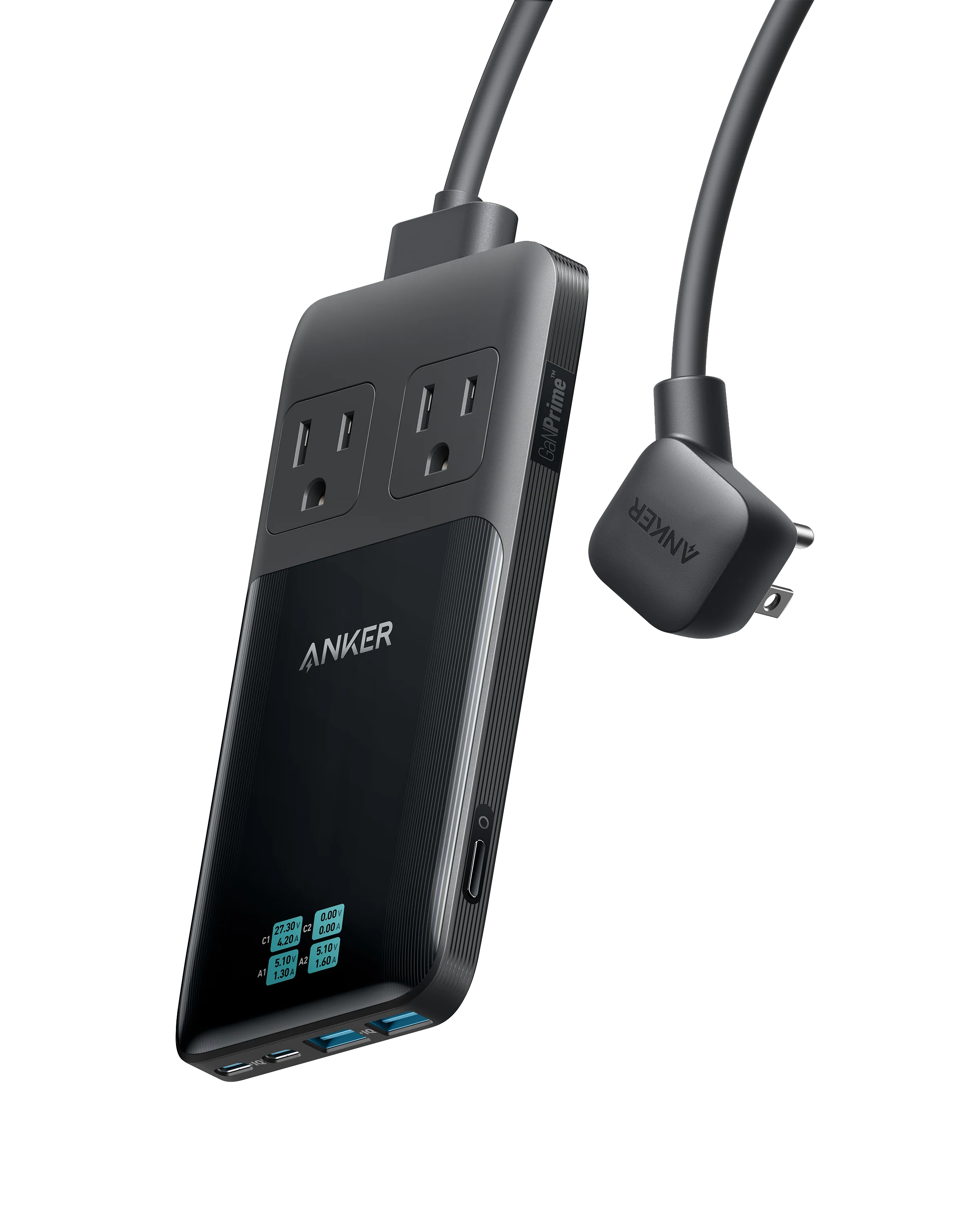
- 6 ports total: 2 AC outlets, 2 USB-C, 2 USB-A
- USB-C charging supports up to 140W max (per Anker’s spec for the USB-C port)
- Built-in screen shows per-port power, plus voltage and current details
- Slim footprint for a desk: 6.3 × 3.1 × 0.7 in
- 5 ft power cord (including the plug)
- No surge protection
What the Anker Prime 6-in-1 Charging Station (140W) (A9128) is
The Anker Prime 6-in-1 Charging Station (140W) (A9128) is a compact desktop power strip that’s built around modern device charging. Instead of giving you a row of bulky outlets, it mixes 2 AC outlets with 4 USB ports (2 USB-C and 2 USB-A) so you can plug in a couple of traditional power adapters while also charging straight over USB.
It’s designed for the places where charging chaos tends to happen: a desk, a classroom workstation, a dorm room, or a nightstand. The body is slim enough to sit flat without hogging space, and the port mix is aimed at the way most people actually charge now (laptop and tablet over USB-C, phone and accessories over USB-A or USB-C, plus a couple of AC plugs for anything that still needs a brick).
One detail that separates it from a basic power strip is the screen display. It’s not just about adding ports. It’s meant to be a charging station you can check at a glance.
Why it stands out
The main reason to pay for the Anker Prime 6-in-1 Charging Station (140W) (A9128) is consolidation. You can run a laptop, phone, and a couple of smaller devices from one compact hub, instead of scattering separate chargers across your desk or tying up a wall outlet with a chunky multi-plug adapter.
The port selection is practical. Two AC outlets cover the stuff that still needs a standard plug, while the four USB ports handle most everyday charging. For a teacher or student, that usually means your laptop and phone are covered, plus room for a tablet, headphones, a calculator, a document camera accessory, or whatever else you’re rotating through the day.
The display is the other big differentiator. You can tap to cycle through individual port power readings, then tap again to see voltage and current details. That helps you answer simple questions fast: Is my laptop actually fast-charging right now, or did I grab the wrong cable? Is this port doing anything, or is the device already topped off? You can also long-press to turn the display off if you don’t want extra light on your desk.
It’s also built for high-power USB-C charging on paper, with a USB-C port rated up to 140W max. That’s the territory you want if you’re trying to power a USB-C laptop from the same station that’s also charging your phone and accessories.
What it is like to own
In everyday use, it works best as a dedicated charging spot on a desk or nightstand. The 5 ft cord gives you more placement options when the outlet is off to the side or behind furniture, which is common in classrooms and dorm rooms.
The screen changes how you manage charging. Instead of guessing whether a device is pulling meaningful power, you can check the readout. If you’re troubleshooting why a laptop isn’t charging quickly, it’s useful to know that high-wattage charging can depend on the cable. Anker notes that you need a 5A current E-Marker charging cable to charge at 60W or above.
It’s also a more orderly way to share power. Dedicated USB ports plus a couple of AC outlets is simpler than passing around a wall charger or unplugging your own gear when someone needs a quick top-up.
What to know before you buy
This Anker Prime 6-in-1 Charging Station (140W) (A9128) does not have surge protection. If you’re buying a power strip primarily to protect electronics from spikes, you should choose a surge protector instead of this model.
It also does not do wireless charging and it does not have a built-in battery. It’s a powered charging station, not a travel power bank. You’ll still need your own cables, and if you want MagSafe or Qi-style drop-and-charge convenience, you’ll want a different setup.
Finally, keep the AC side in perspective. You get two AC outlets, not a whole row. That’s perfect for a couple of plugs plus a bunch of USB, but it’s not the right tool if your desk setup includes multiple plug-in devices that all need their own bricks.
The specs that matter
This is the whole point of the station. You can cover modern USB charging and still keep two traditional plugs available for devices that won’t charge over USB.
140W-class USB-C is aimed at laptop charging. If you want one station that can handle a USB-C laptop plus smaller devices, this spec is what makes it plausible.
You can confirm what’s actually happening instead of guessing. It’s also handy for spotting a cable issue when you expected fast charging.
It’s slim enough to sit on a desk or shelf without taking over the workspace, which is exactly where charging stations tend to get annoying.
Light enough to move between home and classroom, but substantial enough to feel like a dedicated station rather than a flimsy travel adapter.
Gives you more placement options on a desk or in a classroom where the outlet might be behind furniture.
If you need protection for expensive electronics, you should buy a surge protector. This is about organized charging, not surge defense.
Who this product fits
Teacher desk that turns into a charging pile by October
Plug the station into one wall outlet, then keep your laptop on USB-C, your phone on USB, and still have two AC outlets for whatever needs a standard plug. It keeps the brick pile from spreading across your desk.
Dorm room with too few outlets
Use the two AC outlets for the things that truly need them, and move everything else to USB. You end up with fewer adapters and fewer fights over who gets the wall charger.
You want to know if your laptop is actually fast-charging
The screen lets you check per-port power and dig into voltage and current. If you’re stuck at slow charging, it’s a quick hint that you may need the right USB-C cable for higher wattage charging.
Anker Prime 6-in-1 Charging Station (140W) (A9128) FAQ
Does the Anker Prime 6-in-1 Charging Station (140W) (A9128) have surge protection?
No. Anker states this power strip does not have surge protection. If surge protection is a requirement for your space, choose a surge protector instead.
Can it charge a laptop over USB-C?
Yes, it’s designed for that. Anker lists the USB-C port as up to 140W max, which is in the range used for USB-C laptop charging.
Do I need a special cable to get higher wattage charging?
For 60W or above, Anker notes you should use a 5A current E-Marker charging cable. Without the right cable (or if your device doesn’t request higher power), you may not see higher wattage charging.
Does it support wireless charging or have a built-in battery?
No. Anker states it does not support wireless charging and it does not have a built-in battery. It needs to be plugged into the wall to work.
Is it OK for international voltage?
Anker states the USB ports support an input voltage of 100 to 240V at 50/60Hz. The product also lists an electrical rating of 125V AC, so if you’re planning international use, pay attention to what you’re plugging into the AC outlets and what your destination power standards are.
Should you buy the Anker Prime 6-in-1 Charging Station (140W) (A9128)?
Buy the Anker Prime 6-in-1 Charging Station (140W) (A9128) if you want one compact, desk-ready hub that can handle a laptop over USB-C, a phone, and a few extras, while still leaving you two AC outlets for the oddball stuff. It’s a practical back-to-school upgrade because it simplifies your daily charging routine and keeps your workspace from turning into a knot of adapters.
Pass if your priority is surge protection, wireless charging, or having a lot of AC outlets. This model is a clean, high-power charging station first. It’s not trying to be a protective surge strip or an all-in-one wireless pad.