
What to know first
- Two USB-C ports plus one USB-A port covers most modern school and travel setups.
- Up to 100W max from USB-C when charging a single device (enough for many USB-C laptops).
- With three ports in use, total output is 89W max, so power is shared.
- Compact size (1.7 × 1.1 × 2.7 inches) and 6 oz weight make it easy to toss in a bag.
- To get 100W charging, you’ll want a USB-C cable that supports it (Anker notes using an E-Marker cable).
What the Anker Prime Charger (100W, 3 Ports, GaN) is
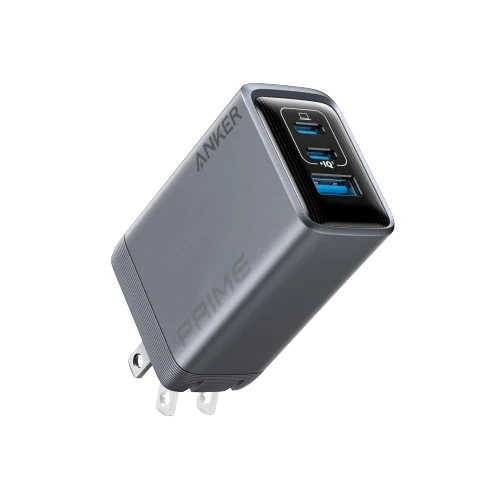
The Anker Prime Charger (100W, 3 Ports, GaN) is a compact wall charger designed to power multiple devices from a single outlet. It has three ports total: two USB-C ports for modern laptops, tablets, and phones, plus one USB-A port for older cables and accessories.
The headline spec is its 100W maximum output. In plain terms, that means it’s built to handle the kind of power a lot of USB-C laptops want, not just phones. If you’ve been carrying a laptop brick plus a separate phone charger, this is meant to consolidate that into one smaller block.
It uses GaN (gallium nitride) tech, which is a newer approach to power electronics that helps chargers stay smaller and more efficient than many older designs. The practical benefit is simple: you get high wattage without carrying a huge cube.
Why it stands out
The most useful thing about this charger is the combination of high total wattage and a genuinely travel-friendly size. Anker lists it at 1.7 × 1.1 × 2.7 inches (not including the prongs) and 6 ounces, which is the difference between “sure, I’ll bring it” and “I’ll just risk it and pack the laptop brick.”
Power-wise, the USB-C ports support up to 100W when you’re charging one device. That’s the number that matters if you want to run a USB-C laptop at full tilt while it’s plugged in. The USB-A port is rated up to 22.5W, which is plenty for a phone, earbuds, or a battery pack.
It’s also a sensible port mix for real life. Two USB-C ports fit the direction everything is going, but the single USB-A port keeps you from having to replace every cable in your bag overnight.
Anker also builds in temperature monitoring and over-temperature control (ActiveShield 2.0). You’re still responsible for using decent cables and not abusing outlets, but it’s good to see modern safety features called out on a high-wattage charger.
What it is like to own
Day to day, this charger is about simplifying your routine. You plug one brick into the wall and run your laptop from USB-C, then use the extra ports for your phone and something small like earbuds or a power bank. For back-to-school life, that means fewer things to forget in your dorm or leave behind in a classroom outlet.
The main ownership detail to understand is how power is shared. With one port in use, a USB-C port can deliver up to 100W. With all three ports in use, total output is capped at 89W. In practice, that can mean your laptop charges more slowly if you’re also charging two other devices at the same time, especially if your laptop is pulling a lot of power.
Cable choice matters more than people expect. Anker notes that for optimal 100W charging you should use an E-Marker cable. If you grab a random USB-C cable from the bottom of a drawer, you might still charge, but you may not get the top speed this charger can provide.
Compatibility is broad across common devices (Anker lists support for a wide range of Apple, Samsung, Google, Microsoft, Dell, HP, ASUS, and Lenovo devices). The key requirement is that your laptop actually charges over USB-C. If it does, this charger is built to be your main brick.
What to know before you buy
The biggest “gotcha” is the shared power limit when you use all three ports. The charger can output 100W max to a single USB-C device, but with three devices connected the total drops to 89W. If your laptop is the priority, you may want to charge your phone and accessories at a different time, or accept that everything will top off more slowly together.
Cables are not included. Plan on bringing your own USB-C to USB-C cable for a laptop, and make sure it’s rated for the wattage you need (Anker specifically calls out using an E-Marker cable for 100W).
There are also a few device-specific notes from Anker that are worth reading if you’re deep in the Apple ecosystem (for example, MacBook charging behavior with third-party chargers can show a plug icon briefly). None of that is unusual, but it’s a reminder that a high-power multi-port charger is a little more complex than a basic phone brick.
The specs that matter
This is what makes it realistic as a laptop charger replacement for many USB-C laptops, not just a phone charger.
You can charge a laptop and still have ports left for a phone and an accessory, plus USB-A helps if you still have older cables.
If you want the fastest charging your laptop can accept over USB-C, this is the mode that matters. It’s also the easiest way to avoid power-sharing slowdowns.
That’s plenty for a phone, earbuds, or a battery pack while your laptop uses USB-C.
When everything is plugged in, the charger has less total power to go around. Your laptop may charge slower if you’re also charging two other devices.
This is small enough to live in a backpack pocket without feeling like you packed a brick.
For commuting across campus or traveling, shaving weight matters. This is easy to carry daily.
It supports a wide range of input voltage, which is helpful if you travel internationally (you still may need a plug adapter).
Who this product fits
You carry a USB-C laptop to class every day
Use the Anker Prime Charger (100W, 3 Ports, GaN) as your main laptop charger, then keep your phone and earbuds charging off the extra ports. You’ll carry one brick instead of two or three.
You study in the library and outlets are always taken
One outlet becomes a mini charging station. Plug in your laptop and still top off your phone and a power bank without asking someone to share.
You travel with a laptop, phone, and a couple small gadgets
The compact size and three ports let you pack one wall charger for your whole kit, instead of a laptop brick plus separate phone and accessory chargers.
Anker Prime Charger (100W, 3 Ports, GaN) FAQ
Is the Anker Prime Charger (100W, 3 Ports, GaN) enough for a laptop?
If your laptop charges over USB-C, this charger can provide up to 100W to a single USB-C device. That’s enough for many USB-C laptops. Your actual charging speed still depends on what your laptop is designed to accept.
Can it charge three devices at once?
Yes. It has two USB-C ports and one USB-A port. With all three ports in use, total output is capped at 89W, so the charger shares power across devices.
Do you need a special cable to get 100W charging?
For optimal 100W charging, Anker says to use an E-Marker cable. If you use a lower-rated USB-C cable, charging may still work but not at the maximum wattage.
Which USB-C port should I use for my laptop?
Anker notes that when using both USB-C ports at the same time, you should use the upper USB-C port for charging laptops.
Does it come with charging cables?
No. Anker notes that charging cables for compatible devices are not included and need to be purchased separately.
Should you buy the Anker Prime Charger (100W, 3 Ports, GaN)?
Buy the Anker Prime Charger (100W, 3 Ports, GaN) if you want one compact wall charger that can realistically replace a USB-C laptop brick while still covering your phone and a couple smaller devices. The size and weight make it easy to carry every day, which is the whole point of a “one charger for everything” setup.
Skip it if your priority is maximum charging speed for three devices at once. With three ports in use, total output drops to 89W, so you may need to stagger what you charge. But if your goal is fewer bricks and fewer outlet problems, this charger fits the job.