
What to know first
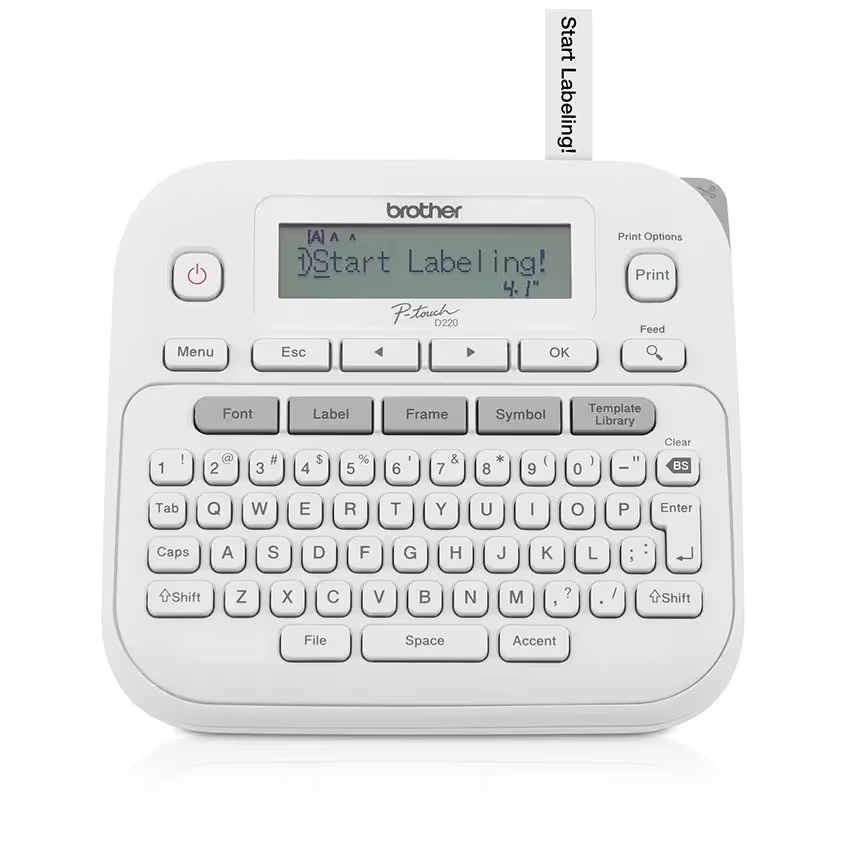
- Standalone label maker with a built-in QWERTY keyboard and 15-character display for previewing labels.
- Works with Brother TZe tapes in multiple widths (3.5 mm to 12 mm, about 1/2 inch max).
- Includes one sample black-on-white laminated TZe tape (12 mm x 4 m).
- Runs on 6 AAA batteries or an optional AC adapter (both not included).
- Lots of built-in formatting: 14 fonts, 11 styles, 99 frames, and 650 symbols.
- Stores up to 30 labels and supports handy modes like auto numbering and vertical printing.
What the Brother P-touch PT-D220 Home/Office Everyday Label Maker is
The Brother P-touch PT-D220 Home/Office Everyday Label Maker is a handheld label maker that lets you type labels directly on the device and print them onto Brother TZe label tape. It’s designed for the kind of labeling you do in real life: bins, file folders, shelves, chargers, student supplies, and anything that tends to wander when it isn’t clearly marked.
The big deal here is that it’s self-contained. You’re not relying on an app, a Bluetooth connection, or a computer. You type on a QWERTY keyboard, preview the label on the built-in screen, then print.
It supports TZe tapes up to about 1/2 inch wide (12 mm). That width is wide enough for readable labels on bins and folders, but still small enough for things like pencil boxes, cords, and classroom tools.
Why it stands out
It’s fast to use because everything you need is on the device. The PT-D220 has a QWERTY keyboard and one-touch formatting keys, so you can make a label in the moment, right where you’re organizing. That matters in a classroom or busy home because labeling usually happens while you’re already in the middle of sorting and putting things away.
The PT-D220 also gives you enough formatting to keep labels consistent. You get 14 fonts, 11 font styles, 99 frames, and 650 symbols. In plain terms, that means you can make labels that are easy to scan at a glance, or add simple icons for younger students or shared spaces.
Tape compatibility is another practical win. It uses Brother TZe tapes, including standard laminated and other specialty options (like flexible ID and extra strength adhesive). Brother lists these tapes as water-resistant, fade-resistant, and chemical-resistant, which is exactly what you want for labels that get touched, wiped down, or moved around.
For repetitive labeling, it has features like auto numbering and the ability to store up to 30 labels. If you’re labeling a set of student bins or a row of supply drawers, that can save time and keep everything uniform.
What it is like to own
Setup is straightforward: you power it (6 AAA batteries or an optional AC adapter), load a TZe tape cartridge, and start typing. Brother includes a sample roll of black-on-white laminated TZe tape in the box (12 mm wide, 4 m long), so you can print labels right away.
The 15-character, one-line display is there to preview what you’re about to print. It’s not a big screen, but it’s enough to catch typos before you waste tape. There’s also a dedicated preview key, which is the kind of small convenience that makes a label maker feel less fiddly.
Because it’s a standalone device with physical keys, it’s easy to hand to someone else and get the same results. In a classroom, that can mean a co-teacher, aide, or responsible student can label supplies without needing your phone or logging into anything.
For storage, it’s a compact handheld unit (6.2 x 5.9 x 2.7 inches) that can live in a desk drawer or a supply cabinet. It weighs 1.08 pounds, so it’s not a featherweight, but it’s still easy to move from your desk to a shelf while you work.
What to know before you buy
Power is the first thing to plan for. The Brother P-touch PT-D220 runs on 6 AAA batteries or an optional AC adapter, and neither is included. If you want it ready for daily classroom use, it’s worth deciding up front whether you’ll keep fresh AAAs on hand or buy the adapter so it’s always ready at your desk.
The screen is basic and not backlit. If you often label in a dim supply closet or a low-light classroom corner, that’s something to consider. You can still use it, but it won’t be as comfortable as a model with a lit display.
Finally, remember that this model is intentionally not app-based. If you want to build more complex label designs on a phone or save templates in an app, you’ll be happier with a different style of label maker. The PT-D220 is for quick, consistent labels you can make on the spot.
The specs that matter
TZe is a widely available tape family with lots of sizes and finishes. It’s easy to restock, and you can choose tapes that fit the surface you’re labeling.
12 mm is wide enough for readable bin and folder labels, but still neat on smaller items like pencil boxes and cords.
You can match the tape width to the job instead of forcing every label to be the same size.
You can make labels quickly without a phone, and a physical keyboard is faster and less error-prone for lots of short labels.
You can preview text before printing to avoid wasting tape, but it’s best used in normal lighting.
You can make labels that are easier to scan and more consistent across a classroom or home system.
It’s portable if you use batteries, or you can keep it always-ready at a desk with the adapter. Either way, you’ll need to budget for power.
Who this product fits
A teacher setting up a classroom in August
The Brother P-touch PT-D220 lets you label bins, folders, supply drawers, and shared tools quickly at your desk, then carry it to shelves as you go. Because it doesn’t rely on an app, you can keep moving without pairing or troubleshooting.
A family organizing a busy kitchen and homework station
Use 12 mm tape for pantry bins and file organizers, then switch to narrower tape for chargers, pencil boxes, and small containers. The preview screen helps you avoid typos so labels look consistent.
Someone labeling cords and devices at home or in an office
Print short, readable labels for power bricks, HDMI cables, and shared equipment so you can tell what’s what at a glance. Auto numbering can help when you’re labeling a set of similar items.
Brother P-touch PT-D220 Home/Office Everyday Label Maker FAQ
Does the Brother P-touch PT-D220 need an app?
No. The Brother P-touch PT-D220 Home/Office Everyday Label Maker is a standalone label maker with a built-in keyboard and screen. It does not support mobile app printing.
What tape does the Brother P-touch PT-D220 use?
It uses Brother TZe label tapes. Brother lists compatibility with multiple TZe tape types and widths, including 3.5 mm, 6 mm, 9 mm, and 12 mm.
What comes in the box with the Brother P-touch PT-D220?
The box includes the PT-D220 label maker, documentation, and one sample black-on-white laminated TZe tape (0.47 inch or 12 mm wide, 13.1 feet or 4 m long).
Does the Brother P-touch PT-D220 come with batteries or a power adapter?
No. It can run on 6 AAA batteries or an optional AC adapter, but both are not included.
Can the Brother P-touch PT-D220 print more than one line?
Yes. Brother lists a maximum of 2 print lines, which is useful for slightly longer labels or adding a second line like a name plus a subject.
Is the Brother P-touch PT-D220 good for outdoor labels?
It can be, depending on the TZe tape you choose. Brother describes its TZe tapes as durable and lists water-resistance and fade-resistance for the tape system.
Should you buy the Brother P-touch PT-D220 Home/Office Everyday Label Maker?
Yes, if you want a straightforward label maker that works the second you pick it up. The Brother P-touch PT-D220 is built around the basics that matter: a real keyboard, a preview screen, and tape options that cover most home, office, and classroom labeling.
Buy it with a plan for power and extra tape. Once you do, it is a tool that makes daily organization stick because it’s easy to use in the moment, right when you notice the mess.