

Pickori's Take
- The HP OmniBook 3 16 is one of the better affordable large-screen laptops for battery-conscious Office, browser, school, and home use, and the 16GB/512GB configuration is a strong buy at $599. The main caveat is software compatibility. Its Snapdragon X chip uses Arm rather than the x86 design in Intel and AMD laptops, so confirm that any specialist apps, drivers, or accessories you depend on support it.
- The value is there. At this price, 16GB of memory, 512GB of storage, a 16-inch 16:10 workspace, a 3.65-pound body, and unusually long battery life are worth more than the plain IPS screen and plastic-heavy chassis cost you.
- Battery life is the main reason to choose it. A 16GB/512GB IPS unit ran past 13 hours at full brightness, and higher-spec OLED siblings lasted much longer in video tests, so a full workday on one charge is a safe expectation.
- Buy the 512GB version. The 256GB base model fills up quickly, the memory is soldered, and the single SSD can be replaced but there's no slot for a second drive.
- Skip it if you rely on kernel-level anti-cheat games, old printer or scanner drivers, specialist VPN or security tools, virtual machines, or professional creative and CAD software without confirmed Arm support, or if you need a color-accurate screen.
A big-screen laptop built around its battery
The OmniBook 3 16 is a deliberate bet. HP wagered that people shopping for an affordable 16-inch laptop care more about room to work and a battery that outlasts their day than about a processor that tops benchmark charts. So instead of pairing a hot, power-hungry chip with a modest battery, it matched an eight-core Snapdragon X X1-26-100, rated up to 2.97GHz, with a 68Wh pack. That is a generous capacity for a laptop this light. Almost everything this review praises, and most of what it criticizes, comes from that one decision.
Weight is the quieter half of the bet. At 3.65 pounds and about 14.12 by 9.91 by 0.58 inches, this is a 16-inch laptop you can carry without negotiating with your shoulder. Big screens usually come with a weight penalty, and HP has mostly waived it here. That matters more than it sounds. A laptop that stays on the desk because it's a chore to pack delivers exactly zero hours of battery life to the person who needed it on campus or at the gate.
Taken together, the OmniBook 3 16 is refreshingly honest about what it is. It isn't a workstation, a gaming laptop, or a creator's machine in disguise. It's a large, light, quiet productivity laptop with serious stamina, and that focus is why it succeeds for the right buyer instead of posing as an all-rounder. The stamina deserves a closer look, because it's the feature that most separates this laptop from its neighbors on the shelf.
Battery life you can plan a day around
Battery claims are usually written to be admired and then ignored. HP's rating of up to 33 hours and 30 minutes of video playback for the 16GB/256GB base model is a best case under HP's own conditions, and it should be read that way. What makes the OmniBook unusual is that the independent results point the same way, even though they come from different configurations, use different methods, and land on different numbers.
The spread is useful because each figure answers a different question. CNET's 34 hours and 5 minutes came from a controlled YouTube streaming rundown on a 32GB/1TB sibling, a steady, light workload that flatters any efficient machine. PCWorld's almost 22.5 hours measured local video playback on a 32GB/1TB OLED unit. Windows Central's roughly 25 to 30 hours is a deliberately conservative mixed-use estimate from its own OLED sibling. The reviewers set aside a Windows battery report near 38 hours because streaming-heavy use had inflated it. All three are 32GB/1TB configurations, and the PCWorld and Windows Central units used OLED panels, which draw power differently from IPS. None of these numbers describes the 16GB IPS models most buyers will consider. What they establish is a ceiling, and it's remarkably high no matter how you measure it.
For anyone weighing the 16GB IPS models, the most relevant number comes from Computer Bild's 16GB/512GB IPS unit, which ran past 13 hours at full display brightness. Full brightness is about the harshest condition a battery test can impose, and most people spend the day well below it. One result isn't a runtime guarantee, but it supports a confident practical conclusion: this configuration clears a normal workday with room to spare, and you can stop choosing coffee-shop seats by their distance from a wall outlet.
Some habits will pull that figure down: long video calls, a bright screen, translated x86 apps working hard, and sustained heavy processing. What changes is where you start. You're spending down a much larger reserve than most 16-inch Windows laptops offer, so a demanding day tends to end at a lower percentage rather than a frantic search for the charger. On ordinary days the 65W USB-C GaN adapter can stay in the drawer, and when you do need it, it plugs into either USB-C port.
The same efficiency keeps the laptop calm. Computer Bild measured 0.2 sone during office work, which is effectively silent, and 2.3 sone under stress, which is still restrained for a laptop working hard. Windows Central also found it cool and quiet. You get a palm rest that stays comfortable and a fan that doesn't narrate your spreadsheet, and both count for more than spec sheets admit in a library or during a late-night deadline.
What an eight-core Snapdragon X means for real work
On paper, the Snapdragon X X1-26-100 has eight CPU cores at up to 2.97GHz, integrated Adreno graphics, and a 45-TOPS NPU. The spec sheet doesn't tell you much about how it will handle your work. The useful questions are which of your jobs it breezes through, which it only gets done, and which depend on whether the software was built for Arm. The table sorts common workloads into those groups.
| Workload | Outlook | What to expect |
|---|---|---|
| Browser tabs, email, and Microsoft 365 | Excellent | Edge, Chrome, and Microsoft 365 all run natively on Arm, so this is where the chip is most comfortable. Sixteen gigabytes of memory leaves room for a crowded browser session alongside several Office documents without the slowdown that sets in when memory runs short. |
| Video calls and streaming | Excellent | Mainstream calling and streaming apps are well supported, and the 1080p IR camera with a privacy shutter handles daily meetings and infrared face login. Calls work the camera and processor harder than playback does, so a day of back-to-back meetings will drain the battery noticeably faster than a day of video. |
| Light photo editing | Good | Crops, exposure adjustments, and resizing are comfortable work for the CPU. The screen is the real limit. At roughly two-thirds sRGB coverage, the IPS panel can't show accurate color, so it's fine for sorting and trimming but not for final color decisions. |
| Local video editing | Mixed | The answer depends on your editor. An older non-Arm build of Handbrake ran slower through Windows translation on the OLED sibling, and Adobe Premiere Pro produced an installation error on a 16GB/512GB IPS unit. Confirm your editing software's Arm support before you count on this laptop for video projects. |
| Gaming | Weak | Casual and browser games are fine. Demanding games are not. A non-native 3DMark Time Spy run landed about 50 percent behind an AMD Radeon 860M comparison result, and games with kernel-level anti-cheat may not run at all. You're buying endurance here, not frame rates. |
| Legacy or specialist Windows software | Verify first | Printer and scanner utilities, specialist VPN and security clients, older line-of-business apps, virtual machines, and CAD or engineering tools are where support gets patchy. Translation handles many ordinary programs, but hardware drivers typically need Arm versions of their own. If your printer's utility has no Arm version, that feature simply won't be available. |
For a $599 laptop that will mostly run documents, browsers, coursework, and calls, this is the right processor. It puts its effort where mainstream buyers notice it: steady responsiveness with very little wasted power. Windows Central saw performance barely change when its unit came off the charger, which is not a given on budget Windows laptops, so the OmniBook behaves the same at a desk as it does on a train. Computer Bild measured 0.2 sone of fan noise during office work, close to inaudible in a quiet room, and 2.3 sone under a full stress load. A sustained stress run on a 16GB/512GB unit held 99 percent stability. The laptop stays cool, stays quiet, and doesn't slow down as a long session wears on.
Keep the graphics and the NPU in proportion. The Adreno GPU accelerates the display, plays video, and runs casual games, but it doesn't make this a budget gaming laptop, and it doesn't suit GPU-heavy creative work. The 45-TOPS Hexagon NPU is a separate processor dedicated to AI tasks. It runs supported on-device AI features efficiently, so the CPU and battery don't have to carry that load. That's a pleasant bonus. It is not a reason to choose this laptop over one with a better screen or simpler software support, and the Copilot+ badge on the box shouldn't outrank battery life, memory, storage, or price.

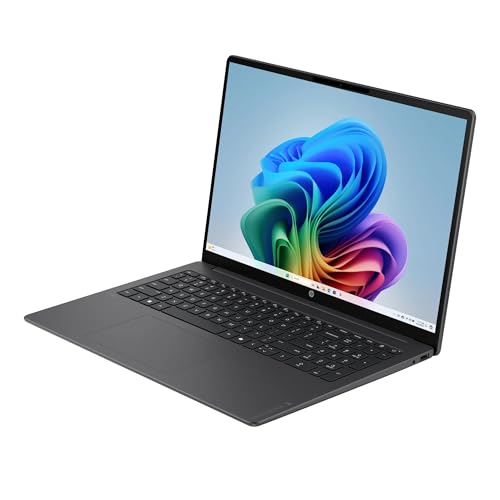


Living with it: keyboard, ports, camera, and build
The keyboard is one of the better reasons to choose this laptop. Reviewers rated both the keyboard and touchpad positively across the configurations they evaluated, and the full-size numeric keypad puts the 16-inch chassis to good use for anyone who spends time in budgets or spreadsheets. Check backlighting before you order, because it varies by configuration. Windows Central's OLED unit had a bright backlight, and Computer Bild's 16GB/512GB IPS unit had none. If you type in dim rooms, confirm it in the listing specifications instead of assuming.
The port selection is generous for the money: two 10Gbps USB-C ports with USB Power Delivery and DisplayPort 1.4a, two 5Gbps USB-A ports, HDMI 2.1, and a 3.5mm audio jack. That covers an external monitor, a wired mouse, a flash drive, and the charger without a bag full of dongles. The limit is speed. The USB-C ports top out at 10Gbps, well short of USB4 or Thunderbolt, so very fast external SSDs and high-end docks won't reach their potential. Most owners will never notice. Anyone moving large video files every day will.
Wireless is current, with Wi-Fi 6E and Bluetooth 5.3. The 1080p webcam, which PCWorld judged reasonable, includes infrared sensors for Windows face sign-in and a physical privacy shutter. That pairing is more useful than it looks on a spec sheet. Unlocking the laptop by glancing at it beats typing a PIN dozens of times a day, and the shutter ends any debate about whether the camera is watching.
The speakers are the weakest part of the package. PCWorld called them weak and thin, which is fine for calls and YouTube tutorials but a letdown for music or movie night. Plan on headphones or a Bluetooth speaker when sound matters.
Storage speed outperforms the price. Windows Central measured about 7,073 MB/s read and 5,705 MB/s write, and Slide Style's IPS unit read at roughly 7,050 MB/s, so apps and files open without hesitation. Capacity is the real question on the 256GB base model, and the storage guide below explains why 512GB is the better long-term choice.
The build is practical rather than precious. The chassis is mostly plastic under an aluminum lid. Windows Central noticed body flex and occasional creaking, though the lid itself felt more rigid, and PCWorld found the hinge looser than ideal. None of that suggests fragility. It does mean the OmniBook feels like a value laptop that happens to weigh 3.65 pounds, not a premium laptop that happens to be cheap. At this price, that's a fair exchange for the weight savings. In the family's four-figure OLED configurations, the same plastic becomes much harder to forgive.
Where the $599 price shows
Every laptop at this price cuts corners. The question is whether HP cut the ones you'll notice. Here are the compromises, ordered roughly by how likely each is to rule the laptop out for a particular buyer.
The display is the most visible saving. Rated at 300 nits and 62.5 percent of sRGB, and measured at about 66 percent sRGB on Slide Style's IPS unit, the panel looks pale beside better laptop screens, which is how Computer Bild described it too. For text, spreadsheets, web pages, and casual video, the 16:10 space and anti-glare finish serve well. For photo editing, color grading, or design, the screen will mislead you. Buyers who want richer color can consider the OLED version, a separate decision covered in the display guide.
Memory is the quiet long-term limit. Sixteen gigabytes of LPDDR5x-8448 is the right amount for this processor and its intended workloads today, but it's soldered to the board and can't be upgraded. If you expect much heavier multitasking over the next several years, buy 32GB at the start.
Finally, the value case depends on the price holding. At $599, the battery life, memory, storage, weight, and screen size add up to a strong deal, and the pale panel and plastic body are sensible places to save. At that level, conventional Intel and AMD laptops with better screens, stronger graphics, or no compatibility questions deserve a close look before you commit.
Will your Windows apps and accessories work on Arm?
The verdict covered the basic split between Arm and x86. This is the version you can act on, and it starts with why translation works for most programs but not all of them. A processor executes instructions written in a specific format. Intel and AMD chips use the x86 format, and Snapdragon X uses Arm. An ordinary application is self-contained enough that Windows can convert its x86 instructions into Arm instructions while it runs, usually fast enough that you won't notice in everyday work, with some slowdown on heavy, sustained jobs. Drivers are different. They're the low-level software that lets Windows talk to hardware and reach deep into the system, which is why printers, scanners, VPN clients, security tools, and anti-cheat systems generally need a genuine Arm version rather than a translated one. That's where most compatibility trouble lives.
The software most buyers use every day is already covered. Microsoft 365, Edge, Chrome, common calling and messaging apps, streaming services, and a wide range of mainstream programs either have native Arm versions or run well through translation. If your day is documents, email, a browser, video calls, and Netflix, you're squarely inside this laptop's comfort zone.
Check these categories by name before you buy: printer and scanner utilities, especially for older devices; corporate VPN clients and endpoint security software; legacy line-of-business applications required by an employer or school; virtual machine software; games that use kernel-level anti-cheat; and professional creative, CAD, or engineering applications. Support in these areas varies by product and sometimes by version, so a vague claim that something works on Arm won't settle the question.
The check takes about five minutes. Search each essential program or device model together with "Windows on Arm," and look for an Arm version or a clear compatibility statement from the developer or manufacturer. If everything checks out, buy with confidence. If one tool you can't work without remains uncertain, an Intel or AMD laptop is the safer choice for you, even at some cost in battery life. Most shoppers will clear this check without a single surprise, which is exactly why it's worth the five minutes.
256GB or 512GB: which OmniBook 3 16 should you buy?
The capacity on the box isn't the space you get to use. Before you save your first file, Windows, its recovery files, and the room it reserves for updates have already claimed a sizable share of a 256GB drive. Then come your applications, browser caches that swell quietly over months, and cloud folders that keep local copies unless you tell them otherwise. Free space on the base model shrinks far faster than the label suggests, and a nearly full drive turns into a standing appointment with the cleanup tools.
The 256GB model suits one kind of owner: someone disciplined about living in the cloud, with only a handful of installed apps, photos and documents stored online, and synced folders set to download files only when needed. If that describes you, the base model is fine. If it sounds like homework, it isn't the right choice.
For almost everyone else, the 16GB/512GB configuration is the better-balanced laptop, and at $599 it's the one this review recommends. It has the same processor, the same 16GB of memory, and the same 16-inch screen, with twice the local storage. That space absorbs a bigger app library, an offline photo collection, downloaded video for a long flight, and several years of accumulated files without constant triage. It removes the one compromise that holds the base model back while leaving everything else about the laptop unchanged.
Don't buy the smaller drive counting on an easy upgrade later. The single M.2 SSD can be replaced through HP's documented service procedure, which is good news for long-term repair, but there's no empty second slot. Upgrading means removing the original drive, installing a larger one, and moving or reinstalling everything. That's a repair job, not a quick expansion, so buy the storage you need on day one.
The affordable IPS model or the OLED upgrade?
The IPS screen is built for everyday practicality. You get the full 16:10 workspace, an anti-glare finish that holds up under office lighting and beside a window, and enough sharpness at 1920 by 1200 for documents, spreadsheets, and web pages. HP rates it at 300 nits and 62.5 percent of sRGB, and a close IPS sibling measured about 66 percent. In practice, colors look muted and images lack depth. It does its job without ever impressing anyone, and it's a large part of why this configuration can be priced where it is.
OLED changes the viewing experience in a way you'll notice immediately. Windows Central's OLED sibling measured full sRGB coverage, 92 percent AdobeRGB, and 99 percent DCI-P3, with brightness a little over 300 nits. That means deep blacks, rich color, and contrast that makes movies and photos look far better. The trade-offs are real. The glossy panel reflected bright rooms enough to bother the reviewers, and the OLED unit they evaluated came with 32GB of memory and 1TB of storage, which moves it into a more expensive category and a different value conversation.
Choose IPS if the laptop is mainly for documents, browsing, school, and streaming, and you want the most practical configuration for the money. Choose OLED if you spend hours with photos, watch a lot of video on the laptop, or simply want a screen you enjoy looking at, and you're prepared to judge that configuration against premium laptops rather than expecting it to inherit the IPS model's value case.
The 16GB/512GB configuration at $599 uses the IPS panel, not OLED. When comparing listings in this family, read the display specification directly. The processor name alone won't tell you which screen is in the box.
Who this product fits
A student who needs one laptop for four years
This is close to the ideal buyer. The 16:10 screen fits a paper and a research tab side by side. Reviewers consistently like the keyboard, and it includes a numeric keypad for stats and spreadsheet homework. The battery also outlasts a full day of classes, so you won't be fighting over the one working outlet in the lecture hall. Settle two things first. Backlighting varies by configuration (at least one 16GB/512GB unit didn't have it), so check the listing if you study late. More important, confirm that exam-proctoring software, the campus VPN client, and any specialist coursework apps support Arm, because school IT requirements are where surprises usually hide. Then buy 512GB. Four years of lecture recordings, downloads, and course software will fill 256GB well before graduation.
A remote worker who's tired of charging cables
If your day is Teams, email, spreadsheets, and a browser that never closes, the charger can stay in the drawer until evening. Video calls use more battery than anything else in that routine, so a day of back-to-back meetings ends with less charge than a spreadsheet day. You still start with far more headroom than most 16-inch Windows laptops give you. The infrared camera handles calls and face login, and the large screen fits a shared document and a call window without constant alt-tabbing. Keep a headset nearby, because the speakers are the weak link on calls. Before ordering, confirm that your employer's VPN, security agent, and line-of-business apps support Arm. Corporate software is where compatibility gaps usually turn up.
What else to compare
At $599, the OmniBook's combination is hard to match: 16GB of memory, 512GB of storage, a 16-inch screen in a 3.65-pound body, and battery life most conventional budget laptops don't come close to. The alternatives below each solve a problem the OmniBook doesn't. Intel and AMD models remove the Arm compatibility check entirely, and many have brighter screens or stronger graphics. The OLED version is the natural step up for buyers who care more about image quality than price.
 Acer Aspire Go 16A conventional Intel big-screen laptop with fewer software-compatibility questions and a choice of touch or 120Hz non-touch displays
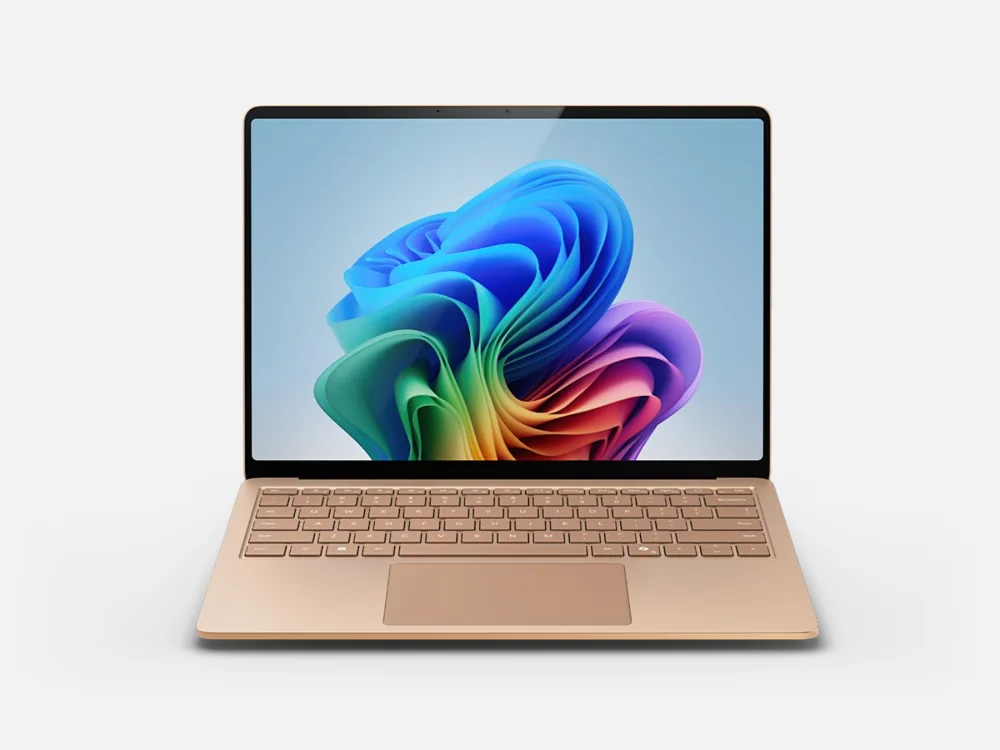 Microsoft Surface Laptop 7A more premium Windows-on-Arm alternative with a brighter, faster display and stronger overall construction
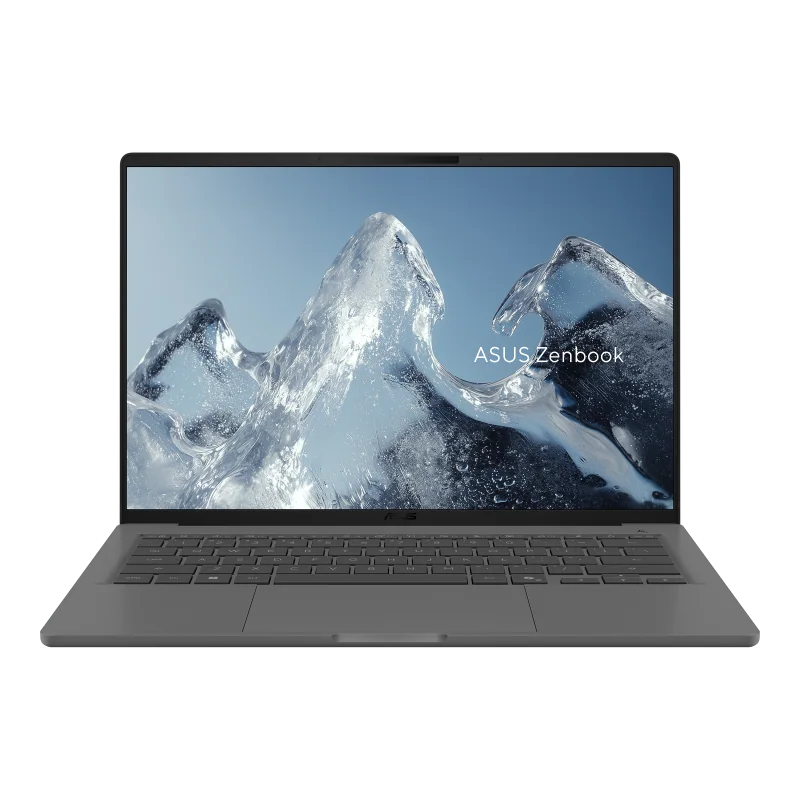 ASUS Zenbook A14A smaller and much lighter Snapdragon alternative for travelers who value portability over a 16-inch workspace
 HP OmniBook X Flip 14A more flexible HP alternative with a touchscreen convertible design for buyers who do not need the larger 16-inch canvas
HP OmniBook 3 16 (Snapdragon X) FAQ
Is the HP OmniBook 3 16 worth buying at $599?
Yes. The 16GB/512GB configuration gives you enough memory, practical storage, a large 16:10 screen, a light body, and unusually long battery life, and the pale IPS panel and plastic build are sensible places to save at that price. It's a strong pick for browsing, Microsoft 365, school, video calls, and streaming.
Does the HP OmniBook 3 16 run all Windows programs?
Most, but not all. Snapdragon X uses Arm rather than the x86 design in Intel and AMD laptops. Microsoft 365, Edge, Chrome, and common calling and streaming apps run natively or through Windows translation. The gaps are usually older printer and scanner drivers, specialist VPN and security tools, legacy business software, virtual machines, kernel-level anti-cheat games, and some professional creative and engineering applications. Check the programs you can't work without.
How long does the HP OmniBook 3 16 battery last?
HP rates the base model for up to 33 hours and 30 minutes of video playback, which is a best case. The most practical result is a 16GB/512GB IPS unit that ran past 13 hours at full brightness, while 32GB/1TB OLED versions lasted much longer in video-focused rundowns. Expect comfortably more than a normal workday, and less with heavy video calls or a bright screen.
Should I get the 256GB or 512GB OmniBook 3 16?
Get 512GB unless you live in the cloud and install very few apps. Windows, recovery files, updates, applications, and browser caches take a large share of a 256GB drive before your own files arrive. The 512GB configuration mostly ends that housekeeping without changing anything else about the laptop.
Can I upgrade the memory or storage later?
Memory, no. The 16GB is soldered to the board, so choose 32GB at purchase if you expect heavier workloads. Storage, yes, with a catch. The single M.2 SSD can be replaced through HP's documented service procedure, but there's no second slot, so an upgrade means swapping the drive rather than adding one.
Is the OmniBook 3 16 display good enough for photo or video editing?
Not for color-critical work. The IPS panel is rated at 300 nits and 62.5 percent of sRGB, which is fine for documents, web work, and casual viewing but noticeably pale. The OLED version measured full sRGB and much wider color, which makes it the editing choice, though it costs more and picks up more reflections in bright rooms.
Sources and research notes
Specifications come from manufacturer documentation. Measured results are attributed to independent evaluations.
The bottom line on the OmniBook 3 16
Plenty of budget laptops try to be slightly good at everything and end up memorable for nothing. The OmniBook 3 16 made clearer choices. HP spent on what a big-screen productivity laptop is judged on every day: room to work, enough memory, sensible storage, a body light enough to carry, and a battery that means you stop planning your day around outlets. It saved on screen quality, speakers, and the plastic around them. At $599, those are the right things to save on, and that's why this configuration is a smart purchase rather than a compromise you have to talk yourself into.
Its limits are easy to state. Take five minutes to confirm that your essential software, drivers, and accessories work on Arm. Choose 512GB over 256GB. Look elsewhere if you need serious gaming, accurate color, or a chassis that feels expensive.
If it passes those checks, the OmniBook 3 16 is one of the most sensible large-screen laptops for work, school, travel, and home at this price: a roomy Windows machine that performs the same at a desk as on a train, and still has battery left when the day ends.