
What to know first
- 8 MP camera with resolution up to 3264 x 2448 for crisp close-up detail
- Full autofocus helps when you move between different materials during a lesson or demo
- Up to 30 fps at Full HD (1920 x 1080) for smoother live video
- USB 2.0 UVC connection means it behaves like a standard camera source in many apps
- Folded size is 10.91 x 3.07 x 1.89 inches, so it is easy to stash when you need desk space
What the IPEVO V4K Ultra High Definition USB Document Camera (Part Number 5-880-4-01-00) is
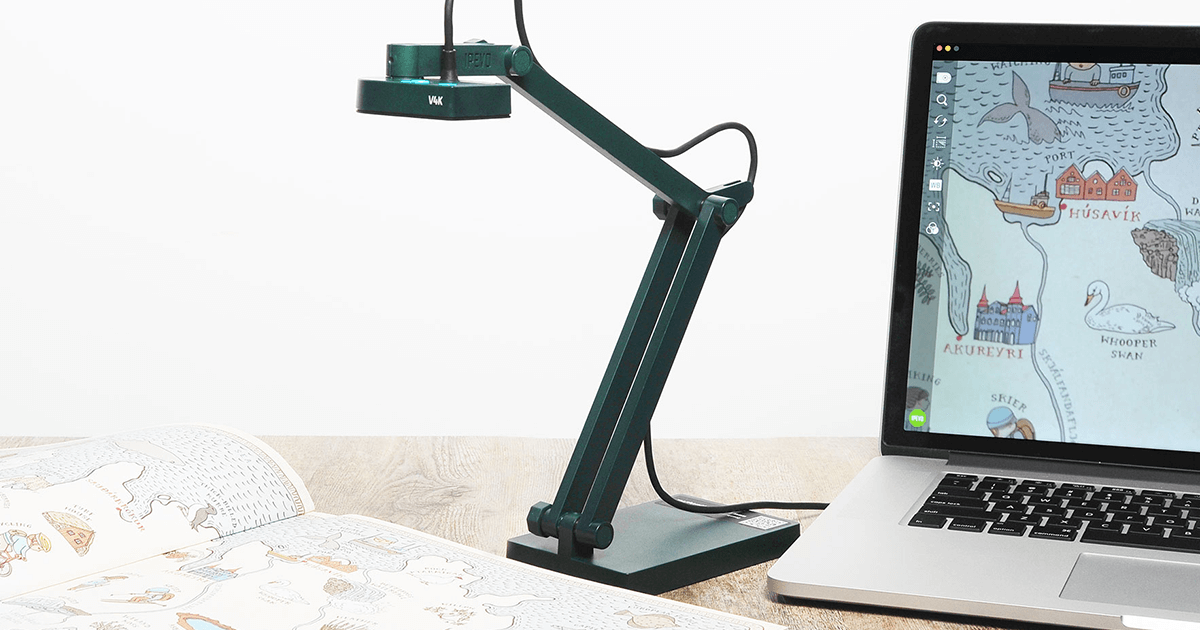
The IPEVO V4K is a USB document camera (sometimes called a visualizer) designed to show paper, books, and small objects on a screen. In a classroom, that usually means projecting a worksheet, a book page, or live handwriting so everyone can follow along. In an office or remote setup, it can be used to show physical documents or objects on a video call.
This model uses an 8.0 megapixel camera with a full autofocus lens and supports ultra high definition resolutions up to 3264 x 2448. In plain terms, it is built to keep small text and fine lines from turning into a blurry mess when you zoom in or when the image is displayed on a large screen.
It connects via USB 2.0 using a UVC interface, which is the common standard that lets computers recognize it as a camera. That is why it can work across Mac, Windows PCs, and Chromebooks, and why it can also be used in many video and presentation apps that accept a camera input.
Why it stands out
The main reason to pay for the IPEVO V4K is image clarity for real classroom materials. With resolution up to 3264 x 2448 from an 8 MP camera, it is set up to show the tiny stuff clearly: the difference between similar math symbols, the texture on a science specimen, the small print on a worksheet, or the details in a diagram.
Autofocus is another big deal for day-to-day teaching. The V4K has a full autofocus lens and is designed for fast focusing when you switch between materials. That is exactly the moment when cheaper document cameras can slow you down, because you end up waiting for focus to settle or manually adjusting.
For live demos, smoothness matters almost as much as sharpness. The V4K supports up to 30 fps live video capture at Full HD (1920 x 1080). That helps when you are writing in real time or moving objects under the camera, because the motion looks more natural instead of choppy.
The physical design is built around a multi-jointed stand that can be adjusted for different heights and angles. IPEVO also includes bolts at the joints so you can tighten them with a coin if they loosen over time. That is a practical detail for a tool that gets repositioned constantly in a classroom.
What it is like to own
Setup is straightforward: the IPEVO V4K connects to your computer over USB and shows up as a UVC camera source. That means you can use it in apps that let you pick a camera input, including video conferencing tools and recording software, or in IPEVO’s own Visualizer software.
In a typical lesson flow, you can keep it on your desk, swing the arm into position, and point it at whatever you are demonstrating. The maximum shooting area is 13.46 x 10.04 inches, which is large enough for a full sheet of paper and then some. If you are modeling handwriting or steps, you can keep your work within that area and project it for the room.
When you are done, the foldable design is a real convenience. Folded, it measures 10.91 x 3.07 x 1.89 inches, so it can go into a drawer or a cabinet instead of living on your desk all day. At 1.28 pounds, it is also light enough to move between rooms without feeling like a piece of AV furniture.
What to know before you buy
This is a USB document camera, not a standalone presenter. It uses a USB 2.0 UVC interface, so you need a computer in the loop to display the image on a projector, monitor, or in a video call. If your classroom setup is built around plugging directly into a display without a computer, you will want a different style of document camera.
Your computer matters for smooth video. IPEVO lists minimum and recommended system requirements for lag-free live streaming up to 1920 x 1080, including CPU, RAM, and dedicated video memory guidelines. If you are using an older machine, you may need to lower resolution or frame rate in your software to keep things running smoothly.
The V4K includes an attached USB cable that is 4.90 feet long. That is usually fine for a laptop on a desk, but if your computer is far from where you want to place the camera, plan your layout accordingly.
The specs that matter
Higher resolution makes small print and fine lines easier to read when projected or shared on a call, especially when you zoom in on a worksheet or diagram.
When you move from a book page to a small object or shift the camera height, autofocus reduces the time spent fiddling with focus so you can keep teaching.
Smoother motion helps when you are writing live, flipping pages, or moving manipulatives under the camera.
UVC is the common camera standard, so many apps can recognize it as a camera source without special hardware. It also means you need a computer to use it.
This is the practical limit of how much of your desk it can capture at once. It is large enough for a full page and room for your hands while you write.
A document camera is only convenient if it is easy to store and move. This one can live in a drawer and come out when you need it.
If your school uses mixed devices or you switch between a classroom computer and a personal laptop, you are not locked into one platform.
For a classroom tool that gets adjusted and moved daily, a longer warranty can matter for budgeting and peace of mind.
Who this product fits
You want students to follow your handwriting step by step
Set the IPEVO V4K over a worksheet or blank paper and project the live view. The high resolution and autofocus are aimed at keeping your writing and small symbols clear as you work in real time.
You teach with manipulatives, specimens, or small objects
Use the adjustable arm to frame a close-up view of whatever is on your desk. The camera’s resolution and maximum shooting area make it easier to show details without passing items around the room.
You record quick lesson clips or flipped-classroom videos
Because it functions as a standard UVC camera, you can select it as the video source in common recording tools. That lets you capture a top-down view of your work without setting up a tripod and a separate camera.
You need a document camera that does not permanently take over your desk
When class is over, fold it down to its compact size and stash it in a drawer or cabinet. It is built to be moved and stored, not bolted to a cart.
IPEVO V4K Ultra High Definition USB Document Camera (Part Number 5-880-4-01-00) FAQ
Does the IPEVO V4K work with Chromebooks?
Yes. IPEVO lists compatibility with Mac, PC, and Chromebook. Since it uses a UVC interface, it is designed to show up as a standard camera source on supported devices.
Do you need special software to use the IPEVO V4K?
Not necessarily. It is a UVC camera, so many apps that can select a camera input can use it. IPEVO also offers its own Visualizer software if you want a document-camera focused interface.
Can the IPEVO V4K be used for Zoom or other video calls?
Yes. Because it functions as a standard USB camera source, it can be used with video conferencing software that lets you choose a camera input.
How big of an area can the IPEVO V4K capture?
IPEVO lists a maximum shooting area of 13.46 x 10.04 inches. That is enough to show a full sheet of paper and still have room for your hands while you write or point.
Is the IPEVO V4K a standalone document camera you can plug directly into a projector?
No. This model outputs over USB 2.0 using a UVC interface, which is meant to connect to a computer. To display it on a projector or monitor, you typically route it through your computer.
What comes in the box with the IPEVO V4K?
IPEVO lists the package contents as the V4K USB document camera with an attached USB cable that is 4.90 feet (150 cm) long.
Should you buy the IPEVO V4K Ultra High Definition USB Document Camera (Part Number 5-880-4-01-00)?
Yes, if your goal is simple: show paper and small objects clearly, without turning your desk into an AV project. The IPEVO V4K gives you high resolution (up to 3264 x 2448), autofocus, and smooth Full HD video, plus a foldable arm that is easy to store between classes.
Skip it if you need a document camera that works without a computer or you need wireless operation. But for a typical modern classroom where a laptop is already connected to a projector or display, the IPEVO V4K Ultra High Definition USB Document Camera (Part Number 5-880-4-01-00) is a practical buy that fits right into the workflow.