
What to know first
- Connects via Logitech’s 2.4 GHz wireless (Unifying receiver) or Bluetooth, and can pair with up to three devices.
- Easy-switch buttons on the keyboard make device hopping quick (laptop to tablet to desktop).
- Full-size layout with a built-in palm rest is geared for long sessions, not portability.
- Mouse includes a tilt wheel with middle click and a dedicated gesture button.
- Battery life is rated up to 36 months for the keyboard (2 AAA) and 24 months for the mouse (1 AA).
What the Logitech MK850 Performance Wireless Keyboard and Mouse Combo (920-008219) is
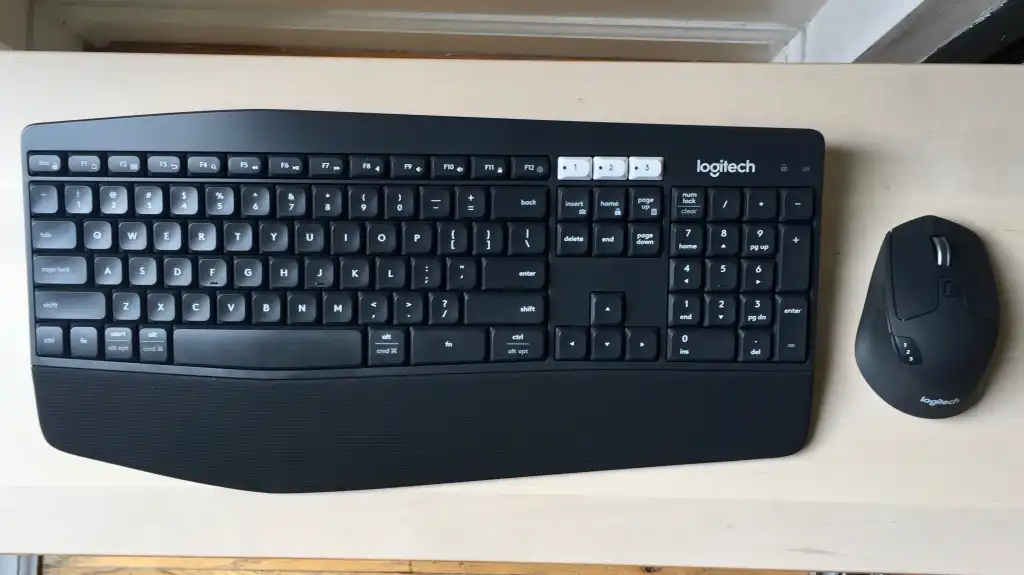
The Logitech MK850 Performance Wireless Keyboard and Mouse Combo (920-008219) is a full-size wireless keyboard paired with a matching wireless mouse. It’s built for a desk setup where you want comfort and a familiar layout, including a number pad, without being tethered by cables.
The headline feature is multi-device use. Both the keyboard and mouse can connect to up to three devices and switch between them. That matters if you’re a student using a laptop for school, a tablet for reading, and maybe a family desktop, or if you’re splitting time between a work machine and a personal one.
It supports Logitech’s 2.4 GHz wireless connection using a Unifying receiver (a single USB dongle) and Bluetooth Smart. In plain terms: you can use it with a computer that has a USB port, or pair it over Bluetooth with compatible devices, including mobile devices that support it.
Why it stands out
It’s a comfort-first combo that still feels like a “real” desktop setup. The keyboard is roomy, full-size, and includes a cushioned palm rest, which is exactly what you want when you’re typing for hours and your laptop is sitting up on a stand. For back-to-school, that’s the difference between hunching over a laptop and settling into a more ergonomic posture.
Switching between devices is straightforward. The keyboard has three easy-switch buttons near the function row, and you can pair by holding a button until the indicator light flashes. Once devices are paired, switching is a tap. The mouse also supports switching among up to three devices using a button.
The layout is designed to play nicely across Windows and Mac. Keys like Start, Alt, and Control automatically change function depending on whether you’re connected to a PC or a Mac, so you’re not constantly re-learning muscle memory when you move between machines.
If you like customizing shortcuts, there’s support for Logitech Options software (at release) on both Windows and Mac, with Windows users getting seven programmable keys on the keyboard. The mouse can also be customized with functions and gestures, which can be triggered with the mouse’s gesture button or by holding the Fn key.
What it is like to own
This is a set you leave on your desk. The keyboard is about 16.9 inches wide and weighs 733 g (about 1.6 pounds). The mouse is also on the larger, heavier side at 135 g (about 4.8 ounces). That extra size can feel steadier for long sessions, but it’s not what you buy for tossing into a bag between classes.
Day to day, the workflow is simple: pick your connection method (USB receiver or Bluetooth), pair up to three devices, then switch as needed. If you’re writing a paper on a laptop, then answering messages on a tablet, then jumping to a desktop for printing, you can do it without re-pairing each time.
Key feel is tuned for quiet, comfortable typing rather than a crisp, clicky response. If you’re coming from a laptop keyboard, it’ll feel more spacious and relaxed. If you’re coming from a mechanical keyboard, it may feel softer than you want.
Power is low-maintenance. The keyboard uses two AAA batteries and the mouse uses one AA battery, all replaceable. Logitech rates battery life at up to 36 months for the keyboard and 24 months for the mouse, which is the kind of spec that usually means you’re not thinking about batteries every semester.
What to know before you buy
Don’t buy this combo expecting a compact setup. The MK850 is sized like a traditional desktop keyboard, and the mouse is also more “desktop mouse” than “travel mouse.” If your priority is portability for a backpack, you’ll be happier with a smaller keyboard and a slimmer mouse.
Left-handed users should pause. The mouse’s Forward, Back, and gesture buttons are on the left side, which can be annoying if you mouse with your left hand and want those buttons within easy reach.
Software support is a moving target over time. Logitech lists Logitech Options support (at release) and also points users toward Logi Options+ as its next-generation customization software. If you care about custom shortcuts and button assignments, plan on using Logitech’s current software ecosystem rather than assuming an older app will be the long-term answer.
The specs that matter
This is a full-size desk keyboard with a number pad. It’s stable for long typing sessions, but it’s not something you’ll enjoy carrying around campus.
A larger mouse can feel more controlled for long study sessions, but it takes up more space in a small dorm desk setup and isn’t travel-friendly.
You can use a USB dongle for a typical laptop or desktop, or go Bluetooth for devices where you’d rather not tie up a USB port.
If you’re juggling a laptop, tablet, and desktop, you can switch without re-pairing. It’s a real quality-of-life upgrade for school and home office.
Replaceable batteries mean no charging routine. The long rated life suggests you can go semesters without thinking about power.
This is tuned for everyday pointer control, not high-DPI gaming. For schoolwork, browsing, and productivity apps, it’s the right kind of simple.
Tilt and middle click are handy for spreadsheets, tabs, and productivity shortcuts. The gesture button can add extra controls if you like customizing how you work.
Who this product fits
Laptop on a stand for homework every night
Pair the Logitech MK850 Performance Wireless Keyboard and Mouse Combo (920-008219) to your laptop and keep your screen at eye level. The full-size keyboard and palm rest make long writing sessions feel less cramped than typing directly on the laptop.
One desk shared between school and personal devices
Connect the combo to a school laptop, a personal desktop, and a tablet. Use the easy-switch controls to jump between them without constantly unpairing and re-pairing Bluetooth devices.
Spreadsheet-heavy classes or part-time work
The full-size layout with a numeric keypad and a mouse with a tilt wheel fits the way you actually work in Excel or Google Sheets, especially when you’re entering lots of numbers.
Logitech MK850 Performance Wireless Keyboard and Mouse Combo (920-008219) FAQ
Can the Logitech MK850 Performance connect to multiple devices?
Yes. The keyboard and mouse can connect to up to three devices and switch between them. The keyboard uses dedicated easy-switch buttons, and the mouse has its own switching control.
Does the Logitech MK850 Performance use Bluetooth or a USB receiver?
It supports both Bluetooth Smart and Logitech’s 2.4 GHz wireless connection using a Unifying receiver. That gives you flexibility depending on whether you want to use Bluetooth or keep things simple with a USB dongle.
Is the Logitech MK850 Performance good for students?
It’s a strong fit for students who do long typing sessions at a desk, especially with a laptop on a stand. The full-size layout and cushioned palm rest are built around comfort and productivity rather than portability.
Is the Logitech MK850 Performance portable?
Not really. The keyboard is full-size (about 16.9 inches wide) and weighs about 1.6 pounds, and the mouse is also fairly large. It’s meant to live on a desk.
Can you customize the keyboard and mouse buttons?
Customization is supported through Logitech’s software ecosystem. Logitech Options is listed as supported (at release), and Logitech also points users to Logi Options+ for supported devices. Windows users can program seven keys on the keyboard, and the mouse supports custom functions and gestures.
Is the mouse left-handed friendly?
It can be used left-handed, but the Forward, Back, and gesture buttons are on the left side of the mouse. If you rely on thumb buttons, that layout is more convenient for right-handed use.
Should you buy the Logitech MK850 Performance Wireless Keyboard and Mouse Combo (920-008219)?
Buy it if you want a comfortable, full-size keyboard and a solid mouse for long study sessions or home office work, and you like the idea of switching between multiple devices without hassle. For a laptop-on-a-stand setup, it’s a straightforward upgrade that makes your workspace feel more like a proper desk.
Skip it if you need something compact or you’re picky about crisp, snappy key feel. The Logitech MK850 Performance Wireless Keyboard and Mouse Combo (920-008219) is built to stay put and keep you comfortable, not to be a travel keyboard or a mechanical keyboard substitute.