
What to know first
- Built for productivity: ergonomic shape, lots of programmable controls, and a standout scroll wheel setup
- Scrolls fast through long documents, and also supports precise line-by-line scrolling when you need control
- Tracks on a wide range of surfaces, including clear glass
- Bluetooth plus a 2.4 GHz USB receiver option for connecting
- Rechargeable battery with a manufacturer-rated life up to 70 days per charge
What the Logitech MX Master 3S Wireless Mouse (Bluetooth Edition) is
The Logitech MX Master 3S Wireless Mouse (Bluetooth Edition) is a premium wireless mouse designed for productivity and long-term comfort. It’s aimed at people who spend hours a day clicking, dragging, and scrolling through schoolwork or office-style tasks, not people who just need something cheap to toss in a bag.
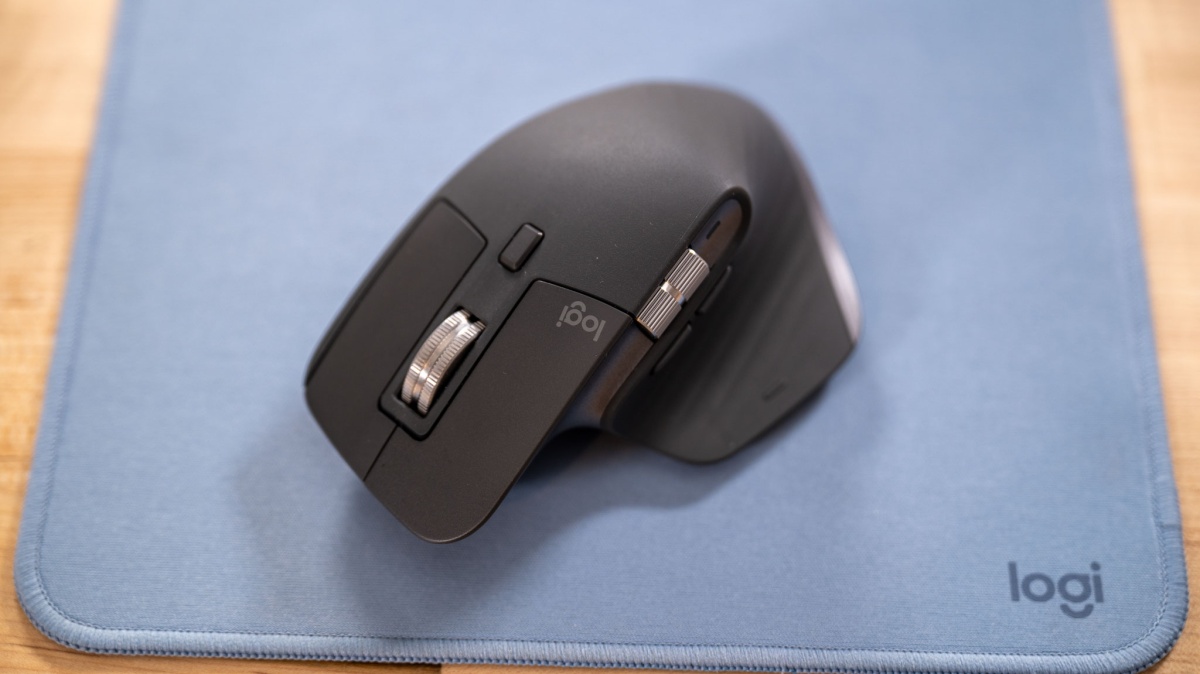
The headline features are its ergonomic right-handed shape, its dual-scroll setup (a main wheel plus a thumb wheel for horizontal scrolling), and a set of programmable buttons you can customize through Logitech’s Logi Options+ software. It also supports both Bluetooth Low Energy and a 2.4 GHz wireless connection via a USB receiver, so it can fit into a laptop-only setup or a desktop dock setup.
Compared with a basic mouse or a trackpad, the change is simple: you do less fiddling and less repetitive scrolling. Big documents become easier to navigate, and common actions can be moved onto buttons instead of keyboard combos.
Why it stands out
The scroll wheel system is the reason people buy this mouse. The main wheel supports a fast free-spin mode for moving quickly through long pages, plus a more controlled, notched mode for line-by-line work. There’s also a button below the wheel that can slow or stop the free-spin behavior, so you can switch from fast scrolling to fine control without changing how you hold the mouse.
The second wheel, placed for your thumb, is for horizontal scrolling. If you work in wide spreadsheets, timeline editors, or large canvases and you constantly need to move side to side, this wheel is a straightforward fix.
Tracking is another strong point. This model uses an optical sensor that supports sensitivity up to 8,000 DPI, which is mainly useful when you’re working across lots of pixels (think a 4K monitor, dual monitors, or both). Higher sensitivity means you can move the cursor farther with less physical mouse movement, which can reduce the amount of arm travel in long sessions.
It’s also unusually flexible about where you can use it. It can track on many surfaces, including clear glass, so you’re not stuck hunting for the perfect mousepad when you’re working at a coffee shop table, a dorm desk, or wherever you end up studying.
What it is like to own
Day to day, the MX Master 3S is built around comfort and speed. The shape is meant to support your hand in a more natural position than a flat, travel-style mouse, which matters when you’re doing long writing sessions or hours of problem sets. It’s a mouse you rest your hand on, not one you pinch with your fingertips.
Clicks are designed to be quieter than the previous MX Master 3 generation, and that matters if you work around other people. In a quiet room, loud mouse clicks can be distracting. Here, the goal is a softer sound without making the buttons feel vague.
If you want the mouse to feel personalized, plan on using Logi Options+. That’s where you can assign actions to buttons and set up gestures. If you don’t care about customization, the mouse still works as a normal mouse without special software, but you’re skipping a big part of what you’re paying for.
Charging is straightforward because it uses a built-in rechargeable battery and charges via USB-C (no loose AA batteries to keep around). Logitech rates the battery for up to 70 days per charge, which is the kind of cadence that fits into a school schedule without constant maintenance.
What to know before you buy
This is a heavier mouse than many common alternatives. If you love ultra-light mice or you want something that feels effortless to move, the MX Master 3S may feel like more work to push. That weight is part of the stable, planted feel, but it’s not for everyone.
The horizontal thumb wheel has more resistance than the main wheel. Some people will like that because it helps prevent accidental runaway scrolling, but it can feel stiffer than you expect at first.
If you plan to use the USB receiver, note that there’s no onboard storage for it in the mouse. The receiver is small, but it’s still one more tiny thing you’ll need to keep track of in a backpack.
The specs that matter
Bluetooth is great for laptops and tablets with limited ports. The USB receiver option is handy when you want a dedicated connection on a desktop or dock.
Higher DPI helps on high-resolution or multi-monitor setups because you can cover more screen space with less hand movement.
Free-spin is for moving quickly through long documents. Notched scrolling is for precision, like landing on the right row in a spreadsheet.
If you work in wide spreadsheets, timelines, or side-to-side canvases, this is faster and less annoying than shift-scrolling or dragging scroll bars.
You can put common actions on the mouse (back/forward, app switching, copy/paste, custom shortcuts) to reduce keyboard reaching.
You’re not buying disposable batteries or charging every few days. It’s more like a periodic top-up.
The mouse feels stable and substantial, but if you prefer very light mice, this can feel tiring to move for long periods.
Who this product fits
You’re starting college and expect lots of long study sessions
The Logitech MX Master 3S Wireless Mouse (Bluetooth Edition) makes long library blocks easier to manage. The ergonomic shape and fast scrolling make reading, writing, and research less fussy than living on a trackpad.
You live in spreadsheets and wide tables
Between the main wheel for vertical scrolling and the thumb wheel for horizontal scrolling, you spend less time dragging scroll bars and more time working. It’s a practical advantage if your assignments or job involve data.
You use a 4K monitor or a dual-monitor setup
The higher sensitivity range (up to 8,000 DPI) makes it easier to move across lots of screen real estate without big arm sweeps. That’s a small ergonomic win that adds up over long days.
You work in quiet shared spaces
The quieter click design is a real courtesy feature. It helps keep a dorm room or library table from turning into a constant click soundtrack while you’re taking notes or editing papers.
Logitech MX Master 3S Wireless Mouse (Bluetooth Edition) FAQ
Is the Logitech MX Master 3S Wireless Mouse (Bluetooth Edition) good for students?
Yes, if you spend long hours on a laptop doing reading, writing, and research. The comfort-focused shape, fast scrolling, and quieter clicks are all practical for library and dorm life.
Can the Logitech MX Master 3S connect over Bluetooth without a USB receiver?
Yes. It supports Bluetooth Low Energy, so you can use it with compatible devices without plugging in the USB receiver.
Does the Logitech MX Master 3S work on glass?
Yes, it can track on clear glass, which is unusual for a mouse. It also works across many other surfaces, so you’re less dependent on a mousepad.
Do you need Logitech software to use the MX Master 3S?
No, it works as a standard mouse without installing anything. But if you want to customize buttons and gestures, you’ll want Logitech’s Logi Options+ software.
How long does the Logitech MX Master 3S battery last?
Logitech lists battery life up to 70 days on a single charge. It’s rechargeable and charges via USB-C, and a charging cable is included.
Is the Logitech MX Master 3S a lightweight mouse?
No. It weighs about 141 g (4.97 oz), which is heavier than many basic or travel mice. Some people like the stable feel, but if you want ultra-light, look elsewhere.
Should you buy the Logitech MX Master 3S Wireless Mouse (Bluetooth Edition)?
Buy the Logitech MX Master 3S Wireless Mouse (Bluetooth Edition) if you want a mouse that makes long computer sessions feel smoother: faster scrolling, easier navigation in wide workspaces, and a shape that’s meant to be used for hours. It’s a real upgrade over a trackpad or a basic mouse when your day is mostly documents, tabs, and spreadsheets.
Skip it if you mainly want something small, cheap, and light, or if you know you won’t use the extra controls. If you want a quiet, comfortable mouse that’s built around scrolling and shortcuts, the MX Master 3S fits that job well.