
What to know first
- One-piece aluminum stand designed for stability, with rubber padding so your laptop doesn’t sit on bare metal.
- Raises and tilts a laptop to bring the screen closer to eye level and the keyboard to a more angled position.
- Built-in cable outlet (2-inch diameter hole) helps route a charging cable neatly off the back.
- Space underneath is intended for stashing a keyboard, notebook, or small desk items.
- Fixed height and angle. If it’s too low or too high for you, there’s no adjustment.
What the Rain Design mStand Laptop Stand is
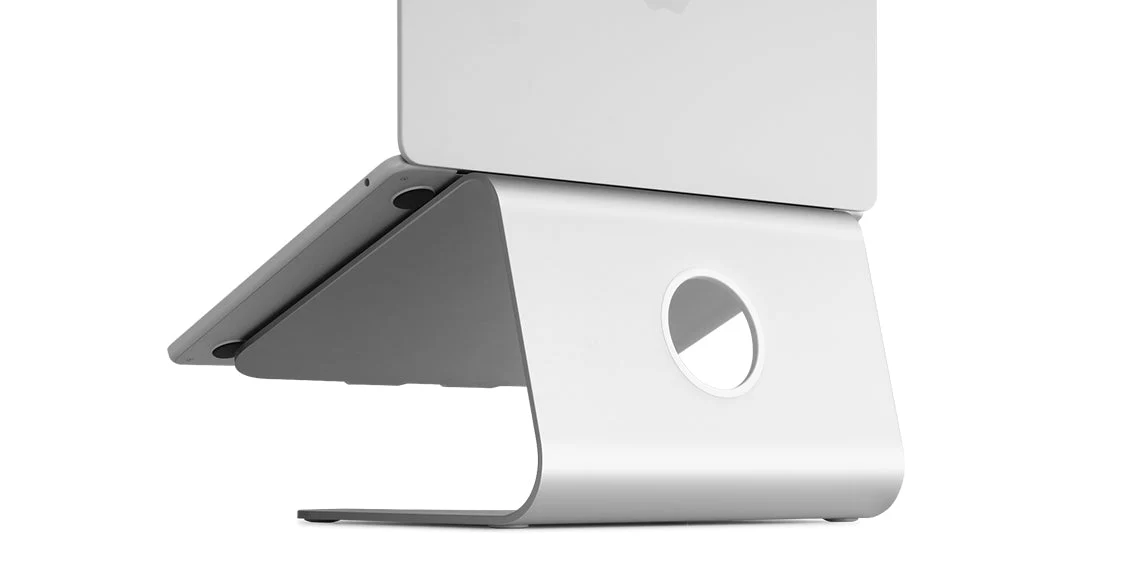
The Rain Design mStand Laptop Stand is a desktop laptop riser made from a single piece of aluminum. The goal is straightforward: lift your laptop screen up and tilt the whole machine so you’re not staring down at it all day.
It’s sized to work with MacBooks and is described as compatible with most notebooks. Rain Design also states it’s large enough for a 16-inch MacBook Pro to sit securely.
Unlike adjustable stands, the mStand is a fixed shape. You’re buying it because you want a stable, set-it-and-forget-it stand that turns a laptop into a more desktop-like workstation.
Why it stands out
Stability is the main reason to pay for the mStand instead of a flimsier riser. Rain Design builds it from a single solid aluminum plate, and the stand has a wide base (7.5 inches by 10 inches) that’s meant to keep it planted while you type or open and close your laptop.
The design also cleans up a desk in two ways. First, there’s a cable outlet on the back (a 2-inch diameter hole) so you can route a charging cable neatly instead of letting it drape across your workspace. Second, the open space under the stand is meant for stashing an external keyboard or a notebook, which matters a lot on smaller student desks.
If you like the look of aluminum Apple hardware, the mStand leans into that. It has an anodized aluminum finish and comes in multiple colors (including Silver, Gold, Space Gray, Black, Midnight, and Starlight) so it can match a MacBook aesthetic rather than looking like a random office accessory.
Rain Design also positions the aluminum body as a heat sink and says the tilt improves airflow. In plain terms, the stand is designed to leave more of the laptop exposed to air instead of trapping it flat on a desk.
What it is like to own
Ownership is simple because there’s nothing to assemble and nothing to adjust. You place it on your desk, set your laptop on the rubber-padded top surface, and you’re done. The rubber feet on the bottom are there to keep the stand from sliding and to protect the desk surface.
The fixed tilt changes how your laptop feels immediately. Your screen sits higher and closer to your natural line of sight, and the keyboard sits at an angle. Some people are fine typing on that angle, and others prefer pairing a stand with an external keyboard and mouse for longer sessions.
Cable management is a small detail that ends up being a daily convenience. If you keep your laptop plugged in at a desk, running the charging cable through the back outlet helps keep the cable from cutting across your workspace.
Because the stand is a single piece of aluminum and weighs 3 pounds, it’s more of a “leave it on your desk” accessory than a travel stand. It’s portable in the sense that you can move it between rooms, but it’s not designed to fold down.
What to know before you buy
The big limitation is adjustability: the Rain Design mStand Laptop Stand is one fixed height and one fixed angle. That’s great for durability and simplicity, but it also means it won’t fit every body and chair setup. If you’re tall, or if you switch between different chairs, you may want a stand that can go higher or lower.
It also doesn’t swivel. Rain Design sells a different model (mStand360) with a swivel base, but the standard mStand is meant for one-person, straight-ahead desk work.
Finally, make sure you actually want a desktop stand. At 3 pounds, it’s sturdy, but it’s not the kind of stand you toss in a backpack every day.
The specs that matter
A one-piece stand is less likely to wobble or loosen over time because there are no hinges or joints to flex. The anodized finish is also meant to look like it belongs next to aluminum laptops.
A wider footprint gives the stand more leverage against tipping and shifting when you type or adjust your laptop.
This is the lift you’re getting, period. It can be a big comfort upgrade if it matches your desk and chair, but it won’t work for everyone since it’s not adjustable.
These dimensions tell you how much desk space it will occupy and help you judge whether it fits on a narrow dorm desk or a crowded workstation.
Heavier stands tend to feel steadier during typing and daily use. The flip side is it’s not a lightweight travel accessory.
If your laptop lives on the stand, routing the charging cable through the back keeps the desk surface clearer and reduces cable clutter.
Padding helps keep the laptop from sliding and helps prevent metal-on-metal contact. It also protects your desk surface.
Who this product fits
You’re setting up a back-to-school desk in a small space
The Rain Design mStand Laptop Stand raises the screen and frees up the space underneath, so you can slide a notebook or external keyboard under the laptop when you need the desk clear for writing.
You write and research for hours and your neck feels it
By lifting the laptop screen closer to eye level, the mStand helps you stop curling over the keyboard. Pair it with an external keyboard and mouse if you want a more desktop-like posture for long sessions.
You want a stand you can actually type on without it bouncing
The mStand’s wide base and single-piece aluminum build are designed to keep movement low while typing, so the laptop feels more planted than it does on many lighter, jointed stands.
You hate messy charging cables on your desk
Run your charging cable through the 2-inch outlet on the back and keep it routed behind the stand instead of across your workspace.
Rain Design mStand Laptop Stand FAQ
Is the Rain Design mStand Laptop Stand adjustable?
No. The Rain Design mStand Laptop Stand is a fixed-height, fixed-angle stand. If you need to raise the screen higher or share the stand with someone who sits at a different height, an adjustable stand will make more sense.
Does the Rain Design mStand Laptop Stand fit a 16-inch MacBook Pro?
Rain Design states that the mStand is big enough for a 16-inch MacBook Pro to sit securely on it. It’s also described as fitting all MacBooks and being compatible with most notebooks.
Will the aluminum scratch my laptop?
Rain Design says the stand is padded with thick rubber feet so that no part of the notebook touches the aluminum surface. That padding is also there to help keep the laptop from sliding.
What’s the difference between the mStand and the mStand360?
Rain Design says the mStand360 adds a low-profile 360-degree swivel base hidden at the bottom. The standard mStand does not swivel.
Does the Rain Design mStand Laptop Stand help with heat?
Rain Design describes the aluminum body as acting as a heat sink and says the tilt improves airflow. Practically, it’s designed to keep more of the laptop exposed to air than when it sits flat on a desk.
Should you buy the Rain Design mStand Laptop Stand?
Buy the Rain Design mStand Laptop Stand if you want a stable, good-looking, no-adjustment laptop riser that makes desk work more comfortable. It raises your screen, keeps your setup from wobbling, and gives you back some desk space underneath.
Pass if you already know you need adjustability or a swivel base. The mStand is intentionally simple. When its fixed height fits your desk and chair, it’s an easy upgrade you’ll notice every day.