
What to know first
- Folds down slim: about 1 x 1.5 x 13 inches when packed
- Light enough to carry daily: Roost lists 6 oz (178 g); another source lists 6.77 oz (191.9 g)
- Seven height settings with a listed screen lift range of 6.5 to 12.5 inches
- Rubberized contact points help grip the laptop and protect it from scuffs
- Self-locking mechanism helps prevent accidental collapse during setup
- Works best as a “laptop becomes a desktop” setup with an external keyboard and mouse
What the Roost V3 Laptop Stand is
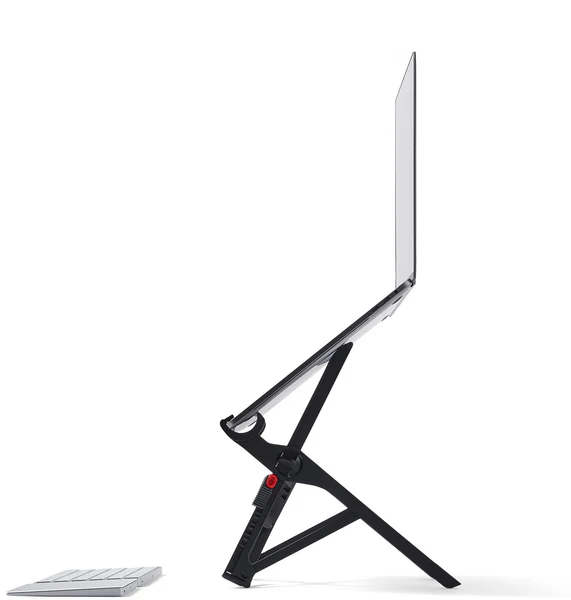
The Roost V3 Laptop Stand is a folding, travel-friendly stand designed to raise your laptop screen closer to eye level. Instead of a flat wedge that just tilts your keyboard, it lifts the whole laptop up, which is what actually changes your posture during long sessions.
The portability is the point. Roost lists it at 6 ounces and about 13 inches long when folded, so it can live in a backpack without turning into a bulky “desk accessory” you only use at home. It also comes with a carrying bag (ripstop nylon is mentioned for the bag) to make it easier to slide in and out of tight pockets without snagging on other gear.
Compatibility is broad. Roost states it fits all makes and models of laptops, and the stand uses pivoting grips at the front edge rather than a tray, so it’s built around holding a wide range of laptop shapes.
Why it stands out
It gets your screen meaningfully higher than most “portable” stands. Roost lists 7 selectable height settings and a screen lift range of 6.5 to 12.5 inches. In real life, that’s the difference between looking down at your screen for hours and having the top of your display closer to where your eyes naturally sit.
The mechanism is designed to be quick and repeatable. You pull the halves apart to deploy it, then use marked height levels on each side. The locks are designed to self-lock as the legs fold out, which is a practical safety feature for something you’ll open and close a lot between classes or study rooms.
The contact points that touch your laptop and the table are rubberized. That matters because it’s what keeps the stand from skating around on a smooth library table, and it helps keep your laptop from shifting in the grips when you adjust the screen angle.
It’s also unusually packable for a stand that lifts this high. Folded dimensions are listed at roughly 1 x 1.5 x 13 inches, which is closer to a water bottle in footprint than a typical desktop riser.
What it is like to own
Using the Roost V3 is a two-step routine: open the stand, set the height, then slot the front edge of your laptop into the pivoting grips. There aren’t extra brackets to attach each time. Height levels are marked on the sides, and the locking tabs push in and out to lock or unlock.
In day-to-day studying, the stand changes your workflow because it pushes you toward a proper “external keyboard and mouse” setup. Once the laptop is elevated, reaching up to type on the built-in keyboard is awkward, so you’re basically turning your laptop into a small desktop station wherever you land.
Storage is straightforward. The stand folds down slim, and the included carrying bag helps it slide into a backpack pocket without catching on other items. If you’re moving between dorm, class buildings, and the library, that small detail makes it more realistic to bring along.
What to know before you buy
Plan for the full setup. The Roost V3 is most useful when you pair it with an external keyboard and mouse. If you want a stand that lets you keep typing on the laptop keyboard comfortably, you’ll be happier with a lower, tilt-style stand instead.
If you use a heavier laptop, be honest about what you want to feel on your desk. The Roost V3 is designed to be light and compact, and its structure can feel relatively thin compared with chunkier stands. The rubberized grips help, but a very heavy laptop is still a different use case than an ultrabook.
If you’re tall and trying to get the screen extremely high, the Roost V3 may not be the last stand you ever buy. Roost’s own lineup includes the V3 Plus with more height settings and a different lift range, which may fit some bodies and desks better.
The specs that matter
You can match the stand to different chairs and tables (dorm desk one day, library table the next) instead of being stuck with one awkward height.
That’s enough lift to bring your screen closer to eye level, which is what reduces the constant neck-down posture during long study sessions.
Either way, it’s light enough to justify carrying daily. The small weight difference won’t matter for most people, but it’s worth knowing the numbers vary by source.
It packs like a slim baton, so it fits in a backpack without taking over the main compartment the way bulkier stands do.
If you’re using a school-issued laptop now and might switch later, you’re not buying a stand that only works with one specific chassis shape.
Rubber is what keeps the stand from sliding on smooth surfaces and helps keep your laptop seated without scratching the edges.
It makes the stand easier to slide in and out of tight pockets and helps prevent the stand’s edges from catching on other items in your bag.
Who this product fits
Dorm desk that’s too low
Set the Roost V3 to a higher setting so your screen sits closer to eye level, then use a compact keyboard and mouse. You get a more comfortable posture without buying a full monitor or a bulky riser.
Library study room hopping between tables
Because it folds down slim and weighs around 6 ounces, you can keep it in your backpack and set up the same ergonomic screen height wherever you find an open seat.
Small apartment kitchen table as a temporary workstation
The Roost V3 turns a shared table into a more workable laptop station. You can pack it away after dinner instead of leaving a permanent stand out.
Roost V3 Laptop Stand FAQ
Does the Roost V3 Laptop Stand work without an external keyboard and mouse?
It can physically hold your laptop, but it’s not the comfortable way to use it. The whole point is raising the screen toward eye level, and once the laptop is that high, typing on the built-in keyboard is awkward. For the intended setup, plan on a separate keyboard and mouse.
How portable is the Roost V3 Laptop Stand for school?
Very portable by stand standards. It folds to about 1 x 1.5 x 13 inches and weighs around 6 ounces (weight varies slightly by source). It also includes a carrying bag to make it easier to slide into a backpack pocket.
How high does the Roost V3 Laptop Stand lift a screen?
Roost lists a screen lift range of 6.5 to 12.5 inches across 7 height settings. In practical terms, that’s enough to move you from a head-down laptop posture to a more eye-level viewing position on many desks and tables.
Will the Roost V3 Laptop Stand fit my laptop?
Roost states it fits all makes and models of laptops. The design uses pivoting grips that hold the front edge of the laptop rather than a one-size tray, which is meant to accommodate a wide range of laptop shapes.
What is the difference between Roost V3 and Roost V3 Plus?
Roost’s own comparison lists the V3 at 7 height settings with 6.5 to 12.5 inches of screen lift. The V3 Plus is listed with more height settings and a different lift range, plus a quick-release adjustment feature. If you want finer height steps, the Plus is the one to look at.
Should you buy the Roost V3 Laptop Stand?
Buy the Roost V3 Laptop Stand if you’re trying to make long laptop sessions feel better on your neck and shoulders, and you need something you can actually carry every day. The combination of real lift, multiple height settings, and a slim folded size is exactly what makes it work for student life.
Skip it if you’re not willing to use an external keyboard and mouse, because that’s where the comfort payoff comes from. But if you’re ready for that setup, the Roost V3 is a smart way to turn almost any desk into a more ergonomic workstation in about a minute.