

Most internet reviews start with a speed number. David's story starts with something better: he forgot the internet was a problem.
For about 18 months, a roof-mounted Starlink Mini has been his primary internet. Not a backup, but the connection he relies on every day while traveling more than 330 days a year. Over roughly 150,000 miles, it has gone with him to rural Montana, Kansas, Florida, and plenty of places where his phone shows no bars at all.
For this interview, we asked David, owner of Owner Operator Truth and a long-term Starlink Mini user, about what changed, what the speed tests really show, where Wi-Fi calling falls short, and why he happily pays for Roam Unlimited. You don't have to live on the road to want what he has: internet that stops being a daily frustration. Alongside his firsthand experience, we explain where Starlink home internet, business services, backup connections, and travel plans make the most sense. This long-term hands-on review is built around his ownership experience, original installation photos, saved speed tests, and monthly data records. The interview answers have been edited for length and clarity.
Pickori: Is Starlink worth it after 18 months of daily use?
David: For me, absolutely. It's one of the best things I've ever bought for life on the road. And it's not because of some peak number on a speed test. It's because I literally never think about the internet anymore.
I just open my laptop and start working like I'm on a home network. I might be in rural Montana, or Kansas, or Florida, and it doesn't matter. I never think about it. It's that good. It just always works for me.
That's the whole review in one sentence, honestly. Everything else is detail.
Pickori: What changed when you replaced your phone hotspot with Starlink?
David: It looked like hoping. I relied on Verizon for both calls and internet, and my laptop basically lived on my phone's hotspot. I'd pull in somewhere, check my bars, turn on the hotspot, and see what happened.
When you travel as much as I do, a lot of that time is in remote places with no cellular service at all. So there was always this little background question running in my head: am I going to be able to get anything done here? You don't realize how much mental energy that takes until it disappears.
A friend recommended Starlink, I bought the Mini, and it's been my main internet connection while traveling in the US ever since.
Pickori: Is there one moment when the difference really clicked?
David: Mount Baker. There's a parking lot near the base of the mountain with no cell service. The first time I was there, people had written directions on the signs, roughly telling you to go to the dirt mound on the north side, stand on top, and maybe you'd get one bar.
I love that, honestly. It's such a perfect picture of how people used to deal with no coverage. Everybody's sharing tips about which pile of dirt might connect you to the world.
The next time I came back, I had Starlink. I parked, and I had internet and Wi-Fi calling. No mound required. That's when it really sank in that the old rules didn't apply to me anymore.
Pickori: Do your friends notice?
David: All the time. When we're talking about some spot with no service, somebody will stop and go, “Oh, but you have Starlink. It doesn't matter for you.” And they're right. It's kind of become a running joke.
The other side of it is that when we're parked somewhere remote together, I share my Wi-Fi. So suddenly I'm the most popular person around.
Pickori: What does everyday use actually look like?
David: Completely normal, which is the best compliment I can give it. Laptops, tablets, phones, a smart TV, GPS updates, a network printer. Everything just connects.
The printer is my favorite example. Printing over Wi-Fi is local, so it doesn't actually need the satellite. But having a steady home-style network wherever I am means everything behaves like it does in a house. I hit print, it prints. I turn on the TV, it streams. My devices just stay on the same network. It's boring in the best way.
Pickori context: The Mini has Wi-Fi built in, and Starlink's Mini setup guide notes that a separate router isn't required. The kit includes its cable and power supply, and the Starlink app has an obstruction tool to help pick a spot with a clear view of the sky.
Pickori: What do your Starlink Mini speed tests show?
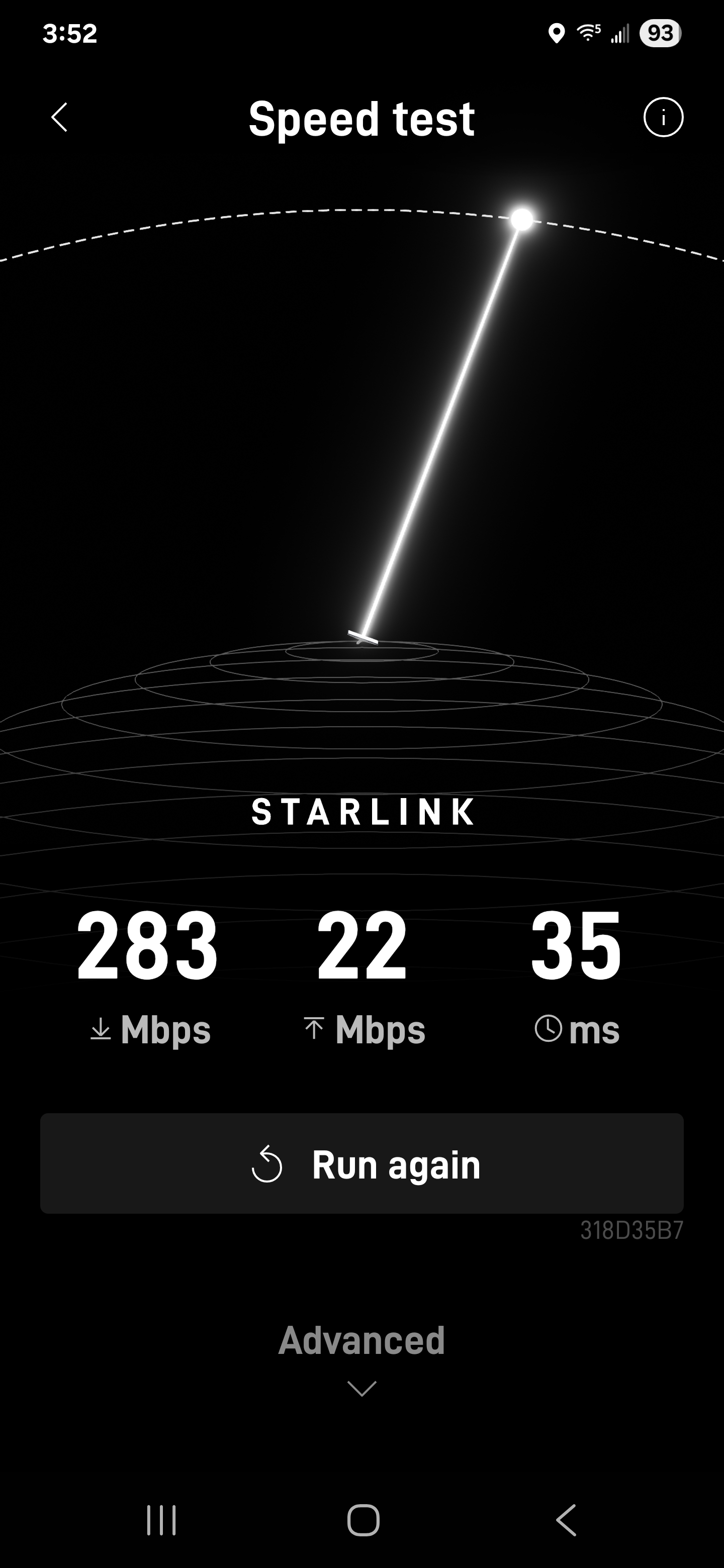
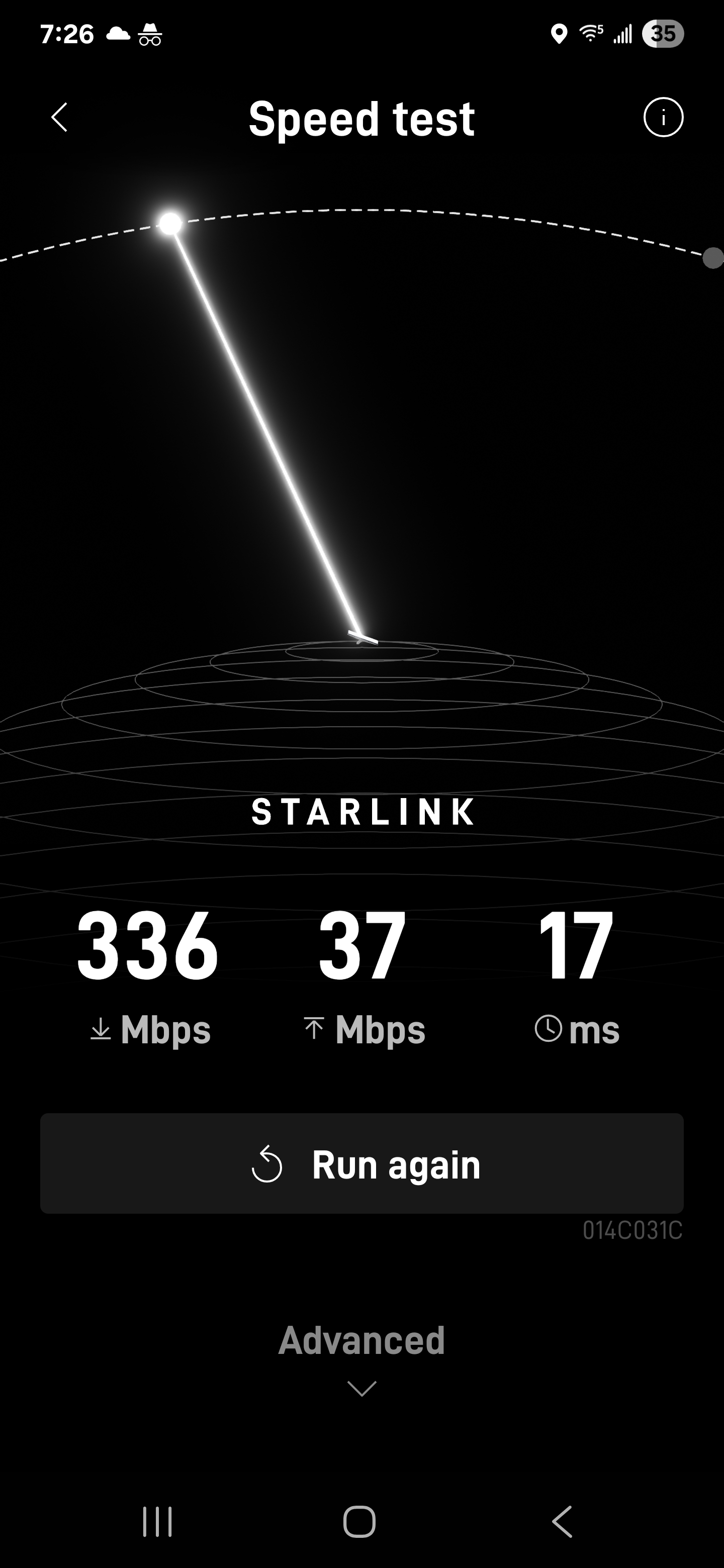
David: When I've saved screenshots in the past, I've seen results like 283 Mbps down and 336 Mbps down. Those are the numbers that better represent what I normally see.
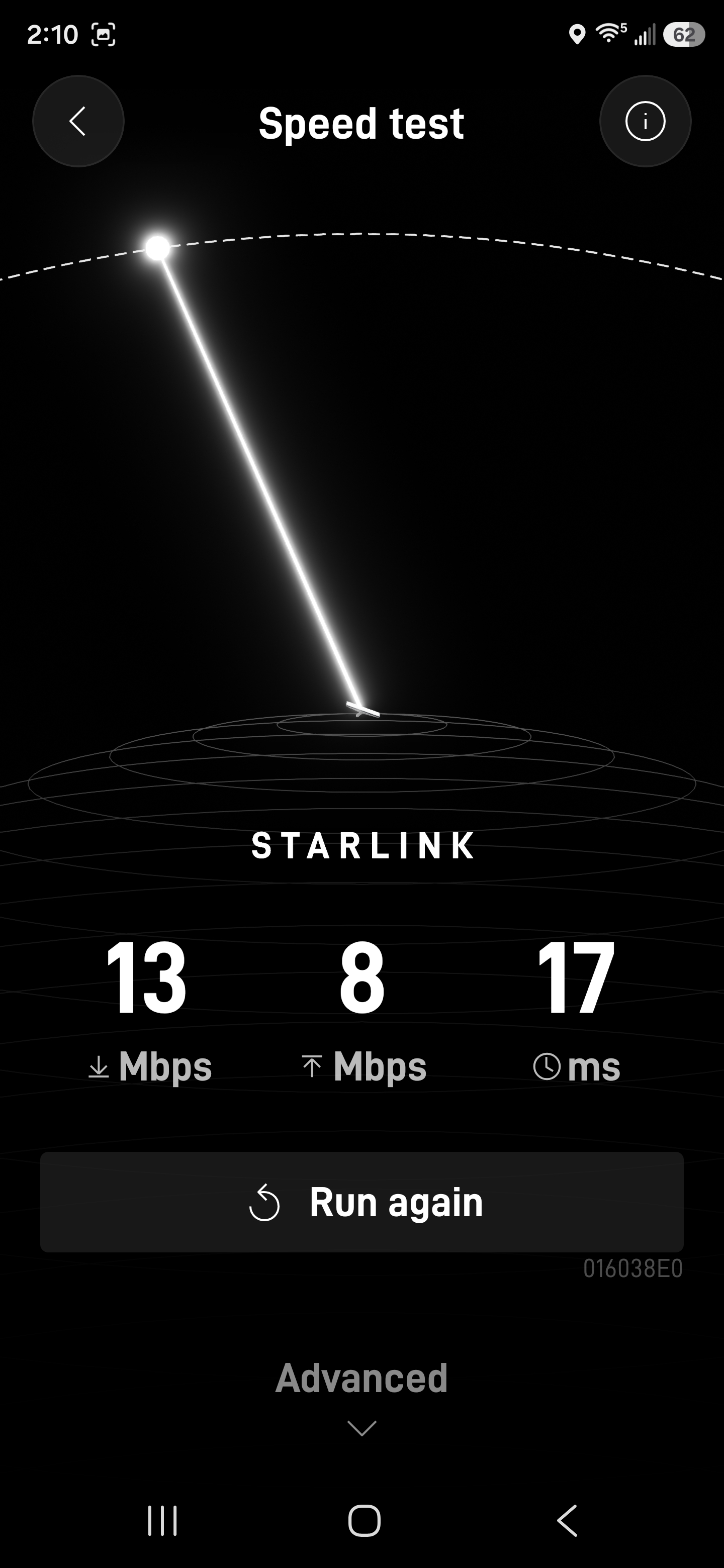
But I didn't want to show only the pretty ones. When we were talking today, I ran tests while my view of the sky was partly blocked, two people were streaming movies, and I was working online with a pile of tabs and windows open. The numbers came in much lower.
And here's the funny part: everything felt normal. Two people were streaming movies, and I was getting on with my work. The test looked slow; using the connection didn't feel slow to me.
Original speed-test screenshots
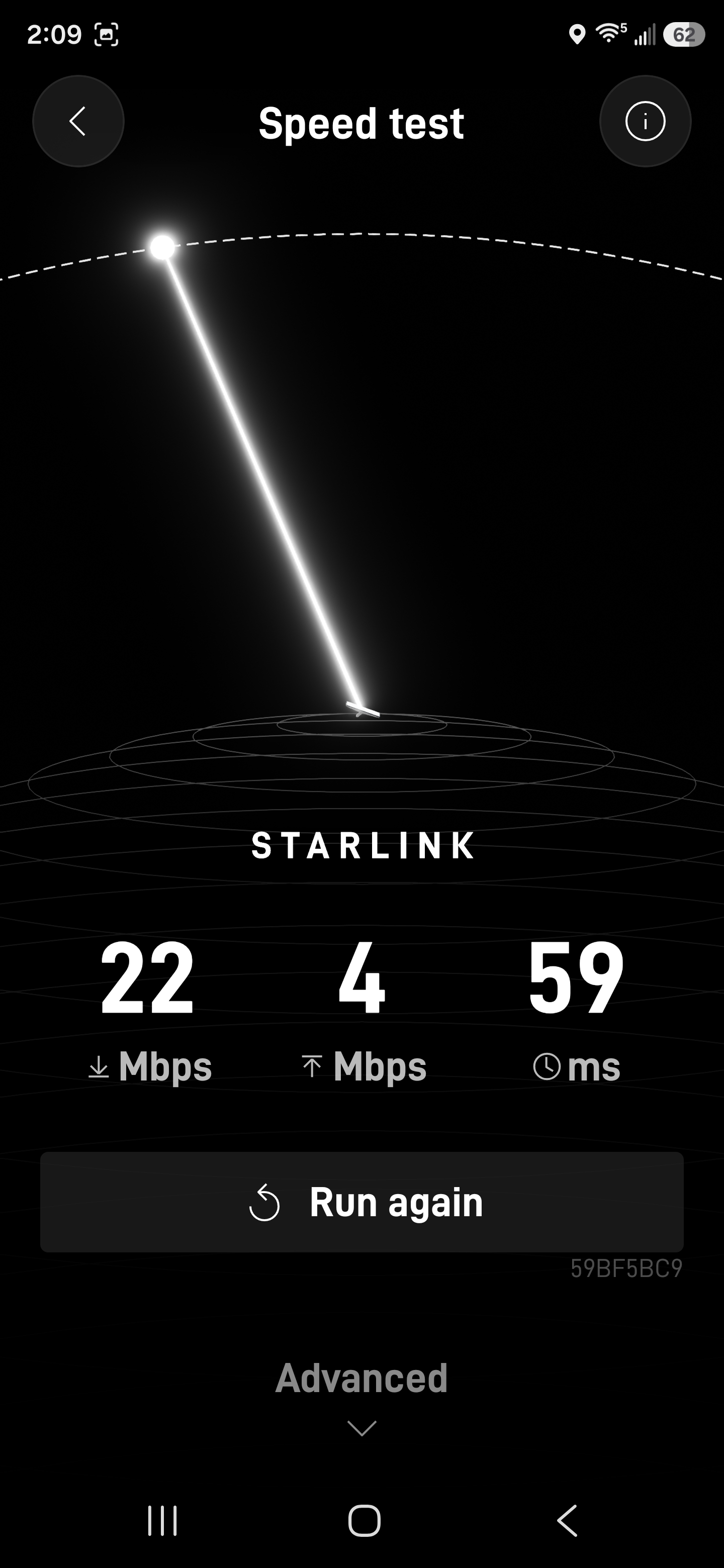
| Test | Path measured | Download | Upload | Latency |
|---|---|---|---|---|
| Earlier saved test | Starlink router to internet | 283 Mbps | 22 Mbps | 35 ms |
| Earlier saved test | Starlink router to internet | 336 Mbps | 37 Mbps | 17 ms |
| Oct. 27, run 1 | Starlink router to internet | 13 Mbps | 8 Mbps | 17 ms |
| Oct. 27, run 2 | Starlink router to internet | 22 Mbps | 4 Mbps | 59 ms |
| Oct. 27, phone (two runs) | Phone to internet | 11 Mbps | 1 Mbps | 34 ms / 36 ms |
| Oct. 27, phone | Phone to Starlink Wi-Fi only (not internet) | 235 Mbps | 164 Mbps | Not shown |
Pickori context: These are snapshots David saved, not an average and not a promise of what every buyer will get. The rows also measure different things. According to Starlink's speed test guide, the standard app test runs from the Starlink router to the internet, a device-to-internet test also includes your local Wi-Fi, and a device-to-router test measures only the local Wi-Fi link. That's why the 235/164 Mbps result sits in its own row: it measures that phone's local Wi-Fi throughput, not the internet connection.
The partly blocked sky and the streaming happening at the same time are both plausible influences on today's lower readings, but no before-and-after test isolated the cause. The more useful takeaway is David's: the numbers dropped, and real use still felt normal.
Pickori: How does Starlink Mini Wi-Fi calling hold up?
David: This is the one area where I'll give you a real shortcoming. Wi-Fi calling is incredibly valuable when there's no cell service. At that Mount Baker lot, it meant I had Wi-Fi calling on my phone despite having no cellular service.
But sometimes there's a conversational delay. Not every call, but enough that it happens, and when it does, the other person and I start talking over each other. You both pause, you both start again, you both stop. It's awkward.
So I've gotten used to saying, “Hold on, let me turn off Wi-Fi calling.” When I have decent cellular coverage, I use cellular for calls. When I don't, I'm thrilled to have Wi-Fi calling. That's my rule, and it works.
Pickori: What does your Starlink Mini setup involve?
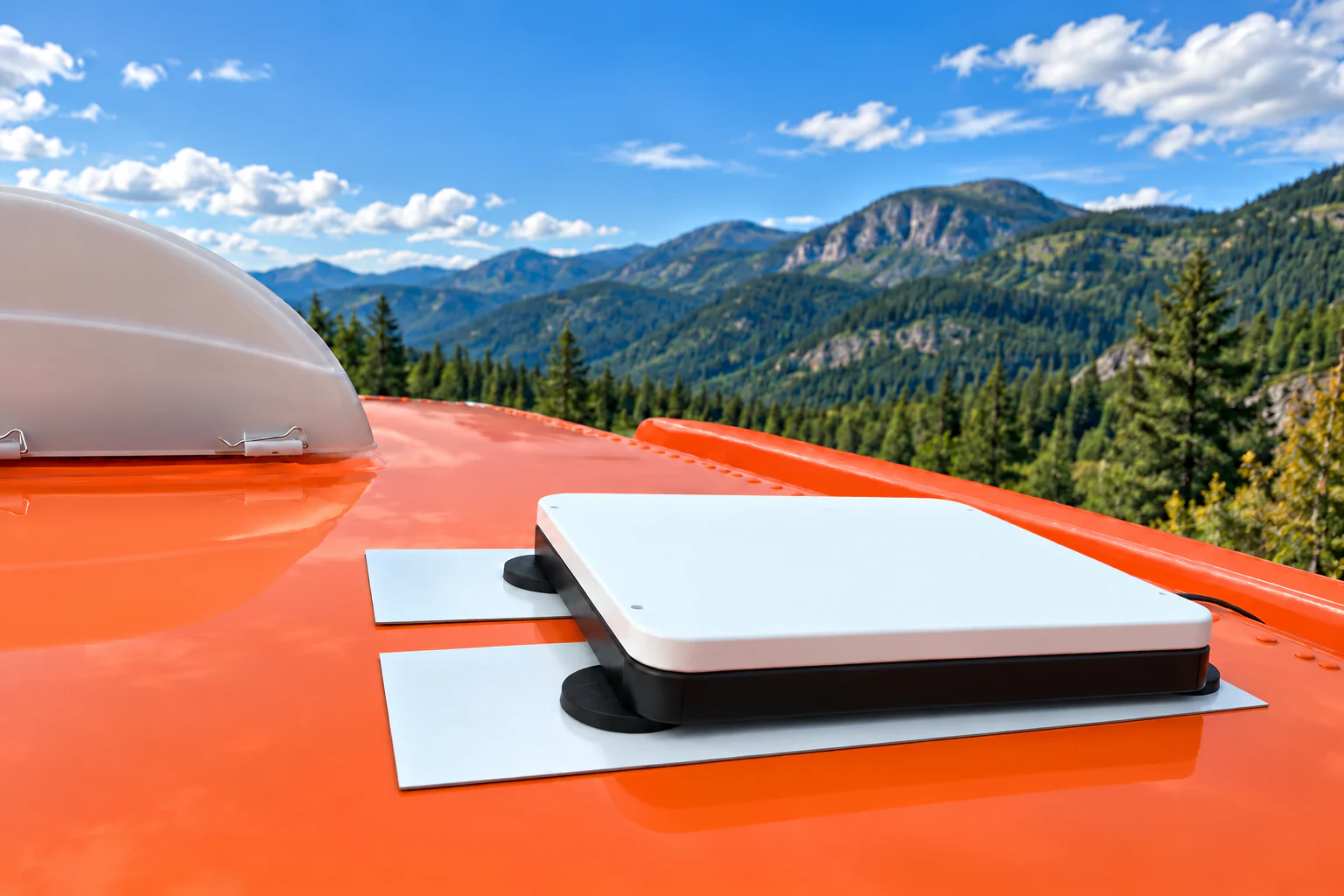
David: I use a Veritas Vans magnetic Starlink Mini mount. Two steel plates are bonded to the roof, and the mount's magnets grab onto those plates. I put it up as a temporary solution. That was 18 months and roughly 150,000 miles ago, and it's still the same setup. Turns out temporary can be pretty permanent when it works.
Power is about as simple as it gets. I use the cable and power supply that came with the Mini, route it into my vehicle, and plug it into a regular household-style AC outlet. That's it. No fiddling.
Starlink Mini power consumption: planning for 25 to 40 watts
Pickori context: Starlink's official Mini spec sheet lists average power consumption of 25 to 40 watts. That's the manufacturer's figure, not a measurement from David's setup, but it's a useful starting point if you're planning your own power. At that average draw, ten hours would use about 250 to 400 watt-hours before any additional power-conversion losses. That's a planning estimate, not a battery-runtime test; David uses an AC outlet rather than a portable battery.
Pickori: Have you used it while moving?
David: Yes, it's been on the roof in motion. It just keeps doing its job up there.
Pickori context: Starlink's in-motion policy currently supports in-motion use on Roam with supported hardware, including the Mini, in authorized locations. Secure mounting matters. David's mount has worked for him, but every vehicle and installation is different, so plan yours carefully.
Pickori: What about weather?
David: It's seen pretty much everything. Mojave summer heat, heavy rain, snowstorms, hail, strong winds, severe cold. The Mini and the mount have both come through it. After all of that, they're still on my roof doing their job.
Pickori: What's the one thing it really needs?
David: A view of the sky. If you've got a roof directly overhead, it's not going to work. That's just physics.
Other than that, I can remember only one time in about 18 months when a blocked view of the sky caused trouble. And today I'm sitting with a partly blocked view, and everything still feels normal. So it's a rule to respect, but it hasn't been something I fight with.
Pickori: Is Starlink Roam Unlimited worth $175 a month?
David: I gladly pay $175, because it's that good that I never even think about it. I have no problem with the cost.
I paid $499.99 for my Mini, and my Roam Unlimited plan started at $165 a month and is $175 now. But think about what I'm actually getting. I can park in a place with zero cell service and work like I'm at home. I have Wi-Fi calling in a parking lot where the signs tell you how to hunt for one bar. My friends can get online when they're with me. That's not a luxury to me. That's my life working the way it should.
When something takes a worry completely off your plate every single day, the price feels easy. I'd make the same choice again without thinking twice.
Pickori context: It helps to separate the hardware from the subscription. David bought his Mini outright; $499.99 is his historical purchase price, not a quote for today's hardware. The service plan is what you pay monthly, and Roam Unlimited is the plan David chooses for daily, full-time use. It isn't the only way into Starlink.
Starlink internet plans and monthly cost: you don't have to spend $175
On Starlink's US Roam page, Roam 100GB is listed at $55 a month, Roam 300GB at $80, and Roam Unlimited at $175. The capped plans continue with low-speed data after the high-speed allowance is used. The right choice depends on how much data you use, not the speed of a single test. For lighter use, checking email, maps, and the occasional show, those lower tiers are worth a close look.
Pickori: How much data do you actually use?
David: I do track it. July was 601 GB, and August was 514 GB. September was only 1.7 GB because I was traveling out of the country and wasn't using Starlink. October is at 269 GB so far.
| Month | Data used | Context |
|---|---|---|
| April | 274 GB | Full month |
| May | 401 GB | Full month |
| June | 317 GB | Full month |
| July | 601 GB | Full month |
| August | 514 GB | Full month |
| September | 1.7 GB | Traveling abroad; not using Starlink |
| October | 269 GB | Month to date, reported October 27 |
Pickori context: This is why Unlimited makes sense for David. Four of his five months from April through August exceeded 300 GB, with July reaching 601 GB. A 300 GB high-speed allowance would have meant cutting back or accepting slower service for the remainder of those months. For the connection he uses to work and stream every day, Unlimited earns its place. September reflects time abroad, and October is still in progress; neither is a normal full month of active use.
Pickori: What about Starlink for home internet or occasional travel?
David: I'm on the road almost all year, so Unlimited fits my life. But not everybody travels the way I do. Someone who needs internet at home or only travels three months a year doesn't have to choose the same plan I have.
Pickori context: Here's how we'd think about a few common situations, based on Starlink's official pages as of October 27, 2026.
Starlink home internet: who should choose Residential?
Pickori's view: For a household stuck choosing between unreliable cellular coverage and slow rural internet, we'd put Starlink near the top of the list. The appeal is everyday freedom: working from home, watching a movie, and letting someone else use the connection without constantly negotiating who gets the bandwidth. Start with the Residential equipment and plan offered for your address, rather than copying David's travel setup.
If you mostly need internet at one address, you probably don't need a travel plan at all. Starlink's US service plans page lists Residential service starting at $55 a month in select areas. That's a monthly service starting price, not an all-in cost including hardware and taxes, and availability depends on your address and eligible hardware. Check your own address before buying.
Starlink Residential includes unlimited data, with different speed tiers offered by location. For home buyers, the useful comparison is the service you can actually get at your address. Dependable fiber or cable may already meet your needs; where those options are missing or repeatedly let you down, Starlink gives you a serious alternative. Check the sky view at the proposed installation spot as carefully as you check the monthly bill.
Can you pause Starlink service between trips?
If you're on the road a few months a year, Starlink's Standby Mode lets most eligible Roam, Residential, and Priority subscriptions pause for a small monthly fee, with exceptions for some promotional and rental arrangements. It isn't a free suspension. As a rough example, three months of Roam Unlimited would be 3 × $175 = $525 for the active months, plus standby fees for the rest of the year, your hardware, and any applicable taxes. When you're ready to travel again, you resume on a plan that's available at that time.
Starlink for home and RV travel: can you switch plans?
With hardware and an account eligible for both services, look at Residential for the months at home and Roam for the months away. Don't assume the Mini supports that combination. Starlink's Mini compatibility page says Residential plans aren't supported on the Mini in most countries, with only limited regional exceptions. So a $55 Residential plan is not something to count on for a Mini.
Starlink's plan-change guide says changes are managed in your account and depend on availability, kit eligibility, promotions, and rental restrictions. Some changes take effect right away; others happen at the next billing cycle. Standby also doesn't hold Residential capacity for you, so getting back onto Residential depends on what's available in your area when you return.
For some households, the cleanest answer may be a home setup plus a separately subscribed Mini for travel. That means two kits and two subscriptions, not one plan covering both, so compare the total before you commit.
Pickori: Would you recommend Starlink Mini for RV travel?
David: If you travel a lot, especially anywhere coverage is spotty, buy it. Full-time travelers, remote workers who move around, people who love remote campgrounds and trailheads. I think RV travelers in particular would love it, because so many great spots are exactly the places where your phone gives up.
And if you've ever stood somewhere ridiculous holding your phone in the air hoping for a bar, you already understand why I'm so excited about it.
Pickori: And who should think about it differently?
David: If your camping is mostly under heavy tree cover or you're always parked under a roof, the sky view is going to matter. And if perfectly smooth calls matter more than having a call at all, know that Wi-Fi calling can lag sometimes. Use cellular when you have it.
Beyond that, it's less about whether to get Starlink and more about which plan matches how you live. Someone who travels a few weeks a year doesn't need the same plan I do.
Starlink for business: when we'd put it to work
Pickori's view: A rural office, a remote job site, and a shop that loses its connection during the working day have something in common with David: getting online matters more than winning a speed test. If poor connectivity is interrupting paid work, Starlink belongs on your shortlist. Compare its cost with the work you lose when the connection fails, not just with the cheapest advertised internet package.
For a business installation, start with Starlink for Business. Starlink advertises priority support, a public IP option, and management tools alongside its Priority services. Those are operational features worth considering separately from download speed. David's Mini and Roam experience is our firsthand evidence here; the business guidance comes from the published service details and our buying analysis.
Starlink business plans: look beyond the starting price
The US Local Priority plans currently list 50 GB at $55 a month, 500 GB at $155, 1 TB at $280, and 2 TB at $530, before hardware and applicable taxes or fees. That allowance is priority data. After it is exhausted, service continues at up to 1 Mbps down and 0.5 Mbps up unless you purchase additional priority data.
We would not choose the smallest allowance for a busy office simply because the monthly price looks attractive. Size it around normal working days, including cloud backups, video meetings, and software updates. A plan that makes sense as an emergency connection may be the wrong choice as the only connection for a team.
Starlink backup internet: useful even if you like your current provider
A second internet connection can earn its keep without replacing the first. For a business that cannot afford to lose online orders or access to cloud tools, we'd consider Starlink as a backup to wired broadband. It gives you another way online when the local broadband connection fails, although it still needs power, a clear sky view, and a working Starlink network.
Buying the kit does not, by itself, make your existing network switch over automatically. Plan for a router that supports failover if you need that behavior, and backup power for the Starlink kit and network equipment if power cuts are the problem. Test the switch with the applications you depend on before an outage makes that test urgent.
Pickori: Last question. If a friend asked you about it today, what would you say?
David: I'd say: get it, mount it well, give it a clear view of the sky, and then forget about it. That's what happened to me. Getting my laptop online stopped being something I had to think about. I just open it and start working.
After 18 months and roughly 150,000 miles, that still feels a little bit like magic. And it's the most useful kind of magic, the kind you stop noticing because it's always there.
The Pickori take: who should buy Starlink?
David's Starlink Mini review comes down to one thing: reliability you stop thinking about. Speed tests vary, Wi-Fi calling can lag, and the sky has to be visible. But for someone on the road more than 330 days a year, the Mini turned internet from a daily question into a given, and Roam Unlimited is a price he pays gladly for that.
For a home beyond dependable wired broadband, start with Residential. For a business with unreliable connectivity, compare Local Priority as a primary or backup connection. For satellite internet in an RV or camper, we'd put the Mini high on the shortlist. Its strongest argument isn't a record speed: it's being able to work where a phone hotspot has no signal to use. If you travel full time or close to it and regularly find yourself beyond reliable cellular coverage, this is an easy recommendation. If you travel less, the same hardware can still make sense; just choose the plan, and possibly Standby Mode, around how many months you're actually on the road.
Check Starlink home internet availability | Compare business plans | Explore Roam plans
New customers who sign up through a referral link on starlink.com may qualify for a reward after two qualifying months, depending on eligibility. See Starlink's referral program terms for details.