
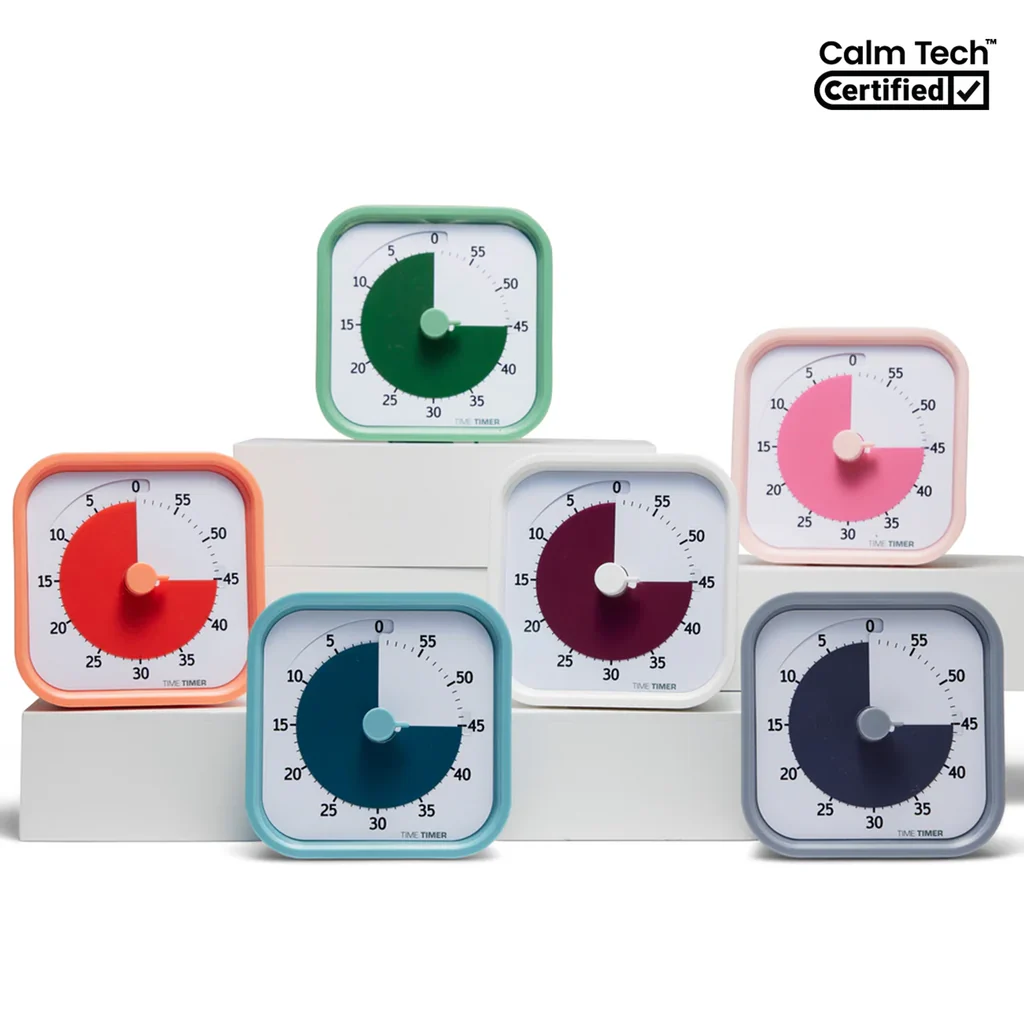
What to know first
- 60-minute visual countdown with a color disk that shrinks as time passes
- No loud ticking. Designed to be quiet for focus and sensory comfort
- End-of-time beep can be turned on or off
- Compact footprint (about 3.5 inches square) works on desks and counters
- Runs on 1 AA battery (not included)
- Home Edition does not include a silicone case (cases sold separately)
What the Time Timer® MOD Home Edition (60-Minute Visual Timer) is
The Time Timer® MOD Home Edition (60-Minute Visual Timer) is a small, standalone timer that shows time passing visually, not just as numbers. You set it up to 60 minutes, and a colored disk gradually disappears as the minutes run out. The point is simple: you can see time left from across the desk without doing mental math.
This timer works well for schoolwork and routines because it reduces negotiation. Instead of “How much longer?” you get a clear visual boundary. It’s also a practical way to stay off your phone. If you use your phone as a timer, you usually end up seeing notifications, opening apps, and losing the thread of what you were doing.
The MOD Home Edition is designed for personal and home use, with calming color options. It’s compact enough to live on a desk full-time, so it’s there when you need it for a quick study sprint, a break, or a transition like screen time to bedtime.
Why it stands out
The biggest advantage is the visual countdown. A shrinking color band makes “time remaining” feel concrete, which is useful for kids who are still learning time, students who struggle with time blindness, and adults who just work better when they can see the finish line.
It’s also built for quiet. The MOD Home Edition is completely silent while it runs, with no loud ticking. That matters in bedrooms, shared study spaces, therapy offices, and anywhere a repetitive sound becomes distracting or stressful.
When time is up, you can choose a gentle beep or turn the alert off entirely. That flexibility is handy if you want a nudge at the end of a work block, but you don’t want a timer that startles everyone in the room.
The design is intentionally small and tidy. At roughly 3.5 inches square, it fits on a crowded student desk or a kitchen counter without becoming another big object you have to work around.
What it is like to own
Day to day, this timer is meant to be grab-and-go. You set a work block, start it, and rely on the visual disk instead of checking a screen. For studying, it’s an easy way to run focused intervals (for example, a homework sprint followed by a short break) without pulling your phone into the mix.
For families, it’s a practical routine tool. You can use it to keep mornings moving through breakfast and teeth-brushing, then later use it to structure homework time and transitions like “10 minutes until we switch from screens to bedtime.” The visual element helps because it’s not just a parent saying “hurry up.” The timer becomes the neutral referee.
The MOD Home Edition includes a clear protective lens over the disk. That’s useful in real homes and real desks, where hands, dust, and spills happen. Power is simple: it uses one AA battery (not included).
If you care about looks, the Home Edition is offered in multiple colors (including Lakeday Blue, Fern Green, Dreamsicle Orange, Pale Shale Gray, Peony Pink, and Cottonball White). Unlike the MOD Education Edition, it does not come with a silicone case, so if you want extra protection or a different style, you’ll be buying a case separately.
What to know before you buy
This is a 60-minute timer. If you want to time longer blocks, you’ll need to reset it for the next hour or choose a different model designed for longer durations.
The Home Edition does not include a silicone case. That’s not a dealbreaker if it’s mostly living on a desk, but if you expect it to get tossed into backpacks, used by younger kids, or moved room to room a lot, you may want to plan on adding a protective case (sold separately).
It runs on a single AA battery, and the battery is not included. If you’re setting up a study space for back-to-school, it’s worth grabbing a spare AA so the timer is ready on day one.
The specs that matter
Great for homework sprints, practice sessions, and break blocks. For longer study sessions, you’ll reset it each hour.
It fits on a crowded desk or counter without taking up the space you need for a laptop, notebook, or breakfast plate.
You can use it in quiet rooms and shared spaces without the timer becoming the distraction.
You can keep it purely visual for sensitive sleepers or quiet focus, or turn on the beep when you want a clear endpoint.
Helps protect the visual disk from curious hands, dust, and everyday spills.
No charging cable to manage, but you’ll want an AA on hand so it’s ready when you set up a study space.
If the timer is going to live out on a desk or counter, it’s easier to keep using it when it looks like it belongs there.
Who this product fits
You want a phone-free homework timer
Set the Time Timer® MOD Home Edition (60-Minute Visual Timer) for a focused work block and keep your phone out of reach. The shrinking color disk gives a constant reminder of time left without unlocking a screen.
Your mornings are chaotic and you’re tired of repeating yourself
Use it as a routine anchor: 10 minutes for breakfast, 5 minutes for teeth, then a final countdown to shoes and out the door. The visual countdown makes the schedule feel concrete for kids.
You share a study space and noise drives you nuts
Because it runs silently, it won’t add a ticking sound to an already stressful environment. If you don’t want any sound at all, you can turn the end beep off.
You’re setting up a small desk for back-to-school
Its compact footprint keeps the workspace usable. You can leave it on the desk full-time without sacrificing room for books, a laptop, or a lamp.
Time Timer® MOD Home Edition (60-Minute Visual Timer) FAQ
Is the Time Timer® MOD Home Edition (60-Minute Visual Timer) silent?
Yes. It’s designed to run without loud ticking. When time is up, it can give a gentle beep, and you can also turn that alert off for a purely visual timer.
Does the Time Timer® MOD Home Edition come with a case?
No. Unlike the MOD Education Edition, the MOD Home Edition does not include a silicone case. Protective cases are available separately if you want extra durability or a different look.
What battery does the Time Timer® MOD Home Edition use?
It requires 1 AA battery, and the battery is not included. If you’re buying it for back-to-school, it’s smart to add an AA to your cart so it’s ready right away.
How big is the Time Timer® MOD Home Edition?
The product size is listed as 3.47 x 3.47 x 2.05 inches (and also described as about 3.6 inches square). In practical terms, it’s small enough for a student desk or kitchen counter without hogging space.
Who is the Time Timer® MOD Home Edition good for?
It’s a strong fit for students, families managing routines, and anyone who benefits from a visual countdown. It’s also a good option for people who want a quiet timer and for neurodiverse or sensory-sensitive users who find ticking distracting.
Should you buy the Time Timer® MOD Home Edition (60-Minute Visual Timer)?
Yes, if you want a simple, quiet, phone-free timer that makes time visible. The Time Timer® MOD Home Edition (60-Minute Visual Timer) is easy to understand at a glance, which is exactly what helps during homework blocks, morning routines, and any situation where you’re trying to reduce distractions and keep things moving.
Skip it if you need longer than 60 minutes without resetting, or if you want a protective silicone case included in the box. Otherwise, this is a practical little tool that earns its spot on a desk because it changes behavior in a way a digital countdown often doesn’t.