
Pickori's Take
- Pickori's pick for a hybrid worker who carries one headset between desk, commute and listening.
- Call-heavy desk workers who like a boom they can flip should weigh the Evolve2 75. A close-mounted microphone is an acoustic advantage that processing has to make up for.
- If you already own an Evolve2 75 that sounds clean and holds a charge, keep it. This generation is a better fit for new buyers, not a reason to replace a working headset.
Evolve3 75 vs Evolve2 75 and other options
Start with your routine, then the price you see today.
| Your priority | Start here | Why |
|---|---|---|
| One headset for desk, commute and listening | Jabra Evolve3 75 | Pickori's choice when your workday doesn't stay in one place. |
| A boom and a visible mute at a fixed desk | Jabra Evolve2 75 | Start here if your working routine is already built around a boom-mic headset. |
| Long sessions where on-ear pressure bothers you | Over-ear headphones | Cushions sit around the ear instead of on it. Browse options in our headphones hub. |
What's new in the Evolve3 75
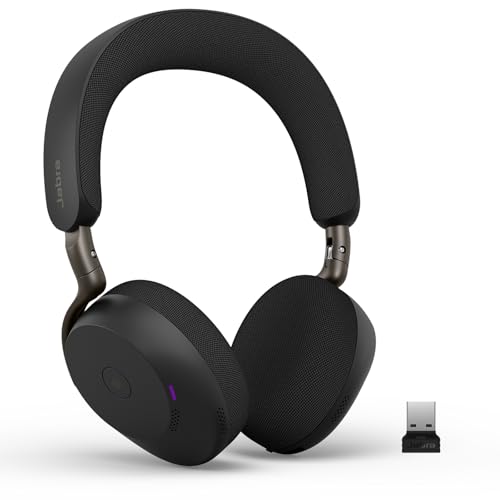
Jabra announced the Evolve3 series on January 21, 2026, and the Evolve3 75 went on sale March 1. It succeeds the Evolve2 75 as Jabra's current on-ear model. One naming trap is worth clearing up early: the Evolve3 85 is the over-ear sibling, not an upgraded 75. If you want cushions that surround your ears, that's a different headset with a different fit, and the comparisons in this review don't transfer to it.
The redesign is what we're judging, and it isn't automatically a better call tool. The gain shows up for someone whose week mixes a standup at home, client calls from a shared desk and a ride across town: the headset packs smaller, and there's no arm to swing down before a call, stow afterward or catch on a zipper. A fresh design doesn't make the boom obsolete for people who like it. The rest of this review is about who actually gains from the change.

Two audiences, and only one of them is you
Every work headset serves two listeners. You hear the meeting, with adaptive noise cancellation reducing steady background sound. Your colleagues hear you through the microphones and voice processing. These are separate systems. A headset that makes your own room feel quieter hasn't, by that fact alone, made your voice clearer on the other end.
Removing the boom shifts more of the work to processing. A boom puts its microphone close to your mouth, which gives it an acoustic head start: your voice arrives stronger relative to the room than it does at an earcup. That's a design advantage, not a promise of a measurable win in any particular call. Earcup microphones sit farther back, so the Evolve3 relies on processing to work out which sound is you. Jabra labels its own noise-removal sample illustrative, so treat it as a statement of intent.
In his March review for Tom's Guide, Peter Wolinski liked the music and compact fit, noted ear pressure after a long session and fiddly buttons, and got microphone feedback ranging from very clear to tinny or distant.
Owner reports split in a similar way. One buyer had clear Teams calls but returned it over music balance and the feel of the adaptive ANC. Another reports distant pickup on internet calls but not in Teams, and a third returned it after Teams colleagues found them intermittently hard to hear. It's a small, self-selected group, so it can't tell you how common either outcome is.
Here's how we read it. Clear and distant results from the same model suggest conditions matter: the input the app has selected, gain, an app's own noise suppression stacked on Jabra's, room echo and how the headset sits are all plausible factors, though none is proven for any single report. The practical meaning is conditional. If you call mostly from one app in a reasonably quiet room and the first-week check comes back clean, nothing here predicts trouble. If you take long calls in echoey rooms or across several apps, and being understood is the core of your job, the boom's proximity advantage is the safer bet. That's why a desk-bound, call-heavy buyer should give the Evolve2 75 serious thought.

Light on paper, still an on-ear fit
On-ear pads rest on your ears rather than around them, so clamping pressure is a big part of whether a long session stays comfortable.
Low weight doesn't cancel out clamping force, and on-ear comfort varies more by head than by spec sheet. If you wear glasses, your frames sit under the pads, and how that feels is personal.
The useful test is a normal working block, not a minute in front of a mirror. Wear it through a real meeting, then another. If your ears are warm or sore by early afternoon, an over-ear design such as the Evolve3 85 is worth trying, since its cushions sit around the ear. That's a different pressure pattern, not a guaranteed fix, and it's far easier to test inside a return window.
Replaceable ear cushions add to the long-term case. Pads take constant contact and wear, and being able to replace them means a tired fit doesn't force you to replace the whole headset.


While you're comparing
The right product, at a better price
Our free morning email rounds up discounts worth knowing about, from kitchen upgrades to everyday tech. Reviews and buying guides arrive separately in our occasional newsletter.
Free to joinUnsubscribe anytime
Laptop plus phone, not three devices
The Link 390 adapter comes paired to the headset. Plug it into a laptop and you get a consistent call connection that doesn't depend on that computer's built-in Bluetooth software, which matters on a locked-down work PC. The headset also connects directly over Bluetooth 5.3 to phones, tablets and compatible computers.
The headset maintains two active connections and remembers eight, and the adapter takes one of the two. The everyday setup is laptop through the adapter plus your phone. A tablet would be a third device, so you'd need to drop one of the others. Two active connections also means your phone can ring during a focused work session. If that's a problem, disconnect what you don't need instead of assuming the switching will always behave the way you want.
The Teams version adds a Teams button and Teams notification lights, with setup tuned for that platform. It isn't limited to Teams, though. Jabra lists Zoom, Google Meet and other leading platforms as compatible through standard controls. The USB-A versus USB-C choice is just the adapter's plug: the headset and microphones are the same either way, so pick the plug that fits your computer and your IT policy.
Teams features don't carry over to phones in full. Jabra says Teams mobile call control and Teams LED notifications aren't officially supported, so don't expect the desktop button behavior to work the same on iOS or Android. And if your employer runs calls through a specific softphone with an approved-device list, check that list before buying. A clean Teams call doesn't tell you how another client will behave.
Listening between meetings, and the battery behind it
Battery ratings only mean something when the conditions match. With ANC and busylights on, the Evolve3 75 is rated for 18 hours of calls, which equals the Evolve2 75 under the same conditions. With ANC and busylights off, the Evolve3 is rated for 22 hours, while Jabra rates the Evolve2 75 at 25. So for an all-meetings day, the new model doesn't extend your talk time, and with everything switched off the older one is rated slightly higher.
Listening is where the ratings diverge: 45 hours of music with ANC on for the Evolve3, versus 33 for the Evolve2 75. That's a rating comparison, not a measured endurance result, and a real mixed day of calls, music and idle time can't be calculated from manufacturer maximums. What the ratings suggest, without proving it, is that people who keep cancellation running between calls may need to charge less often.
That matters most if you use the headset for focus music at your desk and podcasts on the train, where listening time adds up faster than call time. A larger rated listening budget makes it more likely there's charge left for the 4 p.m. meeting, though your own mix of calls, volume and idle time sets the real number. We haven't heard enough to claim the Evolve3 sounds better than the Evolve2 for music, and tuning is a matter of taste.
Both generations have a battery you can replace yourself. Jabra publishes a user repair procedure for the Evolve3 75 and an Evolve2 75 battery repair guide built around the same basics: a T6 screwdriver, a removed cushion and four screws. Neither guide commits to spare pricing or availability, so treat this as a shared long-life feature, not a reason to choose one over the other. The Evolve3 charges through the left earcup's USB-C port in about three hours, or about three and a half on Jabra's optional wireless pad.
Muting by feel instead of by sight
The Evolve2 75's boom gives you a mute you can see: lift it and the microphone mutes by default, and anyone looking at you can tell. The Evolve3 75 replaces that with a dedicated Voice button that mutes and unmutes during a call. Your face stays clear, but you learn the mute by touch. Expect to reach for a missing boom once or twice in the first week.
On the right earcup, one press of the Call and Music button answers a call or plays and pauses, and a double press ends or rejects a call. On this Teams version, the Teams button brings the desktop app forward, and holding it for a second raises or lowers your hand in a meeting. That's handy, but it isn't the mute control, so don't press it expecting silence.
Wear detection pauses music when you take the headset off and resumes it when you put it back on. Jabra's manual doesn't describe removal as muting the microphone, so mute yourself before leaning over to talk to someone. It's also worth glancing at the app's mute indicator now and then, because the meeting app may show its own mute status.
Red busylights come on during calls, and pressing both volume buttons together toggles them manually. They're a social cue that tells people nearby you're busy.
Who should pay for it, and who shouldn't
The value question is whether you'll use what's different across a real workweek. Count the days the headset leaves your desk. If it travels most days, you're paying for a change you'll notice every morning and evening. If it travels once a month, you're paying a premium for a case that mostly sits in a drawer.
If you work at a fixed desk and like a physical boom, the Evolve2 75 is the more natural fit, and a meaningful discount on it strengthens that case. There's no fixed price gap that settles it. Compare what you see today and ask whether folding and longer listening time would change your day. If you already own an Evolve2 75 that sounds clean and holds a charge, there's no reason to replace it just for the new generation.
Some buyers don't need either. If you take occasional calls in a quiet room and never wear a headset outside, a premium wireless Teams headset may be more than you need. That isn't a flaw in the Evolve3. It's built for someone who moves around, and you may not be that person.
A first-week call check that actually tells you something
Update the headset and the adapter through Jabra Direct first. Jabra's notes list headset firmware 1.1.10 and Link 390 firmware 3.2.0 as current. Then open the Teams desktop app, not the browser, and make sure the Jabra device is selected for both microphone and speaker. If you connected through the adapter, it may appear as Link 390 rather than Evolve3. Check your operating system's microphone permissions and run a Teams test call.
Next, call a colleague who'll be honest, using the app you rely on most, in your usual room. Don't ask whether you sound nice. Ask whether your voice comes through consistently, including the ends of sentences, when you turn your head and over the laptop fan. If it's clean in one app but not another, look at that app's settings first. If calls stay distant across apps after adjusting settings, return it while you still can.
Who this product fits
What else to compare
The right choice depends on how you mute, where you work and how your ears handle on-ear pads.
Jabra Evolve3 75 FAQ
Is the Jabra Evolve3 75 better than the Evolve2 75?
For a new buyer who carries a headset between desk and commute, yes, it's the one we'd pick. For call-heavy desk work with a preference for a boom, the Evolve2 75 remains the better fit. The evidence we reviewed doesn't include a direct microphone comparison.
How do you mute without a boom?
Press the dedicated Voice button during a call. The Teams button isn't a mute control, and taking the headset off pauses music but isn't documented as muting the microphone.
Can I use the Teams version with Zoom or Google Meet?
Yes. Jabra lists them as compatible. The Teams button and Teams notification lights are the Teams-specific extras.
Will the Teams button work on my phone?
Don't count on it. Jabra says Teams mobile call control and Teams LED notifications aren't officially supported on iOS or Android, though regular Bluetooth calling and music work.
Does it come with a wireless charging pad?
Not this version. The headset supports wireless charging, but Jabra sells the pad separately. It charges over USB-C with the included cable.
Is the Jabra Evolve3 75 the one to buy?
If your workday moves between a desk, a commute and long stretches of listening, and on-ear pads suit you, the Evolve3 75 is the Jabra headset to buy. Its changes are practical ones for someone on the move, not just a new look.
The boom is the main reason to choose differently. If you spend most of the day on calls at one desk and like muting with a gesture everyone can see, the Evolve2 75 still serves you well.
Sources and research notes
We combine Jabra documentation, published evaluations and individual owner reports with our own analysis of call controls, connectivity and everyday use. This is a research-based review, not a hands-on test. How Pickori evaluates products.
Independent evaluations
- Independent Evolve3 75 evaluationTom's Guide
Official product information
- Evolve3 75 specifications and product informationJabra
- Evolve3 series announcement and availabilityJabra
- Evolve3 75 datasheet (RevD)Jabra
- Evolve3 75 user manualJabra
- Evolve3 75 battery repair guideJabra
- Evolve2 75 battery repair guideJabra
- Evolve3 75 supportJabra
- Evolve3 75 charging FAQJabra
- Evolve3 75 release notesJabra
- Link 390 release notesJabra
- Evolve2 75 product informationJabra
- Evolve2 75 technical specifications and exact variantsJabra
- Teams microphone settings and troubleshootingMicrosoft
- Microsoft Teams and UC headset variants explainedJabra
Retailer listings and evaluations
- Individual Evolve3 75 customer reportsAmazon owners