Pickori's Take
- The Galaxy Book4 Edge 14 is our pick for compatible everyday work that travels, combining a superb screen, low weight and quiet operation in one compact laptop.
- Its value grows with the hours you spend on the built-in screen away from a desk; mostly docked users get less from it.
- Light browsing and documents at moderate brightness are where the battery does best; bright screens and long call schedules are charger days.
- Size internal storage by the files you keep offline and how fast your active projects grow, then confirm your essential apps and accessories support Windows on Arm.
- The Galaxy Book6 Edge is the larger-workspace choice, not a smaller-laptop upgrade.
A premium 14-inch screen and body for everyday Windows work
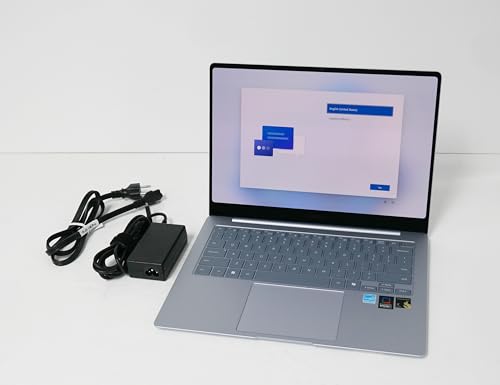
This review covers the US Samsung Galaxy Book4 Edge 14, model NP940XMA-KB1US in Sapphire Blue, with Qualcomm's Snapdragon X Elite X1E-80-100, 16GB of memory, 512GB of storage and Windows 11 Home. Samsung released it in June 2024 as its first Copilot+ PC.
There is a newer model, the Samsung Galaxy Book6 Edge, which we review separately. It is a 16-inch laptop, so it follows the Book4 Edge without replacing this size, and we compare the two further down. For a 14-inch Galaxy Book Edge, the Book4 is the model to judge.
This is full Windows 11 running on a different kind of processor. The Snapdragon chip uses Arm architecture, the design family behind most phone chips, rather than the Intel and AMD designs most Windows software grew up on. For most buyers that difference stays in the background, but app and accessory support deserve a quick check before purchase, which our compatibility section walks through.
Samsung's original $1,349.99 starting price has no bearing on today's choice; what matters is what else the same money buys now. Match memory and storage first, then compare screen quality, weight and noise, and only then ask whether a newer processor would change anything you actually do. Paying extra for speed you won't use makes little sense, but an attractive laptop doesn't excuse a weak offer either. Our best Copilot+ laptops guide maps the wider field.

The display pays off most when you work on the move
The 14-inch AMOLED panel is the main attraction. Its high resolution keeps small text crisp, the 16:10 shape shows more of a page than a widescreen panel, the 120Hz variable refresh rate makes scrolling fluid, and touch makes zooming into photos or tapping through slides natural on a laptop this size.
Independent measurement supports the premium billing. CHIP recorded roughly 405 nits in standard use and 545 nits on a full-white HDR image, with full sRGB and DCI-P3 coverage. Coverage means the panel can reach those colors, not that every shade is accurate, so paid photo work still calls for calibration. For movies, photos and everyday work, OLED contrast at that brightness is a clear step up from typical budget LCDs.
Glare is the trade-off to weigh. Samsung adds anti-reflective cover glass and a Vision Booster brightness feature, but this is still a glossy touchscreen. Reflections are reduced, not removed, so anyone who routinely works facing a window or outdoors may be happier with a matte screen, even a less impressive one.
How you use the screen decides how much all this is worth. If the laptop spends most days closed on a desk and connected to a monitor, its best feature contributes little, and a cheaper or roomier machine may serve you just as well. If it opens on trains, in lecture halls, at client sites and on flights, the display is working for you for hours every week. At 14 inches it is a compact canvas: fine for a document beside a browser, cramped for side-by-side work all day.
What the Snapdragon X Elite handles well, and where it stops
The processor, 16GB of memory and quietly managed cooling point to a laptop built for responsive everyday work. Here is what that means for the tasks shoppers ask about most.
| Workload | Outlook | What to expect |
|---|---|---|
| Browser, email and Microsoft 365 | Excellent fit | Mainstream productivity apps run natively, so the different processor design goes unnoticed, and 16GB leaves room for heavy tab counts alongside documents and chat. Samsung's default Optimized mode is the right setting for this work. |
| Video calls | Strong | The 1080p webcam and quad speakers suit meetings, and a supported Galaxy phone can stand in as the webcam. On days stacked with camera-on calls, especially at high brightness, bring the charger. |
| Short video edits and podcasts in Adobe apps | Capable, with limits | Adobe's version 26 Premiere Pro, After Effects, Audition and Media Encoder run natively on Snapdragon X, and 16GB matches Adobe's minimum for them. Plugins need native Arm versions, and some codec and RAW limitations remain. Short social clips and audio projects fit; long, layered timelines belong on a machine with more memory and graphics headroom. |
| Exports, code compiles and batch conversions | Faster in High Performance mode, with more fan noise | Notebookcheck found that switching from the default Optimized mode to High Performance noticeably raised Cinebench 2024 multicore results, with louder fans and little single-core or graphics gain. Treat it as optional extra speed for CPU-heavy desk jobs, not a setting for email, and not a promise that every app speeds up. |
| PC gaming | Not a reason to buy | Integrated graphics limit demanding titles, and some games, including some with anti-cheat software, do not support Windows on Arm. If gaming is a priority, or a must-play game lacks Arm support, look elsewhere. Light and older titles may run; check each game's publisher first. |
The pattern is consistent: this chip suits short, responsive bursts of everyday work, and the quiet default mode fits that role. Sustained creative work is where 16GB of memory and integrated graphics, rather than processor speed, set the ceiling.
So the buying question is less about benchmarks than about your app list and file habits. If your days look like the first two rows, performance is no reason to hesitate. If they lean on the last three, weigh the alternatives below first.
Keep the kit small and this laptop stays easy to carry
Ports are few but modern: two USB4 ports, HDMI and a headphone jack, with no USB-A or microSD. The USB-C charger occupies one of those USB4 ports at a desk, leaving a single high-speed port for everything else.
The setup is most convincing when it stays simple. A Bluetooth mouse, documents that fit on the laptop and an HDMI monitor need nothing extra. A workflow built around a card reader, a portable drive and several dongles is different: the laptop is still light, but grabbing it and going turns into packing a pouch, and some of the convenience you chose a compact laptop for slips away. Decide which kind of user you are before weighing this design against a model with more built-in ports.
CHIP found the backlit keyboard shallow, with light feedback, while praising the roomy, roughly 12 x 8 cm touchpad and rating the quad speakers as good, with some rattle on heavy bass. That points to a laptop better suited to email, notes and editing than to long writing sessions for people who prefer a deeper keystroke. CHIP also found the laptop quiet even under load. Sign-in uses a fingerprint reader built into the power button.
Samsung's device-linking features add convenience, each with its own requirements. Quick Share moves files between compatible devices, Auto Switch moves compatible Galaxy Buds between devices, and a supported Galaxy phone can serve as the laptop's webcam. Microsoft's Phone Link works with compatible phones and accounts and is not unique to Samsung. Check your own phone and earbuds against each feature before counting any of them as a reason to buy.

While you're comparing
The right product, at a better price
Our free morning email rounds up discounts worth knowing about, from kitchen upgrades to everyday tech. Reviews and buying guides arrive separately in our occasional newsletter.
Free to joinUnsubscribe anytime
Battery life: strong on light days, shorter at high brightness
Set expectations by this laptop's own results. The 14-inch model pairs a 55.9Wh battery with a high-resolution OLED screen, and neither the runtime claim Samsung made for the 16-inch Book4 Edge at launch nor 16-inch test results describe this model's endurance.
Two independent labs tested equivalent 14-inch configurations in 2024, using different methods. In the default Optimized mode, Notebookcheck measured just under nine hours of Wi-Fi web browsing at 150 nits, about six hours and 45 minutes at maximum brightness and nearly 14 hours of local 1080p video. CHIP recorded just under seven hours in PCMark 10's office workload, nearly 10 hours in an intensive web test and a little over 11 hours of Full HD video at 200 nits. Because the protocols differ, the figures belong side by side, not averaged.
Read by workload, the picture is clear enough. Lightweight daily use, meaning browsing, documents and email at moderate brightness, is where this laptop does well, and we would expect it to cover a light workday, though not one that stretches into a long evening. Brightness is one important variable you control: in Notebookcheck's identical browsing test, maximum brightness cost more than two hours. Mixed office workloads landed lower than simple browsing, and local video was the best case, which suits flights.
Your schedule should decide whether the charger comes along. On call-heavy days, in bright rooms or for anything beyond light office work, pack the included 65W USB-C charger. For a shorter outing of documents and browsing at moderate brightness, leaving it behind is a reasonable bet.
RAM, storage and Windows on Arm: what to check before you buy
Memory and storage are fixed internal components. The 512GB uses eUFS, flash storage of the kind more common in phones, rather than an SSD you can swap later, so the capacity you buy is the capacity you keep.
Whether 512GB is enough depends on what you keep offline, not on which cloud service you use. A cloud label is not a storage plan: OneDrive or Google Drive can keep large folders fully downloaded, and those count against internal space like any other file. Separate active work from archives. Documents, spreadsheets and a modest photo collection take little room; a growing camera library, offline video projects or large creative apps fill it faster. If your active files are large and still growing, a 1TB configuration (Samsung offered one at launch) or upgradeable storage makes more sense; if only your archives are large, a drive that stays at home may be all you need.
Memory is a separate question from file space. 16GB suits office multitasking, browser tabs and calls, while heavy creative projects, such as long video timelines, are what push it.
Software support is the other check. Many Windows apps run natively on Arm, and Windows' Prism emulation runs many traditional Intel and AMD programs, though Microsoft does not guarantee that every one will work. Hardware drivers are different: printers, scanners, audio interfaces, VPN clients and security tools need an Arm64 driver or a compatible one supplied by Windows, and emulation cannot translate drivers.
Make the check specific. List the apps, accessories and work tools you cannot do without, then confirm Arm support with each vendor or your IT department. If one essential item fails, the Galaxy Book4 Pro 14 comparison below is your next stop.
Edge 14 or Intel-based Book4 Pro 14: quiet versus flexibility
Samsung's like-sized alternative is the Intel-based Galaxy Book4 Pro 14. Comparing the two, Notebookcheck noted the Pro's replaceable M.2 SSD against the Edge's fixed storage, and credited the Edge with quieter fans.
We would choose the Edge for compatible everyday work in quiet or shared spaces: libraries, open offices, classrooms and meetings, where a laptop that stays hushed is a courtesy to others as well as a comfort to you. When your apps and accessories check out and your offline files fit, its screen, weight and quiet make it the more pleasant compact laptop to live with.
The Pro is the pick when flexibility decides it. Its Intel processor removes Arm-specific compatibility questions, and its replaceable SSD lets internal storage grow with your files. That matters most to people with a driver-bound tool, a managed work setup or a project library that keeps expanding. At similar prices, those buyers get more from the Pro's flexibility than from the Edge's quieter operation.
Will the bigger Galaxy Book6 Edge solve your problem?
Samsung's current Edge model is the Galaxy Book6 Edge. The US version we reviewed, NP960XRD-KB1US, has a 16-inch 120Hz OLED screen, the newer Snapdragon X2 Elite, 16GB of memory, 1TB of storage, USB-A, microSD and a 61.8Wh battery, at 3.42 pounds. That makes it about 0.86 pound heavier than the Book4 Edge 14, and physically larger.
Start with the problem you actually have. If it is workspace, such as wide spreadsheets or two windows side by side all day, the Book6's larger screen addresses it directly. If it is ports, USB-A and microSD take adapters out of your bag. Both laptops use OLED, but sharing the technology does not make them identical panels, so judge the Book6's display on its own merits.
Storage is a separate question. Needing more space does not mean needing a 16-inch laptop; a 1TB Book4 Edge 14, a home archive drive or the upgradeable Book4 Pro 14 can solve that without adding size to every commute. And some limits carry over unchanged: the Book6 Edge still has 16GB of memory, its memory and storage are still fixed, and it still runs Windows on Arm. Choose it for room and ports; stay with the Book4 Edge 14 if you carry your laptop daily and your work fits a 14-inch screen.
14-inch, 16-inch or 15.6-inch: matching the right Book4 Edge
Three laptops share the Book4 Edge name. The 16-inch version is the larger sibling, easy to spot by its USB-A port, microSD slot and number pad.
The 15.6-inch Book4 Edge, launched in October 2024 in selected markets including the US, is a different and more basic laptop. At launch it paired a 1,920 x 1,080, 60Hz, 300-nit anti-glare LCD with an eight-core Snapdragon X Plus and weighed about 1.5kg, with USB-A and microSD. Configurations may vary, but it is not a larger, cheaper version of this OLED model.
The model number settles it. NP940XMA-KB1US is the 14-inch OLED configuration reviewed here; a listing with USB-A, a number pad or a 1080p screen describes a different Book4 Edge.
Who this product fits
A student who works between classes
Browser-based coursework suits it well, and the screen gets real use in lecture halls and libraries, where quiet fans also help. Pack the charger for long study days, and confirm any required exam or lab software runs on Arm before term starts.
A hybrid worker who needs IT approval
If IT confirms that the company VPN, security agent and office printer support Arm, this is a pleasant commuting laptop that stays quiet in open offices. If nobody can confirm it, the Galaxy Book4 Pro 14 is the safer compact choice.
A hobby photographer with a growing library
The OLED screen suits reviewing images, but a growing camera library is exactly the kind of offline data that fills fixed storage, and there is no card slot. If current projects fit and older shoots can live on a drive at home, it works; if active projects keep expanding, choose more or upgradeable storage.
Samsung Galaxy Book4 Edge 14-inch FAQ
How long does the Galaxy Book4 Edge 14 battery last?
In independent tests it handled a light day of browsing and documents at moderate brightness well and lasted longest playing local video, while higher brightness cut runtime noticeably. Our battery section has the measured results.
Will my Windows apps work on the Galaxy Book4 Edge?
Most mainstream apps will. Specialized software and accessories are worth checking first, as our compatibility section explains.
Can you upgrade the RAM or SSD in the Galaxy Book4 Edge 14?
No. Memory and storage are fixed, so see how to size storage before buying.
Is the Galaxy Book4 Edge 14 good for gaming?
Not as a main gaming laptop. Our performance outlook covers what to check before relying on it for a particular game.
Is the 15.6-inch Galaxy Book4 Edge the same laptop?
No. It launched with a 1080p LCD and a Snapdragon X Plus processor rather than this model's OLED touchscreen and Snapdragon X Elite. Our size guide explains how to tell the versions apart.
Should I buy the Galaxy Book4 Edge 14 or the Galaxy Book6 Edge?
Portability favors the Book4 Edge 14; workspace, USB-A, microSD and 1TB of storage favor the 16-inch Book6 Edge. See our comparison and the full Galaxy Book6 Edge review.
Is the Galaxy Book4 Edge 14 the right laptop for you?
Choose the Galaxy Book4 Edge 14 if you work on the move with few wired accessories, your essential apps and devices support Windows on Arm, and your active files fit 512GB. For that buyer, its screen, low weight and quiet operation make it the compact Samsung we would pick.
Look elsewhere if an essential tool or must-play game lacks Arm support, or if your active offline files are likely to outgrow internal storage. The Galaxy Book4 Pro 14 is the compact alternative for Arm-specific compatibility and storage expansion; a gaming-first buyer should compare dedicated gaming laptops. The Galaxy Book6 Edge answers a different need, a larger workspace with more ports, and still runs Windows on Arm. For a wider look, browse our laptop reviews and guides.
Sources and research notes
Our assessment combines Samsung's specifications, current software documentation, independent evaluations of the 14-inch model and Pickori's analysis of portability, everyday work and long-term value. Our editorial standards.
Independent evaluations
Official product information
- Galaxy Book4 Edge: Samsung's Next-Gen AI PC Expands the Galaxy AI EcosystemSamsung Mobile Press
- Galaxy Book4 EdgeSamsung
- Samsung Releases Galaxy Book4 Edge, Its First Copilot+ PC, in Global MarketsSamsung Newsroom
- Galaxy Book4 Edge: Samsung's Next-Gen AI PC, Now Available With 15-Inch DisplaySamsung Mobile Press
- Windows Arm-based PCs FAQMicrosoft
- Creative Cloud apps on Windows ARM devicesAdobe
- Galaxy Book6 Edge Now Available: Next-Generation AI Performance Meets Premium PortabilitySamsung Newsroom