
Pickori's Take
- The Samsung Galaxy Book6 Edge is a fast, thin 16-inch laptop we recommend for processor-heavy work. Against a similarly priced 32GB Galaxy Book6 Pro, your memory needs decide it (Edge vs Pro).
- Battery life swings widely with workload, from a gentle-settings video rating of up to 22 hours to far shorter results on mixed workdays (battery life).
- Check the software you cannot replace before ordering; our Windows on Arm checklist covers the important exceptions.
Where the Galaxy Book6 Edge fits
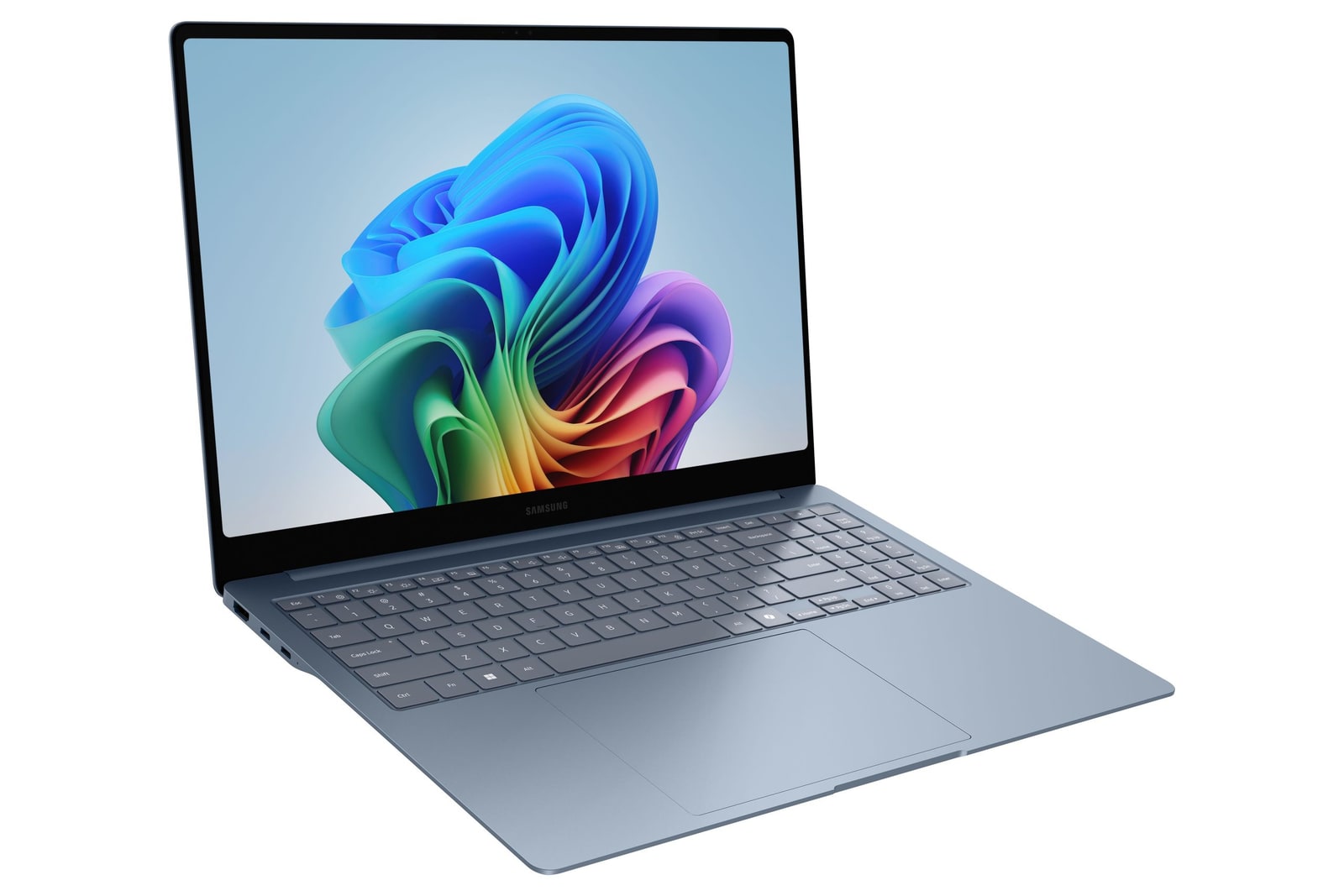
Picture a long spreadsheet beside a research browser on a 16-inch OLED with fewer distracting reflections, in a laptop slim enough for a backpack sleeve, then picture starting a batch export from the same seat. That's the case for the Samsung Galaxy Book6 Edge, which reached U.S. buyers on June 15, 2026, with Qualcomm's Snapdragon X2 Elite inside a 0.48-inch, 3.42-pound body.
For the generation before it, see our Samsung Galaxy Book4 Edge review, which covers the first-generation Snapdragon X Elite model. Book6 Edge keeps the slim formula but moves to a new chip with an 80 TOPS neural processor for Copilot+ PC features and markedly stronger published processor results. Book4 owners deciding whether to replace a working laptop get their own guide below.
Inside Samsung's lineup, Edge means Snapdragon and Pro means Intel, and the two are close enough in size and features that memory and processor platform decide between them (see the comparison below). Snapdragon also means Windows on Arm: full Windows 11, with a short compatibility checklist covered further down.
Samsung sells the U.S. version we're reviewing as model NP960XRD-KB1US in Gray Blue: Snapdragon X2 Elite with Adreno graphics, 16GB of memory, 1TB of storage and Windows 11 Home. It launched at $2,099.99, firmly premium territory, where buyers reasonably expect speed now and capacity for later. Samsung delivers plenty of the first; the second deserves a careful look.
Display quality: a reflection-reducing 16-inch OLED
Glossy OLED panels have a familiar weakness: deep blacks that look superb in a dim room pick up window and ceiling light in a bright one. Samsung covers the Edge's 16-inch Dynamic AMOLED 2X touchscreen with anti-reflective Gorilla Glass DX, which cuts distracting reflections rather than eliminating them. The Galaxy Book6 Pro gets similar reflection-reducing glass, so treat this as a strength of the Book6 family, not a reason to choose Edge over Pro.
Resolution is 2,880 x 1,800 with adaptive refresh up to 120Hz. At 16 inches, that keeps small text crisp and gives two documents enough width to sit side by side. Adaptive refresh smooths long scrolls and slows down when the image is static, which helps conserve battery.
Color results are encouraging. Clubic and Les Numériques both measured average color error at a Delta E of 2.2 on this panel, a promising result for ordinary photo touch-ups and slide design. Color-critical paid work still calls for checking settings against your workflow. Clubic also measured 403 nits in SDR, comfortable indoors and in shade but not a direct-sun screen; Samsung rates HDR highlights at up to 500 nits.
Quad speakers and touch fill out an entertainment side that's easy to overlook. A 16-inch OLED with four speakers is a capable streaming screen on a hotel desk, and touch helps when scrolling a long PDF or signing a form.
Here's the part spec sheets skip: a premium built-in display returns the most value when you're actually looking at it. If your laptop spends most of the week docked to an external monitor, you're paying for a panel and a slim, travel-ready chassis that sit closed much of the time, and a less expensive laptop plus a good monitor may serve you better. Our rough rule: if more than half your laptop hours happen undocked, this display is worth paying for. For people moving among trains, classrooms and client conference rooms, it's a large share of what they're buying.
Snapdragon X2 Elite performance: strong CPU, modest graphics
Both published evaluations used the X2E-88-100 chip: Clubic's unit had 32GB and 1TB, Les Numériques' had 16GB and 512GB, and this review recommends the U.S. 16GB/1TB model. Processor results translate well across those configurations; memory-sensitive behavior on the U.S. model will track the 16GB unit more closely.
| Workload | Outlook | What to expect |
|---|---|---|
| Everyday office work and app switching | Quick | Les Numériques measured the built-in eUFS storage at 4.3 GB/s reads and 3.9 GB/s writes and saw no meaningful hit to office responsiveness. With X2 Elite's headroom on top, routine work should feel brisk. As workloads stack up, the 16GB of memory is what gets tested first. |
| Multicore exports, compression and code compiles | Strong headroom | Clubic's 32GB unit scored 150 single-core and 1,530 multicore in Cinebench 2024. That's a useful gauge of available processor capacity, not a promise that every export or build speeds up by the same margin. Expect the biggest gains in native or well-translated software that spreads work across many cores. |
| Photoshop editing | Very good | Photoshop has run natively on Windows on Arm for years, according to Puget Systems' current support summary. Single-image edits and batch adjustments suit this processor well. Third-party plugins need their own Arm-compatible versions. |
| Premiere Pro projects with supported formats | Good within limits | Adobe lists Premiere Pro, After Effects, Audition and Media Encoder version 26 as native on Windows Arm, with 16GB as the minimum. Intel-built plugins won't load in those native apps, and some RAW formats are unsupported. Supported footage, modest effects and nothing else memory-hungry running alongside make the comfortable fit. |
| Blender rendering and demanding GPU work | Not its strength | Les Numériques found the Adreno graphics trailing Intel's Arc B390 integrated graphics, and Blender couldn't render on the Adreno GPU in that evaluation. That doesn't rule out every GPU-accelerated feature, but demanding or unsupported GPU workloads belong on another machine. Check your specific app's Adreno support. |
| PC gaming | Lighter titles, case by case | Anti-cheat compatibility varies by game, as the checklist below explains, and the integrated graphics are modest. Older and lighter games are the realistic lineup. |
Power mode shapes heat and noise. Under heavy loads in Performance mode, Clubic recorded body temperatures above 50°C (122°F) and fans at 40 to 42 dB from 40 cm. In the default mode, Les Numériques kept the keyboard under 42°C (about 108°F) with noise peaking at 35.7 dB. Different modes and loads explain the gap, so the two results aren't a contradiction.
Our advice is to leave default mode on for daily work, including anything done on your lap, and switch to Performance mode at a desk when a long export or build is worth some extra fan noise.
Keyboard, touchpad and ports: plain inputs, generous connections
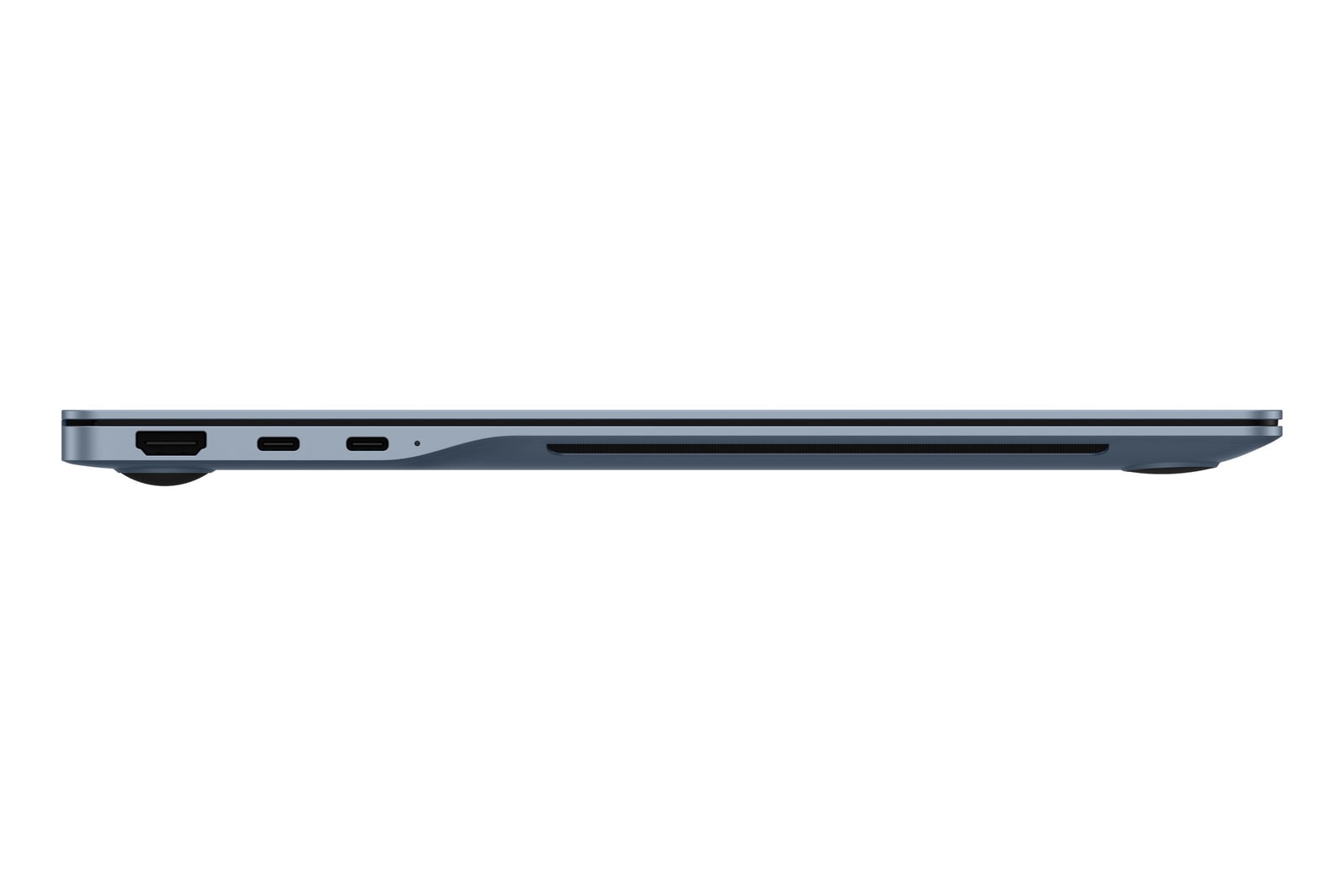
Ports are the Edge's quiet everyday win. Two USB4 ports, a USB-A port, HDMI, a microSD slot and a headset jack mean a conference-room projector, an older flash drive and wired headphones connect without adapters. The card slot takes microSD directly; full-size SD cards from many cameras still need a reader.
Input hardware is solid rather than lavish. Clubic describes short-travel, fairly noisy keys, a conventional mechanical touchpad, a fingerprint reader instead of face login and a 1080p webcam. Heavy typists who work in quiet rooms should try the keyboard if they can, and anyone used to face unlock will be reaching for the sensor instead.
Galaxy owners get extra convenience through Samsung's apps. Multi Control shares a keyboard and mouse across devices on the same Samsung account and Wi-Fi, Second Screen turns a compatible Galaxy Tab S into a second display, Quick Share moves files, and Storage Share browses a compatible Galaxy phone. They're welcome, but the Pro offers the same features, so a Galaxy phone can make either laptop more convenient without deciding between them.
Copilot+ PC status comes from the 80 TOPS neural processor, which handles Windows' on-device AI features without leaning on the main processor. Treat it as a capable extra that arrives with the chip rather than the reason to choose this laptop.

While you're comparing
The right product, at a better price
Our free morning email rounds up discounts worth knowing about, from kitchen upgrades to everyday tech. Reviews and buying guides arrive separately in our occasional newsletter.
Free to joinUnsubscribe anytime
Windows on Arm compatibility: drivers and plugins first
Start with how software runs. Apps built for Arm run natively and perform best. Many x86 and x64 apps run through Prism, Microsoft's translation layer, so a missing Arm version doesn't automatically mean an app won't work. The useful check is specific: find the exact version you use and whether it's supported natively or through emulation.
Drivers are the firm boundary. Microsoft says drivers must be built for Arm64 or come with Windows, because translation can't cover them. That puts the risk on particular hardware and system-level tools: a lab instrument, an older scanner, a specific printer model or a corporate VPN client. Choosing the Intel-based Pro removes this Arm-specific hurdle, though an outdated driver can still cause trouble on any new Windows laptop.
Adobe's native Arm apps add a plugin rule. Premiere Pro and its siblings running natively need plugins built for Arm, and Intel versions won't load. Puget Systems' current summary also flags RAW codec limits in Premiere. If your edit depends on a third-party effects or color package, confirm its Arm build first, or browse our laptops for content creators for other options.
Gaming and GPU work have narrower limits than they first appear. Some anti-cheat systems lack Arm support, which blocks particular online games rather than all of them. The Blender rendering limit in the performance table is similarly specific: it doesn't take every GPU-accelerated feature off the table, but demanding or unsupported GPU workloads are better served elsewhere.
RAM and storage upgrades: both are fixed at purchase
Clubic and Les Numériques both found the memory and storage soldered to the board, with no standard M.2 slot for swapping in a larger SSD. Les Numériques notes that the battery itself is replaceable. In practice, the 16GB of memory and 1TB of storage you buy are the 16GB and 1TB you'll own.
External storage adds useful room without changing the internal drive. A suitably fast external SSD can hold active projects as well as archives; a microSD card is a convenient way to carry extra files. The difference matters when travelling: those files are available only while the drive or card is connected. If you want to work with nothing attached, choose enough internal storage from the outset.
The physical RAM cannot be expanded. Windows can use storage for paging, but that is not equivalent to adding RAM. Choose enough physical memory for the apps you use together and the projects you expect to grow. When capacity is tight, we would prioritize more RAM over more internal storage: files can move to an external drive, but you cannot add physical memory later.
Galaxy Book6 Edge battery life: it depends on the day
Three published battery figures describe three different days. Samsung rates the 61.8Wh battery at up to 22 hours of local 1080p video at 150 nits with Wi-Fi off and the keyboard light dark. Clubic streamed 1080p YouTube in the Microsoft Edge browser at maximum brightness in power-saving mode and reached 13 hours 20 minutes; its reviewer estimated about 10 hours of ordinary office and web use. Les Numériques' advanced office protocol, a mix of web, Excel, video and rendering at 200 nits, ended at 6 hours 35 minutes.
Averaging those would produce a number nobody experiences, because each protocol measured a different kind of day. Samsung's figure is a ceiling for an offline movie under gentle settings. Clubic's shows streaming endurance holding up even at full brightness. Les Numériques' mixed-work result shows that a heavier, more varied day can land far below the video figures, though it doesn't isolate what any single task costs. Our expectation: lighter browser and document days at moderate brightness have a realistic chance of finishing unplugged, while days that mix in rendering or exports should be planned around the charger.
Samsung includes a 65W charger in the U.S. box and rates it to restore 40% in 30 minutes from a 2% start with the screen and background services off. Charging while you keep working will run slower, so the practical habit is a top-up during a break rather than counting on a full refill between meetings.
Galaxy Book6 Edge vs Galaxy Book6 Pro
What they share: nearly identical size and the same convenience features. The 16-inch Pro weighs 3.51 pounds to the Edge's 3.42, a 0.09-pound gap of about 1.4 ounces that's unlikely to matter on a commute, and Samsung lists it at 11.9mm thick against the Edge's 0.48 inch (about 12.2mm). Both put reflection-reducing glass over a 16-inch OLED touchscreen, and both get the same Galaxy features.
Where they differ: the Pro runs Intel Series 3 processors, so it avoids the Windows on Arm checks, and it offers 16GB or 32GB of memory, 512GB or 1TB of storage, a haptic touchpad and HDR peaks rated up to 1,000 nits against the Edge's 500. The Edge brings Snapdragon X2 Elite, with published processor and battery results for this chassis. There's no controlled head-to-head comparison of the two, so we don't award either a speed or battery win.
Choose the Pro when a 32GB configuration with the storage you need costs about the same as the Edge. That's our long-term default, because memory is the one capacity neither laptop lets you add later. Our rule for a sealed laptop: buy for the projects you expect in year three, not the files on your desk today. The Pro also suits buyers whose app list is uncertain on Arm, or who'd value the haptic touchpad and higher HDR rating.
Choose the Edge when it costs meaningfully less than that 32GB Pro and 16GB comfortably fits your work, since paying for memory you won't use isn't good value. It's also the sensible choice in an equal-memory comparison if you prefer a Snapdragon laptop for software you've already confirmed runs well on Arm.
Upgrading from a Galaxy Book4 Edge: find the bottleneck first
In Clubic's Cinebench 2024 chart, a Galaxy Book4 Edge scored 124 single-core and 982 multicore, well short of the Book6 Edge results in the performance table. That older unit's configuration isn't specified, so read the gap as directional: in that benchmark, roughly a fifth more single-core speed and more than half again as much multicore. Our Galaxy Book4 Edge review covers what the older model still does well.
Start by naming what actually slows you down, because a faster processor addresses one kind of wait. Activity graphs offer clues rather than proof: a busy CPU during an export points toward processor limits, even when only one or a few cores carry most of the load, while memory running near capacity suggests the workload is bigger than 16GB comfortably holds. Heavy GPU work, uploads to a cloud service and copies to an external drive are separate limits, and a newer laptop's graphics or connections may change them in ways a CPU benchmark doesn't predict.
The buying conclusion follows from that. If your waits look processor-bound, the Book6 Edge's stronger processor performance is a sound reason to upgrade, assuming your software runs natively or translates well. If your work presses against memory, the U.S. Book6 Edge's 16GB adds speed but no room, so a 32GB Galaxy Book6 Pro is the better fit once you've confirmed Intel suits your software. If the slowdown comes from GPU features Adreno doesn't support or from a network service, extra CPU speed alone is unlikely to fix it. And if your days are mostly email, documents and streaming, a healthy Book4 Edge is already doing the job.
Who this product fits
A creator cutting short YouTube videos in Premiere Pro
Native Premiere Pro and strong multicore headroom suit edits built on supported footage and modest effects. Audit third-party plugins for Arm versions, close memory-hungry apps while exporting, and watch whether project sizes are trending toward what 32GB would handle better.
A developer running long code builds between meetings
Long builds are the workload this processor suits best. Confirm your toolchain runs on Windows on Arm before buying, treat Performance mode as a desk setting, and on days with repeated builds plan around the charger rather than the video battery figures.
Samsung Galaxy Book6 Edge FAQ
Is the Galaxy Book6 Edge good for gaming?
It suits lighter and older games, not a gaming-first purchase. Check the specific games you play against our compatibility guidance and graphics assessment.
Does the Galaxy Book6 Edge come with a charger?
Yes. Samsung includes a 65W charger with U.S. models. Our battery and charging section explains its quick-charge rating.
Is 16GB of RAM enough on the Galaxy Book6 Edge?
For office work, photo editing and moderate video projects, yes. Long, effects-heavy timelines or several memory-hungry apps at once can press against it. Read our RAM and storage advice before choosing your configuration.
Will my Windows apps run on the Galaxy Book6 Edge?
For mainstream office and web use, generally yes. Check specialist software and connected accessories against our Windows on Arm compatibility checklist before buying.
Can you upgrade the RAM or SSD in the Galaxy Book6 Edge?
No. Both are soldered, with no standard M.2 slot. External drives and microSD cards add file storage, but not internal capacity or memory.
How long does the Galaxy Book 6 Edge battery last?
For lighter document and browser work at moderate brightness, we expect an unplugged workday to be realistic. Repeated exports or rendering call for planning around the charger. Our battery analysis explains why the published runtimes differ.
Who should buy the Samsung Galaxy Book6 Edge?
Buy the Edge when you need a large-screen laptop you can carry every day, 16GB fits your projects, and its price is meaningfully below a suitably equipped 32GB Pro. You get strong processor performance and a reflection-reducing OLED without paying for memory you won't use. At similar money, we would choose the Pro's extra capacity instead.
Use the Edge vs Pro comparison to make that final choice, or browse our laptop reviews for alternatives.
Sources and research notes
Our assessment combines Samsung's specifications, software documentation, independent evaluations and Pickori's analysis of everyday work, portability and long-term value. Our editorial standards.
Independent evaluations
Official product information
- Galaxy Book6 Edge Now Available: Next-Generation AI Performance Meets Premium PortabilitySamsung
- Galaxy Book6 EdgeSamsung
- Galaxy Book6 Edge (16-inch, 16GB), a Copilot+ PCSamsung
- Galaxy Book6 ProSamsung
- Windows Arm-based PCs FAQMicrosoft
- Introduction to page filesMicrosoft
- Support for ARM-based Windows devicesAdobe