

Pickori's Take
- Pickori recommends the 16-inch M5 Pro for Mac creators who regularly edit away from a monitor and need a roomier workspace. Light edits alone don't justify the expense.
- The linked 24GB/1TB configuration is a sensible starting point for contained projects, not a promise that every complex 4K timeline will stay smooth.
- If capacity already limits your projects, solve that before spending on a bigger chassis. More screen area cannot rescue an overloaded editing session.
- For a mostly docked setup, compare the 14-inch first. For essential Windows or NVIDIA-specific software, start with a compatible Windows laptop.
Which laptop fits how you edit?
Screen size, carry weight, and software requirements separate these options more than benchmark scores do.
| Your priority | Start here | Why |
|---|---|---|
| You edit on the laptop screen itself, away from a monitor | MacBook Pro 16-inch M5 Pro | Extra room may reduce panel juggling. Check your own layout at a comfortable scaling before paying for it. |
| You commute daily or dock to a monitor most days | MacBook Pro 14-inch M5 Pro | Prioritize the smaller carry footprint when a desk monitor supplies your workspace. Compare actual prices at matching capacity. |
| Lighter editing on a tighter budget | MacBook Air 13-inch M4, or keep your current laptop | Light photo and video work doesn't justify this price. A lighter Mac, or the capable laptop you already own, is the smarter spend. |
| Your workflow needs Windows or NVIDIA-specific tools | Lenovo Pro 9i Aura Edition Gen 11 | If essential software lacks Mac support, no MacBook configuration will fix that. |
A big editing surface you can carry, not a pro badge
Picture a vertical video edit on a hotel desk. You want the viewer large enough to judge framing, a useful stretch of timeline below it, the caption panel beside it, and audio meters still visible. If that arrangement leaves you repeatedly collapsing panels on your current laptop, another export-speed improvement won't fix the irritation. The MacBook Pro 16-inch M5 Pro is worth considering because it gives that layout more room, without requiring a separate monitor at every stop.
Our configuration, MGEA4LL/A, combines the 18-core CPU and 20-core GPU with 24GB, a 1TB SSD, standard glossy glass, and a Space Black finish. Apple also offers the same chip tier in the 14-inch. The evidence used here isn't a controlled, equal-configuration chassis comparison, so it cannot tell us how much the larger body alone changes sustained performance. Don't pay for size on the assumption that it automatically means quicker exports. Pay for a workspace you have a reason to use.
That makes it a specific purchase rather than an aspirational one. It suits the YouTuber cutting a weekly episode in a cafe, the photographer retouching on location, and the freelancer delivering from hotel rooms. Three groups are better served elsewhere: people who dock to an external monitor most days, people who want a laptop for Windows games, and people whose essential software requires an NVIDIA GPU.

Two kinds of speed: less waiting, less fiddling
Most laptop arguments are about wait time: how long an export, render, or transcode takes. Creators also spend interaction time resizing panels, scrolling a timeline, and opening the inspector to adjust a caption. Faster hardware can improve responsiveness as well as exports, but it cannot supply more physical screen area. If panel juggling is what interrupts your work, the larger screen may address a frustration that a better benchmark score misses. That is Pickori's case for this size, not a measured productivity claim.
Be clear about what resolution can and can't do for you. Display scaling changes density: fitting more interface into a smaller area also makes its controls smaller. Extra physical space gives you another option, but the useful result depends on your app and layout. Before you buy, set up your usual workspace at a scaling you'd honestly tolerate for three hours, then see whether it fits comfortably on a 14-inch. If it does, the bigger body is buying you less than you think. A one-viewer editing layout and a timeline crowded with captions, scopes, and bins are different buying problems.
For color work, Apple's reference modes are more useful than simply turning brightness all the way up. They provide presets for video, photo, and web targets; some disable True Tone, Night Shift, or brightness adjustment. Choose the target that matches delivery, and control the light around you. A client judging an ordinary web image isn't necessarily seeing the HDR presentation that impressed you in a shop. More dramatic on your screen is not the same thing as more faithful to the intended output.
None of that turns the laptop into a broadcast reference monitor or replaces calibration in a client pipeline that demands it. For YouTube, social video, and most photo delivery, though, a large panel with sensible reference presets is a reasonable place to make decisions. Having that wherever you sit is the real product here.
What the 18-core M5 Pro means for creator workloads
These are Pickori's judgments based on the verified chip, memory, and media engine, plus a small set of independent results. Your own apps and project complexity will matter more than any single score.
| Workload | Outlook | What to expect |
|---|---|---|
| Photo editing and retouching | Comfortable for typical sets | We would shortlist it for ordinary culling and retouching. Large layered files and concurrent apps deserve a real-project capacity check; a camera's megapixel count alone doesn't predict that requirement. |
| 4K H.264 and HEVC camera footage | Strong when codecs match the media engine | A promising match when the app and exact recording format use the supported acceleration path. Don't extend that expectation to every profile, multicam combination, or effects stack. Compare original and proxy playback on your own footage. |
| ProRes and ProRes RAW | Well matched | The listed media support makes this a logical Mac to consider. Storage planning becomes important with large media libraries, but effects and project complexity can still be the limiting factors. There is no single bottleneck shared by every ProRes project. |
| Transcodes and batch exports | Quick in published results | In Tom's Guide's Handbrake test, a 64GB unit converted a 4K video to 1080p in 1 minute 45 seconds. That's one workload on a higher-memory machine. Time your own delivery format instead of assuming every export behaves the same way. |
| Noise reduction, heavy effects, and third-party plugins | Depends on the plugin | Media engines speed up codecs, not every effect. In Notebookcheck's Resolve and Premiere comparisons against an RTX 5090 Windows laptop, results varied by app and preset, so don't assume this Mac beats an NVIDIA machine across the board. Confirm plugin support first. |
Our confidence is strongest in recommending this as an editing platform, not in predicting an export time for an unseen project. A useful trial includes the least convenient part of your real workflow: the troublesome plugin, the camera format you cannot change, or the delivery preset your client requires. A quick transcode result cannot stand in for those checks.


While you're comparing
The right product, at a better price
Our free morning email rounds up discounts worth knowing about, from kitchen upgrades to everyday tech. Reviews and buying guides arrive separately in our occasional newsletter.
Free to joinUnsubscribe anytime
Living with the bigger bag, battery, and fan curve
The weight difference in the specifications is only part of the carry decision. A larger footprint can matter more on a tray table or a narrow cafe counter. If your laptop commutes daily and mostly opens for email between meetings, the 14-inch is kinder. If it travels to shoots and then stays open for hours of editing, the larger working surface is easier to justify. Check the internal dimensions of a bag you already use, including space for padding, before budgeting for a new one.
Notebookcheck reported 18 hours 32 minutes; Tom's Guide reported 21 hours 10 minutes. Both were Wi-Fi browsing tests at 150 nits, on 64GB/4TB units. Tom's Guide explicitly described its figure as a single run, pending its usual repeat testing. These results support strong light-use endurance, not an editing-runtime promise. Equal brightness and memory capacity don't make two labs' methods identical, and we haven't established the cause of the gap. Averaging the numbers would hide that uncertainty rather than answer your buying question. Notebookcheck also tested nano-texture glass, not the glossy finish linked here; don't transfer its reflection behavior to this configuration.
Start your connection plan with the devices that must work together: a media drive, camera-card reader, audio interface, and possibly a monitor. The built-in SD slot doesn't accept CFexpress. USB-A peripherals and Ethernet also require extra hardware. Charging through MagSafe leaves a data port available, but a dock may still be worthwhile if it turns several daily connections into one. Check the actual display, drive, cable, and dock combination rather than assuming their largest advertised speed numbers will all apply simultaneously.
Power modes change the experience more than you might expect. In Notebookcheck's evaluation, High Power mode lifted CPU-heavy results substantially over the default Auto setting, while GPU results barely moved, and fan noise rose with both load and mode. In practice, Auto makes sense day to day, and High Power is worth trying for CPU-bound exports when you can live with the extra noise. Quiet browsing and light editing aren't a promise of silence through a long export.
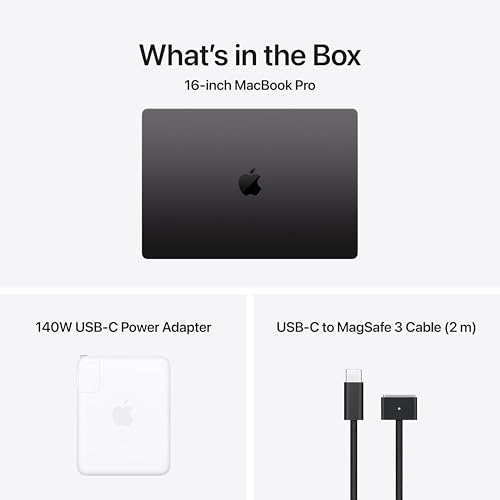
24GB, a glossy panel, and a Mac-only app list
The question isn't whether your work counts as professional. It's what you expect to keep active at once. We consider this configuration a reasonable starting point for contained edits, photo sets, and modest-effects podcasts. Multicam work, layered compositions, and several demanding apps together make a higher-capacity configuration important to compare. Resolution alone cannot settle the choice: a simple long clip and a short effects-heavy sequence can ask very different things of the same machine. Don't assume a tidy conversion such as 24GB on a Mac equaling 48GB on Windows.
If you already own a Mac, check your needs before you shop. Activity Monitor's Memory Pressure graph combines free memory, swap rate, wired memory, and file cache into one reading. A high memory-used figure, compressed memory, or some swap doesn't prove a problem on its own, and compression is normal. Repeated pressure alongside actual slowdowns deserves investigation. The two independent review units discussed above had more memory than this model; their benchmarks cannot validate its capacity for your complex project.
A glossy screen also creates a practical location question. Can you turn away from a window without losing access to an outlet or a comfortable seat? A beautiful display that only works well from one awkward position can be a poor fit for your routine. Check reflections in the spaces where you actually edit, not just beneath a store's lighting.
Finally, this is a Mac, and the macOS editing apps are the point. Gaming shouldn't be among your reasons to spend this much. If a tool you depend on requires an NVIDIA GPU or a Windows-only plugin, check the vendor's current Mac support first. If that support isn't there, a Windows laptop is the right purchase, and our Lenovo Pro 9i Aura Edition review covers that route. An M5 Max won't rescue software that doesn't run on the Mac.
What $2,849 should buy you
Abt listed this exact configuration at $2,849 on October 21, 2026, with a call-to-order notice. That is a dated retailer reference, not an Amazon price or a promise of immediate delivery. At that spend, the 16-inch has to deliver a benefit you'll feel every week, not a spec sheet you'll admire once.
Compare a 14-inch with the same chip tier, memory, and storage, then look at the actual price difference that day. Our MacBook Pro 14-inch M5 Pro review covers MGDN4LL/A with the lower 15-core CPU and 16-core GPU, not an identical-chip comparison. A cheaper base configuration can be the right purchase, but it doesn't isolate what you're paying for screen size. Likewise, a retail promotion can narrow the usual size premium; don't assume the smaller chassis always saves the same amount.
Where buyers go wrong is spending on the chassis and cutting corners elsewhere. For someone whose projects already strain memory, a 16-inch with 24GB is a worse buy than a 14-inch with 48GB. A 16-inch that leaves nothing in the budget for an external SSD and a backup drive is a bad trade too.
Already own an M4 MacBook Pro? Upgrade only for a specific, measured limitation: sustained memory pressure in your real projects, export times that threaten client deadlines, or a screen that's too small for the way you work. A newer generation isn't a reason by itself.
Shooting ProRes doesn't automatically mean you need an M5 Max. Start with the relevant hardware support in the specifications, then consider the rest of your project. Playback, effects, and delivery are separate jobs. Step up when a representative project exposes a limit that the alternative actually addresses, not because the codec sounds professional or a chart says one laptop is faster overall.
If the price makes you wince and your editing is light, keeping a capable laptop you already own, or choosing a lighter, less expensive Mac, is a better use of the money. Our MacBook Air 13-inch M4 review covers that path for lighter work.
Five checks to run before the return window closes
Open your largest real project, not a sample file, using the app and plugin versions you'll actually work with, and connect your usual audio interface, drives, and monitor. Edit for a while, then export in your real delivery format. In Premiere, exports normally use full-resolution media even when proxies are switched on, unless you choose the Use Proxies export option, so smooth proxy playback doesn't promise a quick final export. Keep Activity Monitor open and note whether Memory Pressure stays high at the same moments the project actually slows down.
Next, unplug and edit a real segment on battery, then plan conservatively from what you see rather than stretching one session into a whole-day promise. Take the laptop to the places you usually edit, such as a sunny kitchen table or a cafe under bright lights, and judge reflections there. If high memory pressure repeatedly coincides with slowdowns, reduce unrelated background work and repeat the same passage. If capacity still appears to be the limit, compare a higher-memory model before your return deadline. A graph alone is not a diagnosis, and an exchange isn't automatically the cure.
Making 1TB work: working drive, proxies, and a real backup
Keep the system, apps, active project files, and cache on the internal SSD, put the working media library on a fast external SSD, and keep a separate backup. A working SSD isn't a backup on its own. Final Cut Pro can create lower-resolution proxy media that lighten the editing load, or optimized ProRes 422 files, which are larger. It keeps your originals either way, and generated media can live on external storage.
Proxies cost creation time and storage, and they won't fix an unsupported plugin. Comparing proxy playback with original playback can point you toward a workflow improvement, but it doesn't prove whether the GPU or memory is the bottleneck. For a useful portability check, save your project, stop transfers, close apps using the drive, and safely eject it. Reopen the project and note what becomes unavailable; reconnect before a full-quality export that needs the originals. It's better to discover a missing-media dependency at home than during a client visit.
Who this product fits
A solo YouTuber cutting weekly episodes in cafes
A strong candidate if the larger display makes your actual captioning layout easier to use. Trial the messiest episode, including revisions and export, rather than a clean sample. If lighter hardware already handles that comfortably, spend the difference on the production problem you actually have.
An event photographer culling on location
Worth considering when you regularly review and retouch away from a desk. Inspect detail at a useful zoom instead of treating a fit-to-screen preview as proof of focus. Include your reader, media backup, and usual lighting in the decision; a nicer laptop display doesn't replace a reliable ingest routine.
A creator with a large monitor at home
Start with the smaller Mac unless you would use the laptop screen as a useful second display or regularly leave the desk. Compare the real configuration prices before deciding where the savings go. Extra memory is valuable when you need capacity, not simply because it is available.
What else to compare
If the bigger screen won't change how you work, one of these is a better starting point.

Apple MacBook Pro 16-inch M5 Pro FAQ
Is the MacBook Pro 16 M5 Pro faster than the 14-inch M5 Pro?
Not automatically. Apple offers the same upper M5 Pro chip tier in both sizes. The evidence used here doesn't isolate chassis size in an otherwise identical comparison. Match chip, memory, workload, and power mode before drawing a conclusion from two benchmark results.
Is 24GB enough for 4K video editing?
For contained projects, such as single-camera edits with modest effects, it's a reasonable start. Multicam timelines, stacked effects, and several heavy apps open together point toward 48GB. Judge from Memory Pressure alongside real slowdowns in your own projects.
How long does the battery last while editing?
Plan around your working day, not a headline number. Try a representative unplugged session with your usual brightness and accessories, and keep a margin for heavier work rather than extrapolating an exact whole-day figure. Include the delivery export in that trial if it has to finish before you can reach an outlet.
Can the MacBook Pro 16 M5 Pro replace a gaming laptop?
Don't buy it for that. It's built around macOS editing apps, not Windows game libraries. If games or NVIDIA-specific tools are a priority, a Windows laptop is the right choice.
Will you use the extra screen enough to carry it?
We would buy the MacBook Pro 16-inch M5 Pro for a recurring work pattern: arrive somewhere without a monitor, open a substantial editing project, and work directly on the laptop for hours. In that situation, paying for a larger built-in workspace is a practical choice rather than an indulgence.
Before ordering, compare your normal layout on both sizes and price the capacity your projects need. If the smaller screen is already comfortable, keep the lighter machine and the budget flexibility. If it isn't, this 16-inch has a clear reason to be on your shortlist.
Sources and research notes
Independent evaluations
Official product information
- MacBook Pro 16-inch M5 Pro and M5 Max technical specificationsApple
- MacBook Pro 14-inch M5 Pro and M5 Max technical specificationsApple
- View memory usage in Activity MonitorApple
- Use reference modes with your Apple displayApple
- Create optimized and proxy media in Final Cut ProApple
- Export proxies in PremiereAdobe
- Introducing MacBook Pro with M5 Pro and M5 MaxApple