
Pickori's Take
- Repeatable room cleaning is the purchase. A robot that reliably handles your two or three messiest rooms on schedule can matter more than extra features you would rarely switch on.
- SmartThings earns the purchase when your home already runs on it. Without that, the Jet Bot has no established cleaning edge to justify paying more than a comparable mapped robot.
- Bin automation is worth its premium when emptying is the chore your household will actually skip, typically with heavy shedding or limited willingness to handle dust, not simply because a home is large.
- Owners and shoppers face different questions. If yours completes its runs, keep using it; if you are buying, judge the specific unit’s battery, service route and price against the tasks you need covered.
Which Samsung Jet Bot this is, and why the name confuses shoppers
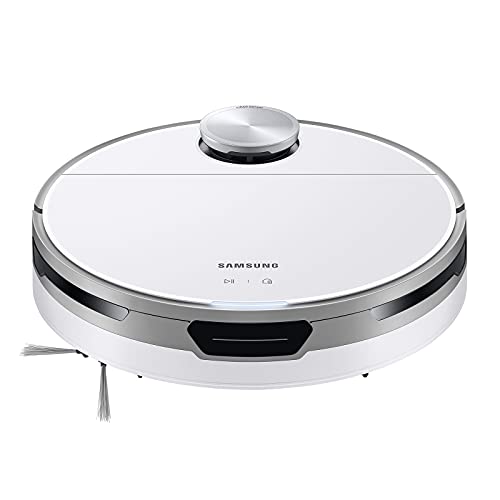
Samsung put the Jet Bot name on several different robots, so this Samsung Jet Bot review starts with the exact model. The original 2021 Jet Bot is VR30T80313W/AA: a LiDAR-mapping vacuum with a washable bin you empty by hand and a standard low charging dock. Samsung’s 2022 U.S. catalog lists it separately from the Jet Bot+ and Jet Bot AI+. Confirm that model number when you buy.
If you searched for a Samsung robot vacuum and mop, this is not that machine. The VR30T80 family manual describes dry indoor cleaning only, with no liquid pickup. Samsung’s mopping robots came later, including the Bespoke Jet Bot Combo and the Bespoke AI Jet Bot Steam Ultra announced at CES 2026.
What that identity means in practice: you are buying a robot whose ongoing tasks are yours to schedule and yours to finish. The exact-model spec sheet lists the mapping, app control, surface-sensing suction and up-to-90-minute runtime with recharge and resume, so larger floors can be finished across a charge. The parts that remain with you are emptying the bin, clearing the brush of wrapped hair, and picking up before runs. Owners who accept that division tend to judge a robot like this on whether it shows up and cleans; owners who expect it to manage itself are better served by a different design.
One spec to ignore when comparing brands: the listed 5W suction is not a pascal rating or the robot’s overall power draw, so it does not line up with other makers’ suction claims.

Room targeting is the reason to own it
Daily dirt is rarely spread evenly. It collects under the dining table, inside the front door and along the kitchen counters. The Jet Bot’s map lets you send it to exactly those rooms, at the times they tend to get dirty, and repeat that job day after day. Robots without room selection can still clean a whole floor competently, but they cannot be told to do the kitchen now and leave the bedrooms alone. If your mess is concentrated in a few places, that control is what turns a robot from occasional novelty into part of the routine.
No Go zones extend the same idea. Draw one around a floor-lamp base, a pet-bowl corner or a rug the robot handles badly, and it stays in place run after run. Each zone is a trade: you remove a recurring hassle and accept that the floor inside it no longer gets cleaned. Keep zones tight around the actual problem.
The live cleaning report shows where the robot traveled, not how much dirt it removed. Use it as a coverage check, then look at the spots that matter after the first few runs: under the table, along the entry mat, at rug edges. If debris lingers somewhere the route clearly covered, add that room to the schedule more often or plan a quick manual follow-up there.
Outside evidence points to a capable machine without isolating any single feature. Belgian consumer group Testachats gives the European VR30T80313W an overall score of 67 and a good-quality rating; we did not access its detailed results. One original-model owner on Reddit described it mapping around an irregular cat tree and chairs and clearing litter from tile grooves, while some litter stayed on mats and desk legs confused it. That is one apartment, but it is consistent with how the design should behave.
Route automation is not object recognition. The map knows your walls and furniture; it does not know where a charging cable fell tonight. The Jet Bot avoids obstacles with sensors, and Samsung asks you to clear cords and clutter before a run. Whether that pre-run pickup is trivial or a nightly battle depends on your household; if it is the latter, a robot with object recognition is aimed at your actual problem.
Where we expect the Jet Bot to fit (expected suitability, not lab scores)
Here is where we expect this design to fit best.
| Workload | Outlook | What to expect |
|---|---|---|
| Daily crumbs and dust on hard floors | Strong fit | Room targeting suits regular runs in the zones that get dirty fastest. |
| Low-pile rugs | Good expected fit | Suction adjusts to the detected surface; low rugs avoid the high-pile issues Samsung flags. Check rug edges early. |
| Thick, high-pile or fringed rugs | Weak fit | The manual flags high pile as troublesome, and fringe can catch brushes. Exclude or choose another robot. |
| Pet hair and litter | Workable with upkeep | The brush is designed to reduce tangling. Expect regular bin emptying and brush checks. |
| Floors with loose cords and toys | Needs a pre-run tidy | Obstacle sensors, not object recognition. |
| Black floors | Not recommended | The manual advises against use on black floors. |
| Spills and mopping | Not suitable | Dry vacuuming only. |
The Jet Bot is built for the everyday layer of dirt in homes that are already reasonably orderly. That is a narrower job than many current robots attempt, but for a household whose mess concentrates in a few rooms, it is the job that matters. If deep carpet or constant clutter defines your floors, compare robots on those specific capabilities rather than assuming any newer model will handle them.

Placing the dock so the bin stays easy to reach
A low dock is easy to fit, but the robot still needs room to use it. Samsung’s manual asks for about 0.5 meters (roughly 20 inches) clear on each side and 1 meter (about 39 inches) in front so the Jet Bot can locate and approach it. That is docking clearance, and it applies however small the base looks.
The second consideration is your own access. The manual shows the bin coming out from the top: you open the top cover and lift the bin upward. That makes emptying simple when the robot sits in the open, and awkward when it is parked beneath a console, bench or low shelf. Hiding the dock under furniture keeps it out of sight but can mean sliding the robot out, often while crouching, every time you empty it. Since manual emptying is a regular part of owning this model, put the dock where you can stand over it and lift the lid freely.
Setup needs Wi-Fi and a Samsung account. After the first mapping run, divide the rooms, add any No Go zones and schedule around when each area actually gets dirty. Check the bin after the first several runs and let what you see decide how often to empty it; fill rate depends on your home, not on a rule of thumb.
Routine care is straightforward. Switch the robot off before maintenance, check the brush regularly for wrapped hair, clean the sensors gently, and let any washed parts dry completely before refitting them.
Furniture height, rugs and floor color decide the fit
The brush can only clean where the robot fits. At 3 15/16 inches tall, the Jet Bot needs that much clearance, plus a little margin, to get under sofas, beds and cabinets. Measure the gaps beneath the furniture that hides the most dust. If they are lower, those spots stay manual, and no schedule changes that.
Rugs come next. Samsung’s manual flags thick or high-pile carpet as potentially troublesome, and fringe is a common catch point for robot brushes. Intelligent Power Control adjusts suction to the detected surface, but it cannot change pile height or tame a fringe. Hard floors and low rugs are where we expect this design to be most at home; a deep or fringed rug is a good candidate for a tight No Go zone.
Floor color is a firmer limit. The manual says not to use the robot on black floors, which can confuse the downward-facing sensors that detect drops. If your home has black flooring, look at other robots rather than experimenting.
For stairs and drops, follow the manual’s boundary instructions, keep the cliff sensors clean and never cover or defeat them. A No Go zone is a cleaning boundary in the app, not a fall precaution.

While you're comparing
The right product, at a better price
Our free morning email rounds up discounts worth knowing about, from kitchen upgrades to everyday tech. Reviews and buying guides arrive separately in our occasional newsletter.
Free to joinUnsubscribe anytime
Jet Bot or Roborock Q7 M5: choosing by the tasks you need
Start with whether you need room targeting at all. If you want to clean particular rooms at particular times, or keep the robot out of certain areas, a mapping robot is worth paying for. If a general whole-floor pass a few times a week is enough, a robot without room selection may cover it for less; our best budget robot vacuums guide shows that tier.
Among mapped robots, the obvious comparison is the Roborock Q7 M5. According to Roborock, it uses LiDAR with documented multi-floor maps, has a detachable mop with three water levels and charges on a small base, so a compact charger is not something only Samsung offers.
Our equal-cost recommendation for a buyer with no SmartThings preference: choose the Q7 M5 if you will use either its light-duty mop for quick damp passes on hard floors or its multi-floor maps for carrying the robot between levels. Those are verified extras, and we have no evidence the Jet Bot cleans better to offset them, so Samsung branding alone does not justify paying more. Choose the Jet Bot when SmartThings is already how you run your home, because keeping the vacuum alongside your other devices is a daily convenience you will actually feel. If neither the mop nor multi-floor maps matter to you, either robot fits the same single-level, vacuum-only job, and the better-priced, better-condition unit wins.
Because this is a 2021 model, judge the specific unit rather than its generation. Ask how the battery behaves: does the robot finish your usual rooms on one charge, or rely on recharge-and-resume more than it should? Samsung’s manual directs battery replacement to its service channels, so before buying, confirm the current service route and replacement-part costs for VR30T80313W/AA and add them to the price. Check whether brushes and filters for this exact model are easy to source where you live. A refurbished or open-box unit with a fresh battery can be a sensible buy; one with an unknown history needs a lower price to make sense. For a Jet Bot you already own, the test is simpler: if it completes its runs and docks reliably, the model year changes nothing, and replacing it would spend money to solve no problem.
Last, ask what work remains. Automatic emptying, available on the Q7 M5+ or Jet Bot+, reduces routine bin trips; it does not remove brush checks or clutter pickup. Pay for it when bin handling is the chore your household is least likely to keep up with.
Pets, family schedules and how full the bin gets
Running the robot more often spreads the dirt across more runs, which can keep each load lighter. It does not reduce how much hair, litter and grit your household brings in. A family with a shedding dog and kids tracking in dirt will keep filling the bin on any schedule, and may find themselves emptying it after most runs. If that sounds unrealistic for your household, a self-emptying model is the better fit, and our best robot vacuums roundup is the place to start.
A narrow schedule can work the other way. If you only want the kitchen and entry done, the robot spends its runs on the dirtiest areas and emptying becomes a predictable step at a time you choose. Busy family schedules also favor targeting: send the robot to the playroom after toys are put away instead of letting a fixed whole-home run hit a cluttered floor.
Jet Bot vs Jet Bot+ vs Jet Bot AI+
The Jet Bot+ (VR30T85513W/AA) keeps the same LiDAR, vacuum-only approach and adds a Clean Station that empties dust automatically. It does not add mopping or object recognition. Both list the same 5W and up-to-90-minute figures, which on its own does not prove identical real-world pickup. The original comes with a standard charging dock rather than a Clean Station, so buy it for what is in the box, not on the assumption of a later upgrade.
The Jet Bot AI+ (VR50T95735W) moves up in sensing with AI object recognition, 3D sensing, a camera and a self-empty station. That is the family member aimed at homes where moving clutter is the main obstacle.
In short: the original for mapped vacuuming with manual emptying, the Plus to cut routine emptying, the AI+ for help with clutter.
If washed floors are the real goal
Wanting floors mopped rather than just vacuumed changes the shopping list. A detachable light-duty mop, like the Q7 M5’s, suits quick damp passes on hard floors. Heavier routines call for more capable systems; one upgrade route is spinning mops with a dock that washes and refills them, as on the Dreame L40 Ultra Gen 2. Those docks still need their own upkeep and a sizable spot, which is the opposite of the Jet Bot’s appeal. Decide whether you value a simple setup for frequent vacuuming or a larger system that takes on wet cleaning too.
What to check in your first week
Use the first runs to separate structural problems from fixable ones. Watch one rug edge, one doorway threshold, the gap under your main sofa or bed, and the dock approach.
A sofa the robot cannot fit under is structural; accept it or reconsider. If docking is unreliable, restoring Samsung’s recommended side and front clearance is the first thing to check, and the manual is the next stop if that does not help. A snagging fringe can be tucked under or excluded. Keep an eye on bin fill after each early run, and confirm you can open the top cover and lift the bin without moving furniture. If either the emptying routine or the dock spot feels awkward, adjust now, while you can still decide whether a different robot suits your home better.
Who this product fits
The SmartThings apartment
Hard floors, low rugs and Samsung routines already in place. This is the home where the Jet Bot is our first choice.
The shedding-dog household
Hair keeps coming however often the robot runs. Unless regular emptying is genuinely easy for you, a self-emptying model cuts more of your actual work.
The two-story home with a quick-mop wish
If you would carry the robot between floors and want a light damp pass on hard floors, a model with documented multi-floor maps and a detachable mop, such as the Roborock Q7 M5, fits better.
Samsung Jet Bot FAQ
Does the Samsung Jet Bot mop?
No. The original Jet Bot (VR30T80313W/AA) is a dry vacuum only. Jet Bot+ and AI+ do not mop either; mopping arrived in later Samsung combo models.
Is the Samsung Jet Bot still worth buying?
Yes for an orderly, mostly hard-floor home that wants room-by-room cleaning, especially one already using SmartThings. Compare it with mapped alternatives on the tasks you need, such as mopping or automatic emptying, and on total cost.
What is the difference between Jet Bot and Jet Bot+?
Jet Bot+ includes a Clean Station that empties dust automatically. Both are LiDAR vacuum-only robots, and the Plus adds no mopping or object recognition.
Can I add a self-empty station to the original Jet Bot later?
The original is sold with a standard charging dock. If you want automatic emptying, buy a model that includes it rather than planning on a later upgrade.
Does the Samsung Jet Bot map rooms?
Yes. It builds a LiDAR map, and the SmartThings app lets you choose rooms, set No Go zones and view a live cleaning report.
Is the Jet Bot good for pet hair and carpet?
We expect it to suit pet hair on hard floors and low rugs with regular emptying and brush checks. Samsung notes thick, high-pile carpet can be troublesome.
How long does the Jet Bot battery last?
Samsung rates it at up to 90 minutes, and it can recharge and resume a cleaning job.
Who should bring one home
Bring the Jet Bot home if the rooms that get dirty are predictable and your floors are clear enough for a robot to reach them. Before buying, measure the gaps under your sofa and bed, then pick a dock spot with the side and front clearance Samsung specifies, plus enough space above and around the robot to open its top cover and lift out the bin. Get those two things right and the schedule does the rest.
Sources and research notes
This research-based review combines Samsung's model documentation, published independent evidence and Pickori's analysis of cleaning routines and buying value. Pickori has not tested this robot hands-on. Our editorial standards.
Independent evaluations
- Samsung Jet Bot VR30T80313W test resultTestachats
- Owner report: Jet Bot with cat tree and small binReddit r/samsung
Official product information
- Jet Bot Robot Vacuum VR30T80313W specification sheetSamsung
- VR30T80 series user manual (regional, retailer-hosted)Samsung
- 2022 U.S. product catalogSamsung
- Jet Bot+ VR30T85513W specification sheetSamsung
- 2023 U.S. product catalogSamsung
- Samsung unveils new AI connected living lineup at CES 2026Samsung Newsroom
- Roborock Q7 SeriesRoborock